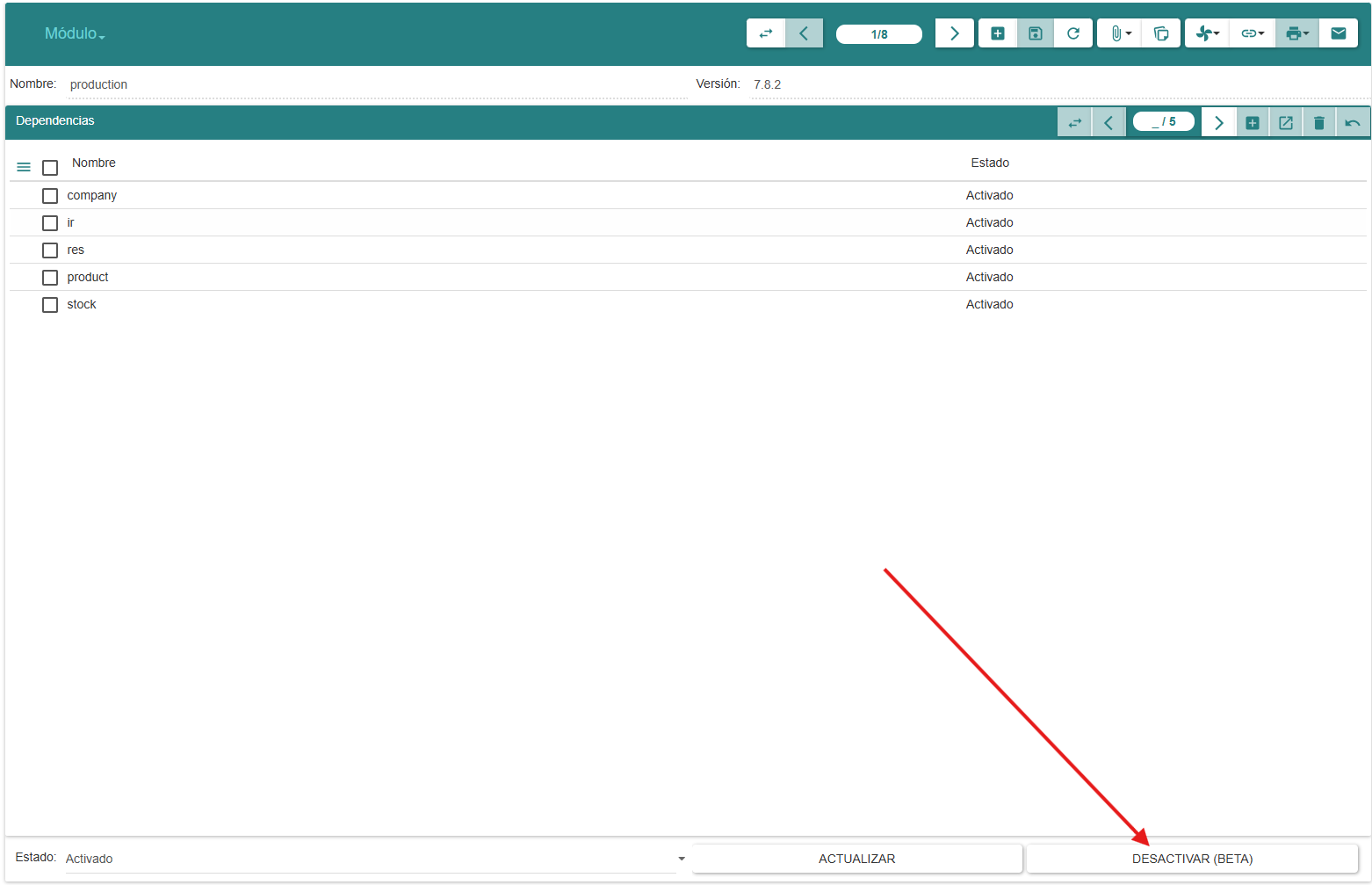
I’ve tried changing the module’s status to “to remove” and then running trytond-admin --verbose -c ../trytond.conf -d trytond -u ir, but it always reactivates it, it doesn’t remove it.
I’ve tried changing the module’s status to “to remove” and then running trytond-admin --verbose -c ../trytond.conf -d trytond -u ir, but it always reactivates it, it doesn’t remove it.
@Xavi Neither in the web interface nor in the desktop client is the status change enabled, that’s exactly why I was asking.
I already found a way to do it:
But like @ced says, the deactivation does not work well. I’m working on a module that extends a party. The deactivation works “well” — the data of the module was erased, but not the info in ir.models and others… And now I can’t reinstall the module without manually cleaning those tables. Are there any standard mechanisms to make an “uninstall script”, or some mechanism like db migrations to guarantee consistency during development?
I tried reading the code and asking Claude for help to figure out how to handle it, but honestly neither Claude nor I are clear on what exactly needs to be cleaned up. I already know that traces are left in the ir_* tables, but I have no idea where else to look.
On top of that, I still haven’t found the exact code that handles module deactivation, nor how to enable the module state transitions — either through the buttons or the module form — so I don’t have to change the status directly in the database.
P.S.: Do you use the IRC channels frequently, or is it better to communicate here?
Hi,
You can manage your modules from the UI → Administration/modules, from there you have a button on each module to change its state to “to activate” or “to remove” then you have a second button to perform the update.
Hope this helps.
Be careful that the deactivation is a beta feature, it may left some data or the database schema unusable.
Does that mean that you don’t see the deactivation button?
The table ir_model_data stores most of that info, there you can see the tables where your module has created records, and the id of those records, but most of them if not all should’ve been cleaned by the deactivation. But of course some of the modifications of your code may be still present on the database after it is deactivated.
I don’t know what have you asked exactly but I’m sure you’ll get an accurated answer if you tell it which is your custom module and ask what changes does it make on the database.
If you provide the traceback we could see what is wrong.
Personally I always ask here.
Btw, if you want to reply it is better if you do it on a different message instead of editing the existing one  otherwise it looks like we’ve already answered your questions.
Hope this helps.
Thanks @xavi. Finally i see the deactivation button  Sorry….
I never noticed that button before, but there it is! 
The reinstallation issue is now resolved; I initially deleted the records manually, and then I had Claude analyze the code that runs during uninstallations to understand what the system does and replicate that behavior in my module.
I now understand that Tryton intentionally avoids deleting certain records to prevent schema breakage. I applied that same logic in my module: if a record is still being referenced by another model, it’s kept; if it’s orphaned, it gets deleted. I’m handling this with a custom delete method that performs that check.
Context: I’m starting to deploy a series of applications for a Mexican government entity, so I’m particularly concerned about module uninstallation or upgrades breaking production — or worse, causing data loss.
I’m gradually getting a better grasp of how the system works and what to expect. If there’s a working group focused on the uninstallation feature, I’d love to participate! 
One idea worth discussing: should each module developer be responsible for their own uninstallation logic, with the core simply calling a standardized method? This would avoid overly generic uninstallation handling and give developers explicit control over what happens to their data.
P.S. I also speak Spanish, but I assume English is more effective for communication on this forum, right?
Muchas gracias
Deactivation of module is a very complex topic.
As far as I know nobody is working on it currently.
What is done currently is that XML records defined in deactivated module are deleted if the database constraint allow it. And that is all, it does.
As I said before it does not change the database schema so every table or columns the module added, they stay.
I think nobody is really working on this feature because in real life it is not used. No module should be activated in production without being carefully analyzed if it is actually useful for the business.
And in testing environment, it is preferred to recreated a database than dealing with the deactivation of tested modules.
By deactivating modules you will mostly end up having trouble, so the best thing you can do is to carefully analyze what are you installing right as Cédric said.
I’m just curious; it does not drop tables nor columns because it is just not developed, or because you are worried about breaking the schema?
I have used this feature a lot but mainly for third party modules that are no longer maintained or have some incosistencies; maybe they shouldn’t be activated from beginning
Because we do not know if the table or column was really created by the module and if it is only used by this module.
I think the proper solution would be to keep the table/column and remove any constraint on them like NOT NULL, REFERENCE, UNIQUE etc.
This thread touches on something I’ve been thinking about as well, especially coming from a government deployment context.
@ced you identified the core issue precisely:
“we do not know if the table or column was really created by the module and if it is only used by this module”
That’s exactly the problem — and I think the answer is: the module itself should know. Since a module declares its own models, it already has all the information needed to enumerate the tables and columns it created. Core Tryton can’t know this generically, but the module developer can.
This leads to a proposal: rather than trying to build a generic uninstall mechanism in core, what if we defined a standard interface that modules — especially third-party ones — are expected to implement? Something like an uninstall() method that the deactivation process calls before proceeding. That method would be responsible for:
Many2One fields, or constraints).DROP TABLE / ALTER TABLE ... DROP COLUMN — and crucially, writing a reversal log before doing so (either to a dedicated table or a file), so there is always a documented path to reconstruct what was removed.This approach avoids the core complexity of trying to infer ownership of structures, and puts responsibility where the knowledge actually lives: with the module developer. Core would simply call the interface if it exists and skip structural cleanup if it doesn’t (preserving current behavior for modules that don’t implement it).
The reversal log part is particularly relevant in regulated environments like government or healthcare, where schema changes need to be auditable even after the fact.
I’m aware this is non-trivial to standardize, but I’d be happy to contribute to a spec or prototype if there’s any interest in moving this direction.
Neither for example the table may preexist because it uses by another application and the Model in the module is just a wrapper.
I have done in the past a prototype like that which were using different namespaces to share a common table between application.
Indeed I do not see a reason why deactivating a module should drop the table and the columns. For me it is fine if the just the Tryton’s constraints are removed such that it does not block other modules.
Cleaning the data is more the job and responsibility of the database administrator (for example there may be legal requirement to keep the data).
That’s a fair point — I hadn’t considered the shared table scenario, and you’re right that dropping columns or tables could break things that Tryton has no visibility into.
I think what I’m really after is not so much automatic cleanup, but rather documented drift. In government environments I’ve worked with, the problem isn’t just orphaned tables — it’s that nobody knows why they exist, who created them, or whether they’re safe to touch. Over time the database becomes an archaeology site: hundreds of tables, no context, and DBAs understandably afraid to remove anything.
So maybe the more realistic ask isn’t “drop this when uninstalling” but rather “leave a note when you go”: a log entry that says this module created this table/column on this date, here’s the original definition, here’s how to drop it manually if you decide to. That way the DBA retains full control and legal data retention requirements are respected, but at least the information exists to make an informed decision later.
I should also say that I’m still early in learning Tryton and its philosophy, so I may well be proposing things that have already been discussed and discarded for good reasons. If that’s the case, I’d genuinely appreciate a pointer — it would help me understand the design decisions better.
Thanks for taking the time to engage with this.
I guess we could add more logging in the TableHandler such that someone may record the output as archive.