maxx
July 8, 2026, 9:58am
1
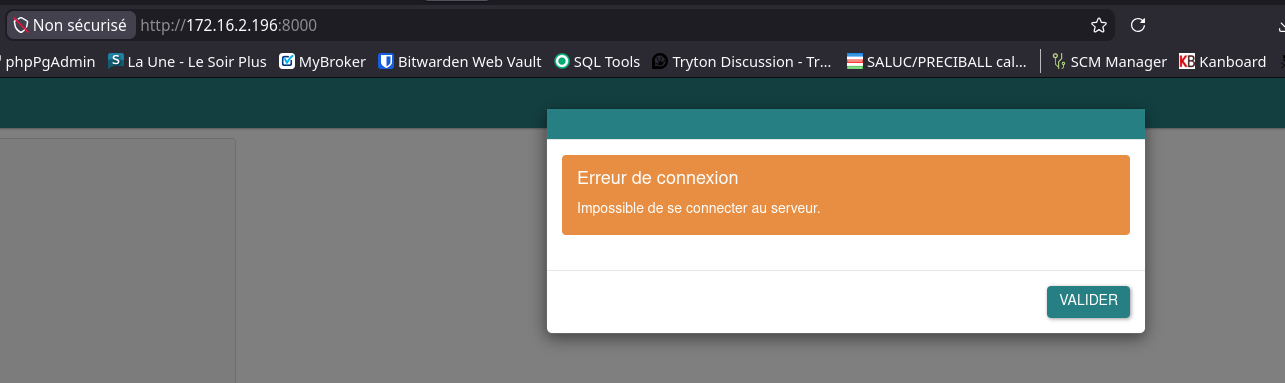
Hi, I’ve installed tryton-sao-last from branch 8.0
My trytond.conf for sao is
[web]

listen = 0.0.0.0:8000
root = /srv/tryton/8.0/sao
My nginx configuration is:
server {
listen 8000;
server_name trytond-server;
client_max_body_size 100M;

location / {
    proxy_pass http://unix:/srv/tryton/8.0/trytond.sock;
    proxy_read_timeout 600s;
    proxy_connect_timeout 75s;

    # Transmet l'IP réelle du client
    proxy_set_header X-Real-IP $remote_addr;

    # Liste toutes les IPs par lesquelles la requête est passée
    proxy_set_header X-Forwarded-For $proxy_add_x_forwarded_for;

    # Transmet le protocole (http ou https)
    proxy_set_header X-Forwarded-Proto $scheme;

    # Transmet le nom d'hôte original
    proxy_set_header Host $host;

}

}
GTK Client is working correctly.
Thanks for help !
ced
July 8, 2026, 10:32am
2
This is because the web client works only with secure cookie so without SSL you can only access from 127.0.0.1.tryton_session cookie is rejected (#14813) · Issues · Tryton / Tryton · GitLab
maxx
July 8, 2026, 11:19am
3
Indeed but also my nginx configuration is erroneous.
Could someone share an example of working nginx configuration for both sao and gtk with gunicorn socket ?
ced
July 8, 2026, 11:22am
4
What is you gunicorn configuration?
maxx
July 8, 2026, 11:24am
5
wsgi_app = 'trytond.application:app'
bind = 'unix:/srv/tryton/8.0/trytond.sock'
workers = 5
worker_class = 'gevent'
worker_connections = 1000
timeout = 600
# umask = 0o007
raw_env = [
        'TRYTOND_CONFIG=/srv/tryton/8.0/trytond.conf',
        'TRYTOND_DATABASE_NAMES = tryton_saluc_80',
        'TRYTOND_LOGGING_CONFIG=/srv/tryton/8.0/trytond_log.conf',
]
PYTHONOPTIMIZE = 1
And the nginx configuration with ssl:
server {
listen 8000 ssl http2;
server_name trytond-server;
client_max_body_size 100M;
ssl_certificate     /etc/ssl/nginx/trytond.saluc.com.crt;
ssl_certificate_key /etc/ssl/nginx/trytond.saluc.com.key;

# --- Optimisations SSL Sécurisées ---
ssl_protocols TLSv1.2 TLSv1.3;
ssl_ciphers HIGH:!aNULL:!MD5;
ssl_prefer_server_ciphers on;
ssl_session_cache shared:SSL:10m;
ssl_session_timeout 10m;

location / {
    proxy_pass http://unix:/srv/tryton/8.0/trytond.sock;
    proxy_read_timeout 600s;
    proxy_connect_timeout 75s;

    # Transmet l'IP réelle du client
    proxy_set_header X-Real-IP $remote_addr;

    # Liste toutes les IPs par lesquelles la requête est passée
    proxy_set_header X-Forwarded-For $proxy_add_x_forwarded_for;

    # Transmet le protocole (http ou https)
    proxy_set_header X-Forwarded-Proto $scheme;

    # Transmet le nom d'hôte original
    proxy_set_header Host $host;

}

}
server {
listen 443 ssl http2;
server_name tryton-saluc-80.saluc.com;
client_max_body_size 100M;
ssl_certificate     /etc/ssl/nginx/trytond.saluc.com.crt;
ssl_certificate_key /etc/ssl/nginx/trytond.saluc.com.key;
root /srv/tryton/8.0/sao;

# --- Optimisations SSL Sécurisées ---
ssl_protocols TLSv1.2 TLSv1.3;
ssl_ciphers HIGH:!aNULL:!MD5;
ssl_prefer_server_ciphers on;
ssl_session_cache shared:SSL:10m;
ssl_session_timeout 10m;

location / {
    try_files $uri $uri/ /index.html;
}
ced
July 8, 2026, 11:38am
6
Whats are the symptom? If it works with the desktop, for me only the missing SSL can prevent the session.
maxx
July 8, 2026, 11:38am
7
Working with this nginx configuration:
— Bloc 1 : accès direct API (client lourd Tryton, scripts, intégrations) —

server {
listen 8000 ssl;
http2 on;
server_name tryton-saluc-80.saluc.com;
client_max_body_size 100M;

ssl_certificate     /etc/ssl/nginx/trytond.saluc.com.crt;
ssl_certificate_key /etc/ssl/nginx/trytond.saluc.com.key;
ssl_protocols TLSv1.2 TLSv1.3;
ssl_ciphers HIGH:!aNULL:!MD5;
ssl_prefer_server_ciphers on;
ssl_session_cache shared:SSL:10m;
ssl_session_timeout 10m;

location / {
    proxy_pass http://unix:/srv/tryton/8.0/trytond.sock;
    proxy_read_timeout 600s;
    proxy_connect_timeout 75s;
    proxy_set_header X-Real-IP $remote_addr;
    proxy_set_header X-Forwarded-For $proxy_add_x_forwarded_for;
    proxy_set_header X-Forwarded-Proto $scheme;
    proxy_set_header Host $host;
}

}

— Bloc 2 : Sao (client web) + RPC sur le même port pour éviter le CORS —

server {
listen 443 ssl;
http2 on;
server_name tryton-saluc-80.saluc.com;
client_max_body_size 100M;

ssl_certificate     /etc/ssl/nginx/trytond.saluc.com.crt;
ssl_certificate_key /etc/ssl/nginx/trytond.saluc.com.key;
ssl_protocols TLSv1.2 TLSv1.3;
ssl_ciphers HIGH:!aNULL:!MD5;
ssl_prefer_server_ciphers on;
ssl_session_cache shared:SSL:10m;
ssl_session_timeout 10m;

root /srv/tryton/8.0/sao;

location / {
    try_files $uri $uri/ @trytond;
}

location @trytond {
    proxy_pass http://unix:/srv/tryton/8.0/trytond.sock;
    proxy_read_timeout 600s;
    proxy_connect_timeout 75s;
    proxy_set_header X-Real-IP $remote_addr;
    proxy_set_header X-Forwarded-For $proxy_add_x_forwarded_for;
    proxy_set_header X-Forwarded-Proto $scheme;
    proxy_set_header Host $host;
}

}
Thanks for your help @ced !