# Turn Over Tax import
**URL:** https://discuss.tryton.org/t/turn-over-tax-import/8362
**Category:** User
**Tags:** accounting
**Created:** [March 3, 2025, 8:09pm UTC](https://discuss.tryton.org/t/turn-over-tax-import/8362 "2025-03-03T20:09:26Z")
**Posts on this page:** 13
**Page:** 1
### Author:  [@Gruenfischer](https://discuss.tryton.org/u/Gruenfischer)
#### Post date: [March 3, 2025, 8:09pm UTC](https://discuss.tryton.org/t/turn-over-tax-import/8362/1 "2025-03-03T20:09:26Z")
Hi folks,
I am trying to implement import taxes without adding a tax line by hand.
**Problem:**
I want to handle import taxes in Tryton without manually adding a tax line.
**Example:**
- First invoice: Purchase outside the EU: €100 (net, no tax)
- Second invoice form customs service provider: Customs invoice: €19 (tax paid by service provider)
**Implementation:**
- Supplier invoice for €100 with 0% tax
- Created an “Import Tax” article
- Defined an “Import Tax” with a 100% rate
- Set up a booking category to apply the tax
**Issue:**
The €19 invoice results in a gross amount of €38 instead of a tax line with €19 tax and €0 net.
**Question:**
Can Tryton be configured to treat the “Import Tax” article as a gross price and subtract the 19 Euro?
**Goal:**
Ensure a correct tax line for VAT reporting.
Thanks Jakob
---
### Author:  [@pokoli](https://discuss.tryton.org/u/pokoli)
#### Post date: [March 4, 2025, 8:42am UTC](https://discuss.tryton.org/t/turn-over-tax-import/8362/2 "2025-03-04T08:42:55Z")
On the second invoice you must manually create a **tax line** (not a product line) with zero base and the required tax amount.
This will create the proper tax values for reporting the tax amount pay to the customs service provider.
---
### Author:  [@ced](https://discuss.tryton.org/u/ced)
#### Post date: [March 4, 2025, 9:43am UTC](https://discuss.tryton.org/t/turn-over-tax-import/8362/3 "2025-03-04T09:43:27Z")
I think you are looking for the [_Account Stock Landed Cost_](https://docs.tryton.org/latest/modules-account-stock-landed-cost/index.html). The customs taxes are not to be managed like the sales/VAT taxes because they are of different kind (they are not collected by the company in the name of the state).
---
### Author:  [@Gruenfischer](https://discuss.tryton.org/u/Gruenfischer)
#### Post date: [March 5, 2025, 6:37am UTC](https://discuss.tryton.org/t/turn-over-tax-import/8362/4 "2025-03-05T06:37:25Z")
Thanks for you input.
I have to report that tax to the authorities, so it should be in the tax report. To achieve that, it has to be a tax line.
@pokoli: That is the result I want to achieve. But I want to get rid of doing this by hand. Adding a tax line manually, feels like a workaround in Tryton, because it is generally well designed to use processes over „do it by hand“.
@ced:
Thanks for the hint, i have to have a look into that implementation. But I am not looking for the „landed costs“ since that concept differs from the base of the EUSt. Latter includes costs only to the „first destination“.
I chose that approach, because from the view of pure accounting a tax just a „reliability or receivable towards the tax office“. Therefore (nowadays as VAT) every line of transaction is split into net and receivable/reliability. So the service product I purchase from my Import Service Provider results in a 100 receivable towards the tax office and 0 net.
I am currently working on an enhanced version of skr04 for Tryton, that includes the necessary tax rules and account rules for germany. As far as I understand there is no way yet to automate the tax line, so I am going to postpone that specific tax.
Regards Jakob
---
### Author:  [@ced](https://discuss.tryton.org/u/ced)
#### Post date: [March 5, 2025, 8:42am UTC](https://discuss.tryton.org/t/turn-over-tax-import/8362/5 "2025-03-05T08:42:25Z")
> [@Gruenfischer](#):
>
> I have to report that tax to the authorities, so it should be in the tax report.
I do not understand what is this tax. From which country are you from? And what is exactly this “tax”?
---
### Author:  [@Gruenfischer](https://discuss.tryton.org/u/Gruenfischer)
#### Post date: [March 5, 2025, 8:59am UTC](https://discuss.tryton.org/t/turn-over-tax-import/8362/6 "2025-03-05T08:59:21Z")
I am from Germany, so basically European rules are to be applied.
The tax is the “Import VAT” my Import Service Provider (ISP) pays to the authorities.
First I get an invoice by the foreign supplier without any tax, just net prices.
A wile later, I get an invoice by the ISP to pay his expenses including the amount of tax he paid to the authorities.
As a business, I have to report the amount of that tax, as Input VAT, to the authorities, to get it refunded.
I fill the monthly report with the help of the “Tax Report” of Tryton. So I want Tryton to calculate the amount in the report. Therefore I need a “Tax Line” from an invoice (from ISP) position that is 100% tax.
---
### Author:  [@ced](https://discuss.tryton.org/u/ced)
#### Post date: [March 5, 2025, 9:00am UTC](https://discuss.tryton.org/t/turn-over-tax-import/8362/7 "2025-03-05T09:00:54Z")
So it is just VAT on the service of the import agent. This works just like any service purchased.
---
### Author:  [@pokoli](https://discuss.tryton.org/u/pokoli)
#### Post date: [March 5, 2025, 10:01am UTC](https://discuss.tryton.org/t/turn-over-tax-import/8362/8 "2025-03-05T10:01:21Z")
No there are two VAT:
- One for the service of the import agent, which has a base amount
- Another which is paid depending on the valuation of the imported goods. In this case there is no base amount because you already paid the base to the supplier, you just need to paid the VAT amount depending on the valuation.
The VAT of the valuation is based on the same percentage as if you purchased the goods to a local supplier, but the base does not depend on the paid amount. It is computed using the customs valuation.
In Spain this is called DUA:
> **[Importación de bienes: ¿Qué es el DUA y cómo se contabiliza?](https://www.kopen.es/dua-que-es-como-se-contabiliza/)**
>
> ¿Tienes previsto comenzar a importar y exportar bienes? Te explicamos qué es el DUA y para qué sirve, quién debe presentarlo y cómo debes contabilizarlo.
---
### Author:  [@ced](https://discuss.tryton.org/u/ced)
#### Post date: [March 5, 2025, 10:23am UTC](https://discuss.tryton.org/t/turn-over-tax-import/8362/9 "2025-03-05T10:23:12Z")
OK I understand now which taxes we are talking about.
So I agree with:
> [@pokoli](#):
>
> On the second invoice you must manually create a **tax line** (not a product line) with zero base and the required tax amount.
except that the tax line should be filled with the VAT tax and as base the value of the imported goods (which was used as base for the VAT). This way Tryton will compute the VAT amount with all in place for the reporting.
> [@Gruenfischer](#):
>
> Adding a tax line manually, feels like a workaround in Tryton, because it is generally well designed to use processes over „do it by hand“.
You have to encode a line so it does not matter if it is an invoice line or a tax line.
> [@pokoli](#):
>
> In Spain this is called DUA:
>
> [Importación de bienes: ¿Qué es el DUA y cómo se contabiliza? | Kopen Software | Tryton](https://www.kopen.es/dua-que-es-como-se-contabiliza/)
I do not see the point for the positive/negative round trip.
Just entering a tax line should be enough.
---
### Author:  [@pokoli](https://discuss.tryton.org/u/pokoli)
#### Post date: [March 5, 2025, 4:25pm UTC](https://discuss.tryton.org/t/turn-over-tax-import/8362/10 "2025-03-05T16:25:13Z")
> [@ced](#):
>
> I do not see the point for the positive/negative round trip.
> Just entering a tax line should be enough.
Agree. The post is from 2021 when we did not know about such feature.
So probably its worth documenting it so others can discover it 🙂
---
### Author:  [@ced](https://discuss.tryton.org/u/ced)
#### Post date: [March 5, 2025, 4:28pm UTC](https://discuss.tryton.org/t/turn-over-tax-import/8362/11 "2025-03-05T16:28:33Z")
It is already documented on [Design — Tryton module for invoicing](https://docs.tryton.org/latest/modules-account-invoice/design.html#invoice) :
> Additional taxes can be manually added to the invoice when required.
---
### Author:  [@Gruenfischer](https://discuss.tryton.org/u/Gruenfischer)
#### Post date: [March 5, 2025, 7:01pm UTC](https://discuss.tryton.org/t/turn-over-tax-import/8362/12 "2025-03-05T19:01:59Z")
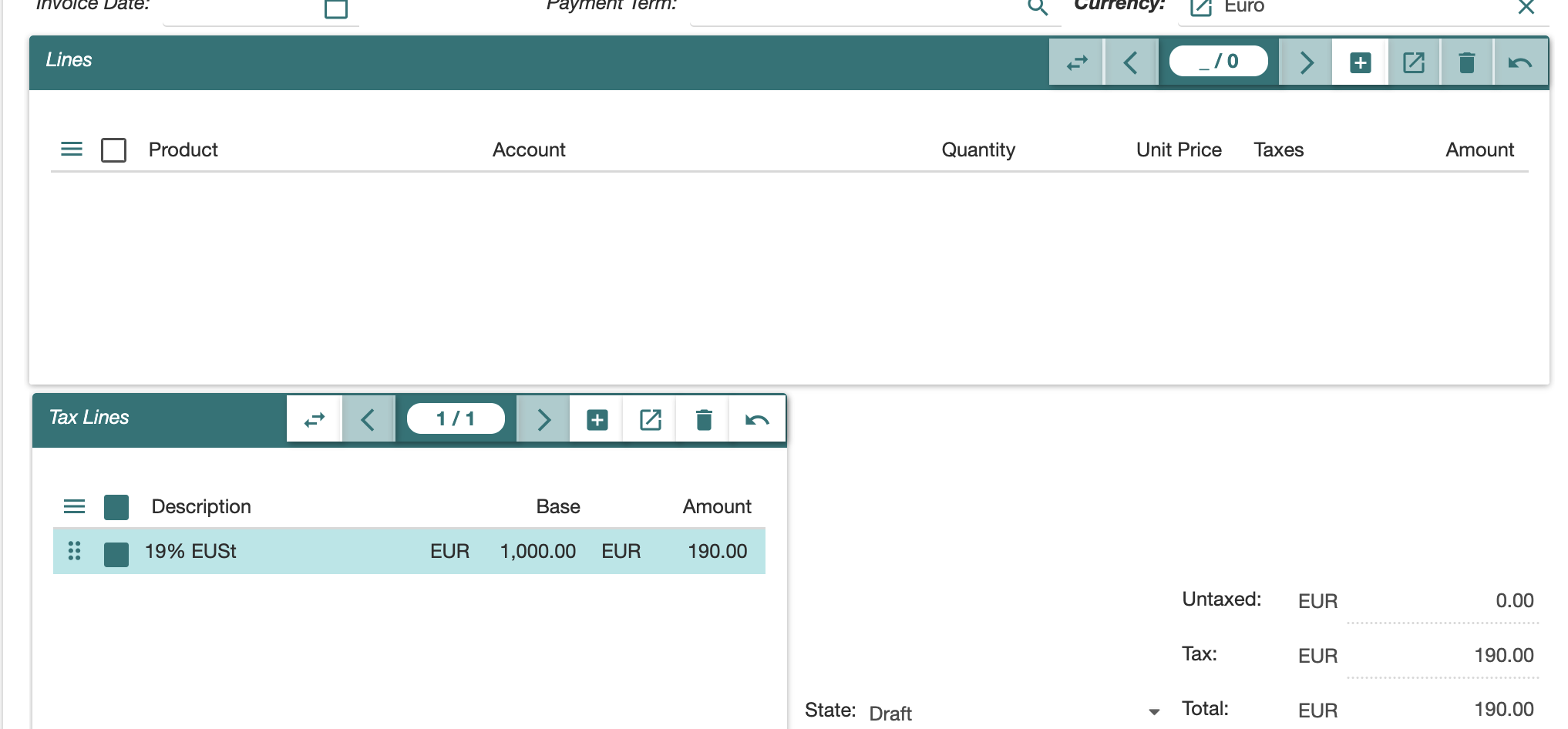
Just to make sure I understand correctly, I have to replace the invoice line by a tax line.
Otherwise the total amount of the invoice does change?
The invoice as received:
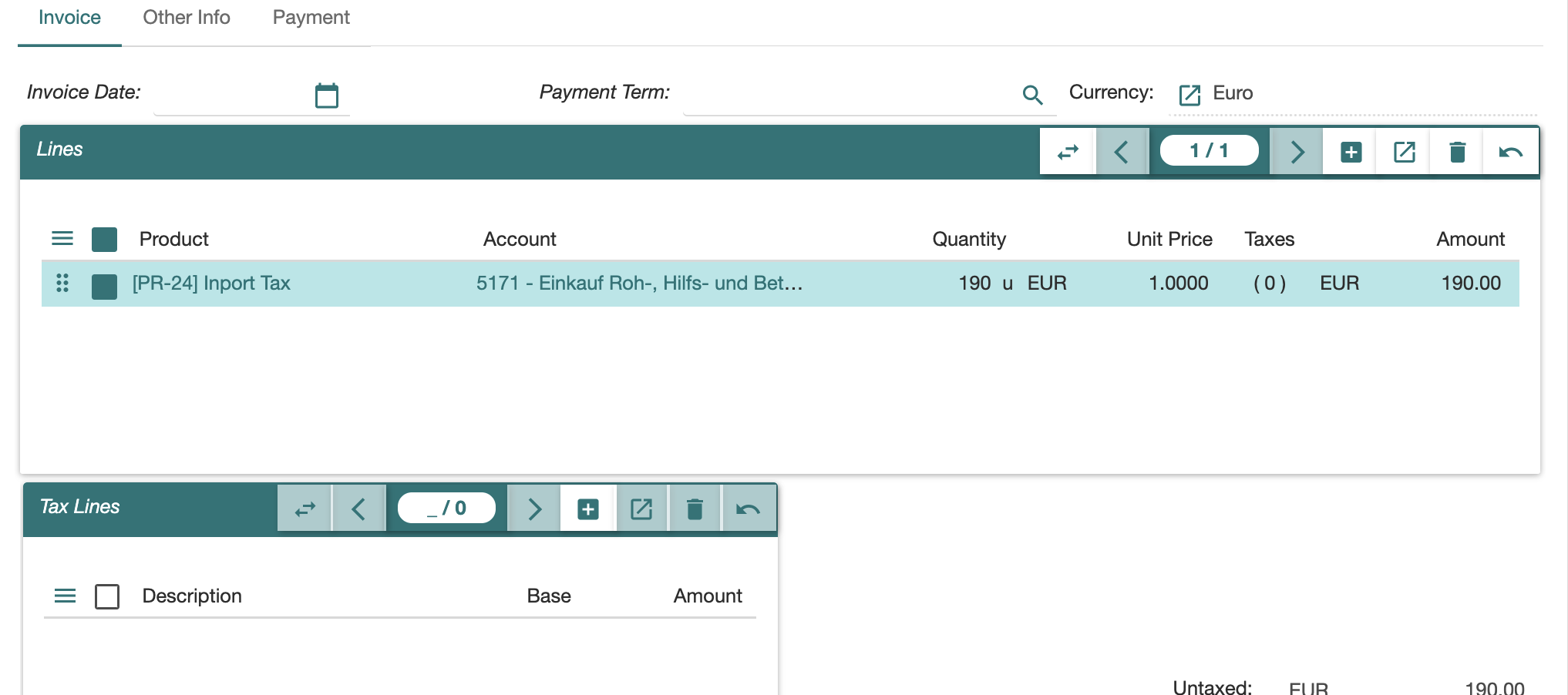
and I replace it with a tax line:
---
### Author:  [@system](https://discuss.tryton.org/u/system)
#### Post date: [March 6, 2025, 7:02pm UTC](https://discuss.tryton.org/t/turn-over-tax-import/8362/13 "2025-03-06T19:02:10Z")
This topic was automatically closed 24 hours after the last reply. New replies are no longer allowed.