# Simplify warehouse / storage locations?
**URL:** https://discuss.tryton.org/t/simplify-warehouse-storage-locations/2840
**Category:** User
**Created:** [June 7, 2020, 11:37am UTC](https://discuss.tryton.org/t/simplify-warehouse-storage-locations/2840 "2020-06-07T11:37:31Z")
**Posts on this page:** 10
**Page:** 1
### Author:  [@herrdeh](https://discuss.tryton.org/u/herrdeh)
#### Post date: [June 7, 2020, 11:37am UTC](https://discuss.tryton.org/t/simplify-warehouse-storage-locations/2840/1 "2020-06-07T11:37:31Z")
For my little, company, the default equipment with warehouse menu items seems a little overdone. All I need is one warehouse - and a second on the long run. Input and output zones are not available.
Is there a strategy to deal with a simple setup as mine? - It seems not possible to delete input or output zone - is there another possibility to simplify the setup?
Or did I - as happening so often - misunderstand the whole concept?
Cheers,
Wolf
---
### Author:  [@bala4901](https://discuss.tryton.org/u/bala4901)
#### Post date: [June 7, 2020, 11:55am UTC](https://discuss.tryton.org/t/simplify-warehouse-storage-locations/2840/2 "2020-06-07T11:55:57Z")
Just coincidence, I am doing some material for the inventory portion,
I think Input and output setup is the simplest setup for inventory.
Because you will still need temporary location to justify the state.
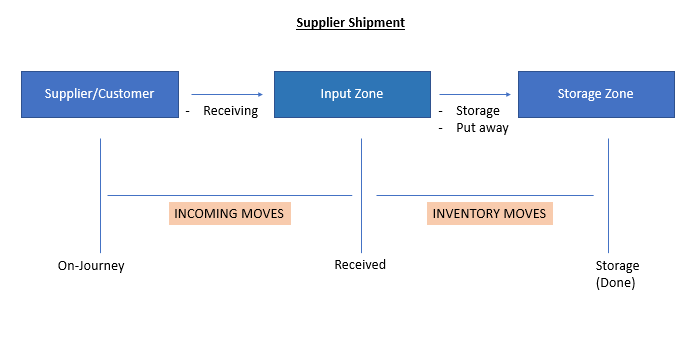
This is the supplier shipment, It is combine Receive and Storage (Done) in a form.
For you (small company), you can ignore the receiving. You may just click “Receipt” and “Done” in the same time. To complete all moves.
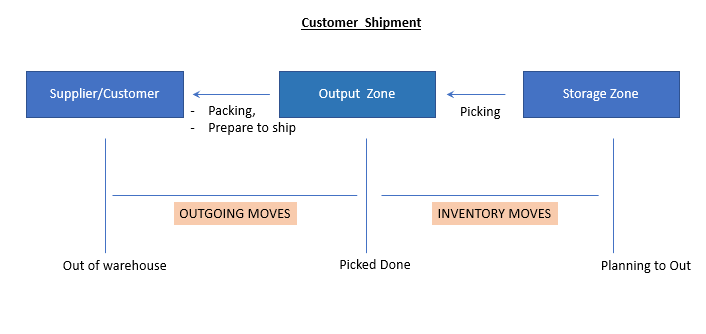
For customer shipment, If you can delivery on same day, just like the “Supplier Shipment” you can “Assign” and “Done” in same time.
However, if in case, you have done “Packed” but have not Delivery for few days. Then it is reasonable to keep the stock at “Output Zone”, that this stock has already book/assign to other customer. So system will not assign those stock for other “Sale”
---
### Author:  [@pokoli](https://discuss.tryton.org/u/pokoli)
#### Post date: [June 7, 2020, 12:01pm UTC](https://discuss.tryton.org/t/simplify-warehouse-storage-locations/2840/3 "2020-06-07T12:01:46Z")
For small warehouse you can use update the warehouse to set the same location for storage, input and output locations.
This will simplify the supplier and customer warehouse by removing the inventory moves. So you just receive and send products from the storage locations.
Hope it helps!
---
### Author:  [@bala4901](https://discuss.tryton.org/u/bala4901)
#### Post date: [June 7, 2020, 12:05pm UTC](https://discuss.tryton.org/t/simplify-warehouse-storage-locations/2840/4 "2020-06-07T12:05:42Z")
> [@pokoli](#):
>
> This will simplify the supplier and customer warehouse by removing the inventory moves. So you just receive and send products from the storage locations.
To my surprise, I just realize can have this setting. 😅 😀 😀 😀
Thank
---
### Author:  [@pokoli](https://discuss.tryton.org/u/pokoli)
#### Post date: [June 7, 2020, 12:06pm UTC](https://discuss.tryton.org/t/simplify-warehouse-storage-locations/2840/5 "2020-06-07T12:06:44Z")
> [@bala4901](#):
>
> You may just click “Receipt” and “Done” in the same time.
When using the same input location as storage location, when receiving the supplier shipment it will be automatically done. You do not need to click done as the same time 😉
> [@bala4901](#):
>
> just like the “Supplier Shipment” you can “Assign” and “Done” in same time.
On customer shipment if you us the same location for output and storage the assign button is hidden and you will be able to directly pack the shipment out.
---
### Author:  [@ced](https://discuss.tryton.org/u/ced)
#### Post date: [June 7, 2020, 6:03pm UTC](https://discuss.tryton.org/t/simplify-warehouse-storage-locations/2840/6 "2020-06-07T18:03:05Z")
> [@herrdeh](#):
>
> It seems not possible to delete input or output zone
Not delete but you can deactivate them to hide them.
---
### Author:  [@herrdeh](https://discuss.tryton.org/u/herrdeh)
#### Post date: [June 18, 2020, 5:28am UTC](https://discuss.tryton.org/t/simplify-warehouse-storage-locations/2840/7 "2020-06-18T05:28:05Z")
> [@pokoli](#):
>
> This will simplify the supplier and customer warehouse by removing the inventory moves. So you just receive and send products from the storage locations.
Sorry, as so often I need some more input. How do I achieve this?
---
### Author:  [@pokoli](https://discuss.tryton.org/u/pokoli)
#### Post date: [June 18, 2020, 6:03pm UTC](https://discuss.tryton.org/t/simplify-warehouse-storage-locations/2840/8 "2020-06-18T18:03:20Z")
You have to open the [Stock Locations](https://demo.tryton.org/model/stock.location;name=%22Locations%22&views=%5B309%2C307%5D) search for your warehouse and update the input and output locations to be the same as storage location. Something like this:
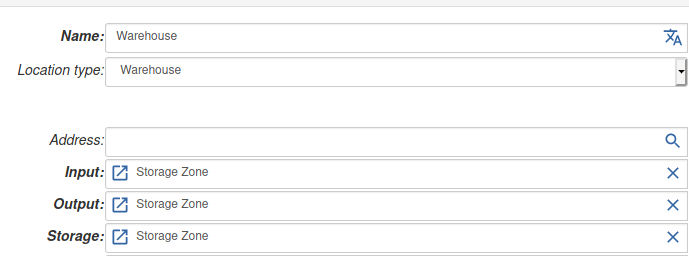
This will provide the simplies workflow for customer and supplier shipments.
---
### Author:  [@herrdeh](https://discuss.tryton.org/u/herrdeh)
#### Post date: [July 7, 2020, 6:14pm UTC](https://discuss.tryton.org/t/simplify-warehouse-storage-locations/2840/9 "2020-07-07T18:14:40Z")
Sorry for the late reply. Yes, now I understand. All the time I was looking out for the name of my warehouse - but it’s close to obvious that “storage zone” is the entity to chose.
Thank you !
W
---
### Author:  [@system](https://discuss.tryton.org/u/system)
#### Post date: [August 6, 2020, 6:22pm UTC](https://discuss.tryton.org/t/simplify-warehouse-storage-locations/2840/10 "2020-08-06T18:22:23Z")
This topic was automatically closed 30 days after the last reply. New replies are no longer allowed.