# Setup trytond and PostgreSQL to use local (UNIX domain) connection without authentication
**URL:** https://discuss.tryton.org/t/setup-trytond-and-postgresql-to-use-local-unix-domain-connection-without-authentication/7837
**Category:** System Administrator
**Created:** [September 11, 2024, 3:43pm UTC](https://discuss.tryton.org/t/setup-trytond-and-postgresql-to-use-local-unix-domain-connection-without-authentication/7837 "2024-09-11T15:43:11Z")
**Posts on this page:** 8
**Page:** 1
### Author:  [@cjm51213](https://discuss.tryton.org/u/cjm51213)
#### Post date: [September 11, 2024, 3:43pm UTC](https://discuss.tryton.org/t/setup-trytond-and-postgresql-to-use-local-unix-domain-connection-without-authentication/7837/1 "2024-09-11T15:43:11Z")
Hi Folks,
I don’t know if I am successfully connecting Trytond to postgresql. I don’t think I am. Trytond gives me a brief status display describing the listening ports, but no confirmation that there is a connection to backend postgresql. (That would be a worthwhile improvement to trytond, which we all know is a temporary test fixture, but it is in use at the time when confusion is highest and understanding is lowest.)
How can I test that trytond is in contact with postgresql? Is there a log somewhere that will confirm it?
Given pg\_hba.conf:
```auto
# TYPE DATABASE USER ADDRESS METHOD
local all all peer
# IPv4 local connections:
host all all 127.0.0.1/32 md5
# IPv6 local connections:
host all all ::1/128 md5
```
If I run trytond as user tryton, meaning “su - tryton”, then “peer” authentication allows trytond access. I can run the client and see what I expect. So far; so good.
If I run as non-tryton, in this case “root”, the following works, demonstrating that postgresql is accessible:
```auto
# psql -h 127.0.0.1 -U tryton
Password for user tryton:
psql (16.3)
Type "help" for help.
tryton=>
```
I believe that trytond should use the credentials in /etc/tryton/trytond.conf to do likewise, but that does not seem to be the case. It is clear to me that trytond is not in contact with postgresql.
So, my problem seems to be with IPV[46] local credentialing of trytond. Can anybody advise me? Maybe tell me about a log that will solve the mystery?
Thanks for the help,
Chris.
---
### Author:  [@dotbit](https://discuss.tryton.org/u/dotbit)
#### Post date: [September 11, 2024, 5:26pm UTC](https://discuss.tryton.org/t/setup-trytond-and-postgresql-to-use-local-unix-domain-connection-without-authentication/7837/2 "2024-09-11T17:26:35Z")
Hi again Chris,
I’d recommend running `trytond -c trytond.conf -vv` so you can get instant feed-back from the terminal. Or look at the log file however your installation may be configured ( I don’t know how you configured it!)
If you can log in to a database using the tryton or SAO (web) client then trytond **can** connect to the database.
This is what tryton looks like when trying to log in with wrong database credentials:
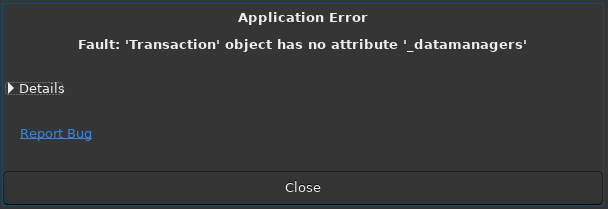
```auto
Application Error
Fault: 'Transaction' object has not attribute '_datamanagers'
>Details
Report Bug
```
If you logged in, and can see the list of modules in your database, then you are successfully connecting to the database.
> [@cjm51213](#):
>
> I don’t know if I am successfully connecting Trytond to postgresql. I don’t think I am.
Why do you think you are not authenticating with the database? What is not working?
---
### Author:  [@dotbit](https://discuss.tryton.org/u/dotbit)
#### Post date: [September 11, 2024, 5:30pm UTC](https://discuss.tryton.org/t/setup-trytond-and-postgresql-to-use-local-unix-domain-connection-without-authentication/7837/3 "2024-09-11T17:30:27Z")
Also on the back-end (trytond) in the above case if wrong database credentials, if running trytond with the -vv flags I get:
```auto
16546 14333241786432 [2024-09-11 17:20:45,486] ERROR trytond.backend.postgresql.database connection to "test" failed
Traceback (most recent call last):
File "/var/trytond/72/lib/python3.11/site-packages/trytond/backend/postgresql/database.py", line 229, in __new__
inst._connpool = ThreadedConnectionPool(
^^^^^^^^^^^^^^^^^^^^^^^
File "/var/trytond/72/lib/python3.11/site-packages/psycopg2/pool.py", line 161, in __init__
AbstractConnectionPool. __init__ (
File "/var/trytond/72/lib/python3.11/site-packages/psycopg2/pool.py", line 59, in __init__
self._connect()
File "/var/trytond/72/lib/python3.11/site-packages/psycopg2/pool.py", line 63, in _connect
conn = psycopg2.connect(*self._args, **self._kwargs)
^^^^^^^^^^^^^^^^^^^^^^^^^^^^^^^^^^^^^^^^^^^^^
File "/var/trytond/72/lib/python3.11/site-packages/psycopg2/ __init__.py", line 122, in connect
conn = _connect(dsn, connection_factory=connection_factory, **kwasync)
^^^^^^^^^^^^^^^^^^^^^^^^^^^^^^^^^^^^^^^^^^^^^^^^^^^^^^^^^^^^^^^
psycopg2.OperationalError: connection to server on socket "/tmp/.s.PGSQL.5432" failed: fe_sendauth: no password supplied
16546 14333241786432 [2024-09-11 17:20:45,487] DEBUG trytond.wsgi Exception when processing
Traceback (most recent call last):
File "/var/trytond/72/lib/python3.11/site-packages/trytond/transaction.py", line 179, in start
database = backend.Database(database_name).connect()
^^^^^^^^^^^^^^^^^^^^^^^^^^^^^^^
File "/var/trytond/72/lib/python3.11/site-packages/trytond/backend/postgresql/database.py", line 229, in __new__
inst._connpool = ThreadedConnectionPool(
^^^^^^^^^^^^^^^^^^^^^^^
File "/var/trytond/72/lib/python3.11/site-packages/psycopg2/pool.py", line 161, in __init__
AbstractConnectionPool. __init__ (
File "/var/trytond/72/lib/python3.11/site-packages/psycopg2/pool.py", line 59, in __init__
self._connect()
File "/var/trytond/72/lib/python3.11/site-packages/psycopg2/pool.py", line 63, in _connect
conn = psycopg2.connect(*self._args, **self._kwargs)
^^^^^^^^^^^^^^^^^^^^^^^^^^^^^^^^^^^^^^^^^^^^^
File "/var/trytond/72/lib/python3.11/site-packages/psycopg2/ __init__.py", line 122, in connect
conn = _connect(dsn, connection_factory=connection_factory, **kwasync)
^^^^^^^^^^^^^^^^^^^^^^^^^^^^^^^^^^^^^^^^^^^^^^^^^^^^^^^^^^^^^^^
psycopg2.OperationalError: connection to server on socket "/tmp/.s.PGSQL.5432" failed: fe_sendauth: no password supplied
During handling of the above exception, another exception occurred:
Traceback (most recent call last):
File "/var/trytond/72/lib/python3.11/site-packages/trytond/wsgi.py", line 110, in dispatch_request
return endpoint(request, **request.view_args)
^^^^^^^^^^^^^^^^^^^^^^^^^^^^^^^^^^^^^^
File "/var/trytond/72/lib/python3.11/site-packages/trytond/protocols/dispatcher.py", line 44, in rpc
return methods.get(request.rpc_method, _dispatch)(
^^^^^^^^^^^^^^^^^^^^^^^^^^^^^^^^^^^^^^^^^^^
File "/var/trytond/72/lib/python3.11/site-packages/trytond/protocols/dispatcher.py", line 54, in login
session = security.login(
^^^^^^^^^^^^^^^
File "/var/trytond/72/lib/python3.11/site-packages/trytond/security.py", line 32, in login
with Transaction().start(dbname, 0, context=context) as transaction:
^^^^^^^^^^^^^^^^^^^^^^^^^^^^^^^^^^^^^^^^^^^^^^^
File "/var/trytond/72/lib/python3.11/site-packages/trytond/transaction.py", line 218, in start
self.stop(False)
File "/var/trytond/72/lib/python3.11/site-packages/trytond/transaction.py", line 237, in stop
self.rollback()
File "/var/trytond/72/lib/python3.11/site-packages/trytond/transaction.py", line 355, in rollback
for datamanager in self._datamanagers:
^^^^^^^^^^^^^^^^^^
AttributeError: 'Transaction' object has no attribute '_datamanagers'
16546 14333241786432 [2024-09-11 17:20:45,489] INFO werkzeug 10.1.3.7 - - [11/Sep/2024 17:20:45] "POST /test/ HTTP/1.1" 200 -
```
The main clue being:
`psycopg2.OperationalError: connection to server on socket "/tmp/.s.PGSQL.5432" failed: fe_sendauth: no password supplied`
---
### Author:  [@cjm51213](https://discuss.tryton.org/u/cjm51213)
#### Post date: [September 14, 2024, 2:46pm UTC](https://discuss.tryton.org/t/setup-trytond-and-postgresql-to-use-local-unix-domain-connection-without-authentication/7837/4 "2024-09-14T14:46:28Z")
Hi Folks,
I have been fooling myself. What I thought was “peer” connection to PostgreSQL, I now believe to be “password”.
I deleted the passwords in ~/.config/tryton/7.2/trytond.conf, because I am running as my Linux user, “Tryton” which is an authorized user for PostgreSQL, which I know because I can “su - tryton” and psql fires right up works just fine without a password challenge. I have “local all all peer” as the first line in pg\_hba.conf.
Now comes the rub. I don’t know how to specify the “server” in the Tryton client to request “peer” authentication. If I use “localhost:8000” it appears that, ironically, the “local” option is ignored for the subsequent “host” options. I believe this because trytond is complaining:
`... connection to server at "localhost" (::1), port 5432 failed: fe_sendauth: no password supplied`
I think the problem is one of ignorance – What do I use if “localhost:8000” results in the need for a password?
Thanks for the help,
Chris.
---
### Author:  [@ced](https://discuss.tryton.org/u/ced)
#### Post date: [September 14, 2024, 3:07pm UTC](https://discuss.tryton.org/t/setup-trytond-and-postgresql-to-use-local-unix-domain-connection-without-authentication/7837/5 "2024-09-14T15:07:27Z")
If you want UNIX domain connection, you must not put a hostname in the URI, see [Configuration file — Tryton server](https://docs.tryton.org/latest/server/topics/configuration.html#postgresql)
---
### Author:  [@cjm51213](https://discuss.tryton.org/u/cjm51213)
#### Post date: [September 14, 2024, 3:37pm UTC](https://discuss.tryton.org/t/setup-trytond-and-postgresql-to-use-local-unix-domain-connection-without-authentication/7837/6 "2024-09-14T15:37:55Z")
Hi Ced,
If my Tryton server is running as an OS user with peer access to PostgreSQL, then there should be no need for a password, and I have confirmed that to be true:
`postgresql://tryton@/`
works.
In fact, there should be no need for a username, either, and **that** turns out to be true:
`postgresql://@/`
works!
Now, that’s the result of some damn fine code, right there!
Thanks for the help,
Chris.
---
### Author:  [@system](https://discuss.tryton.org/u/system)
#### Post date: [September 16, 2024, 6:39am UTC](https://discuss.tryton.org/t/setup-trytond-and-postgresql-to-use-local-unix-domain-connection-without-authentication/7837/7 "2024-09-16T06:39:35Z")
This topic was automatically closed 12 hours after the last reply. New replies are no longer allowed.
---
### Author:  [@ced](https://discuss.tryton.org/u/ced)
#### Post date: [September 24, 2024, 9:21am UTC](https://discuss.tryton.org/t/setup-trytond-and-postgresql-to-use-local-unix-domain-connection-without-authentication/7837/8 "2024-09-24T09:21:53Z")
> [@cjm51213](#):
>
> In fact, there should be no need for a username, either, and **that** turns out to be true:
> `postgresql://@/`
> works!
The `@` should not be necessary, see [URI postgresql:/// does not work anymore (#13543) · Issues · Tryton / Tryton · GitLab](https://bugs.tryton.org/13543)