# Setup Troubles - Database, Server and Client on Windows 10
**URL:** https://discuss.tryton.org/t/setup-troubles-database-server-and-client-on-windows-10/1739
**Category:** User
**Created:** [September 13, 2019, 6:13pm UTC](https://discuss.tryton.org/t/setup-troubles-database-server-and-client-on-windows-10/1739 "2019-09-13T18:13:25Z")
**Posts on this page:** 5
**Page:** 1
### Author:  [@ChrisMurray](https://discuss.tryton.org/u/ChrisMurray)
#### Post date: [September 13, 2019, 6:13pm UTC](https://discuss.tryton.org/t/setup-troubles-database-server-and-client-on-windows-10/1739/1 "2019-09-13T18:13:25Z")
Okay! Lets see where I’ve gone wrong…
I’m on Windows 10 home, I’ve installed trytond with pip on python37. And Tryton 5.2 prebuilt desktop client.
I start with a directory _‘D:\Dropbox\Controller\TrytonDatabase’_, which contains:
_config.ini_
_logconf.ini_
_training.sqlite_
_trytond.log_
config.ini:
_[web]_
_listen = localhost:8000_
_num\_proxies = 0_
_cache\_timeout = 43200_
_[database]_
_uri = sqlite://_
_path = D:\Dropbox\Controller\TrytonDatabase_
_list = True_
_retry = 5_
_languagen = en_
_timeout = 1800_
_[request]_
_max\_size = 2097152_
_max\_size\_authenticated = 2147483648_
_[cache]_
_model = 200_
_record = 2000_
_field = 100_
_clean\_timeout = 300_
_[queue]_
_worker = False_
_[ssl]_
_[email]_
_uri = smtp://localhost:25_
_[session]_
_authentications = password_
_max\_age = 2592000_
_timeout = 300_
_max\_attempt = 5_
_max\_attempt\_ip\_network = 300_
_ip\_network\_4 = 32_
_ip\_network\_6 = 56_
_[password]_
_length = 8_
_entropy = 0.75_
_reset\_timeout = 56400_
_[bus]_
_allow\_subscribe = False_
_long\_polling\_timeout = 300_
_cache\_timeout = 5_
_select\_timeout = 5_
_[html]_
_src = [https://cloud.tinymce.com/stable/tinymce.min.js](https://cloud.tinymce.com/stable/tinymce.min.js)_
logconf.ini:
_[formatters]_
_keys=simple_
_[handlers]_
_keys=rotate,console_
_[loggers]_
_keys=root_
_[formatter\_simple]_
_format=%(asctime)s] %(levelname)s:%(name)s:%(message)s_
_datefmt=%a %b %d %H:%M:%S %Y_
_[handler\_rotate]_
_class=handlers.TimedRotatingFileHandler_
_args=(‘D:/Dropbox/Controller/TrytonDatabase/trytond.log’, ‘D’, 1, 30)_
_formatter=simple_
_[handler\_console]_
_class=StreamHandler_
_formatter=simple_
_args=(sys.stdout,)_
_[logger\_root]_
_level=INFO_
_handlers=rotate,console_
training.sqlite:
_just a blank file_
trytond.log
_just a blank file_
Then I execute in an Admin PowerShell:
py -3 C:\Python37\Scripts\trytond-admin -c D:\Dropbox\Controller\TrytonDatabase\config.ini -d training --logconf D:\Dropbox\Controller\TrytonDatabase\logconf.ini --all -p
I get a bunch of warnings, and then enter nothing for admin email, and ‘admin’ for the password. Log file has this:
```
Fri Sep 13 13:08:38 2019] INFO:server:using D:\Dropbox\Controller\TrytonDatabase\logconf.ini as logging configuration file
Fri Sep 13 13:10:49 2019] INFO:server:using D:\Dropbox\Controller\TrytonDatabase\logconf.ini as logging configuration file
Fri Sep 13 13:11:24 2019] INFO:server:using D:\Dropbox\Controller\TrytonDatabase\logconf.ini as logging configuration file
Fri Sep 13 13:11:25 2019] WARNING:py.warnings:C:\Python37\lib\site-packages\trytond\backend\sqlite\table.py:309: UserWarning: Unable to remove not null with SQLite backend
warnings.warn('Unable to remove not null with SQLite backend')
Fri Sep 13 13:11:25 2019] WARNING:py.warnings:C:\Python37\lib\site-packages\trytond\backend\sqlite\table.py:244: UserWarning: Unable to drop foreign key with SQLite backend
warnings.warn('Unable to drop foreign key with SQLite backend')
Fri Sep 13 13:11:25 2019] WARNING:py.warnings:C:\Python37\lib\site-packages\trytond\backend\sqlite\table.py:314: UserWarning: Unable to add constraint with SQLite backend
warnings.warn('Unable to add constraint with SQLite backend')
Fri Sep 13 13:11:25 2019] WARNING:py.warnings:C:\Python37\lib\site-packages\trytond\backend\sqlite\table.py:175: UserWarning: Unable to set default on column with SQLite backend
warnings.warn('Unable to set default on column with SQLite backend')
Fri Sep 13 13:11:25 2019] WARNING:py.warnings:C:\Python37\lib\site-packages\trytond\backend\sqlite\table.py:307: UserWarning: Unable to set not null with SQLite backend
warnings.warn('Unable to set not null with SQLite backend')
Fri Sep 13 13:11:25 2019] WARNING:py.warnings:C:\Python37\lib\site-packages\trytond\backend\sqlite\table.py:241: UserWarning: Unable to add foreign key with SQLite backend
warnings.warn('Unable to add foreign key with SQLite backend')
Fri Sep 13 13:11:25 2019] WARNING:py.warnings:C:\Python37\lib\site-packages\trytond\backend\sqlite\table.py:317: UserWarning: Unable to drop constraint with SQLite backend
warnings.warn('Unable to drop constraint with SQLite backend')
Fri Sep 13 13:11:25 2019] WARNING:py.warnings:C:\Python37\lib\site-packages\trytond\backend\sqlite\table.py:283: UserWarning: Unable to create index with parameters
warnings.warn('Unable to create index with parameters')
```
Then I execute in and Admin PowerShell:
py -3 C:\Python37\Scripts\trytond -c D:\Dropbox\Controller\TrytonDatabase\config.ini --logconf D:\Dropbox\Controller\TrytonDatabase\logconf.ini
I get this warning:
“C:\Python37\lib\site-packages\trytond\__init_\_.py:15: UserWarning: Timezone must be set to UTC instead of Eastern Standard Time
warnings.warn(‘Timezone must be set to UTC instead of %s’ % time.tzname[0])”
And the server appears to start with these new lines in the log:
```
Fri Sep 13 13:25:05 2019] INFO:server:using D:\Dropbox\Controller\TrytonDatabase\logconf.ini as logging configuration file
Fri Sep 13 13:25:06 2019] INFO:trytond.modules:ir:registering classes
Fri Sep 13 13:25:06 2019] INFO:trytond.modules:res:registering classes
Fri Sep 13 13:25:06 2019] INFO:trytond.modules:tests:registering classes
Fri Sep 13 13:25:06 2019] INFO:werkzeug: * Running on http://localhost:8000/ (Press CTRL+C to quit)
```
Then when I try to connect with tryton 5.2 client, I can’t:
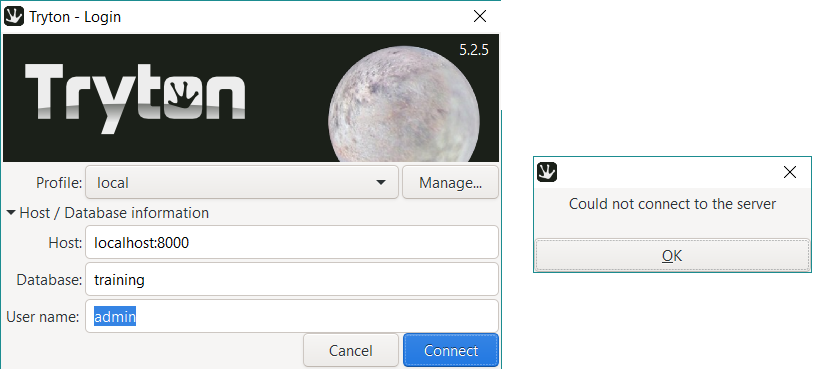
And with the connection attempt there is this additional line in the log:
`Fri Sep 13 13:32:18 2019] INFO:werkzeug:127.0.0.1 - - [13/Sep/2019 13:32:18] "POST / HTTP/1.1" 200 -`
Is it the warnings?
Can I log the client somehow?
Why would there be a 200 response if no connection?
Thanks for any help that can be given,
Cheers,
Chris
---
### Author:  [@ced](https://discuss.tryton.org/u/ced)
#### Post date: [September 13, 2019, 7:56pm UTC](https://discuss.tryton.org/t/setup-troubles-database-server-and-client-on-windows-10/1739/2 "2019-09-13T19:56:19Z")
> [@ChrisMurray](#):
>
> I get a bunch of warnings
This is because SQLite is for developer fast testing than real usage.
> [@ChrisMurray](#):
>
> I get this warning:
> “C:\Python37\lib\site-packages\trytond\_ _init_ \_.py:15: UserWarning: Timezone must be set to UTC instead of Eastern Standard Time
> warnings.warn(‘Timezone must be set to UTC instead of %s’ % time.tzname[0])”
This is important to change otherwise datetime will have offsets.
> [@ChrisMurray](#):
>
> Why would there be a 200 response if no connection?
This is the message when the server answers with no version or no databases. But as the first request seems to be answered with success, it may be due to a socket error on the client side.
You should have more information by activate `-l DEBUG` when starting the client.
---
### Author:  [@ChrisMurray](https://discuss.tryton.org/u/ChrisMurray)
#### Post date: [September 13, 2019, 10:42pm UTC](https://discuss.tryton.org/t/setup-troubles-database-server-and-client-on-windows-10/1739/3 "2019-09-13T22:42:31Z")
Thanks for the quick reply Cédric,
Ok so maybe on the client side, actually I was having the same connection difficulty with postgresql, so thought I’d just use SQLite to remove the chance I had set the database up incorrectly.
I have the windows precompiled .exe version of the client, I can’t figure out how to run it with -l DEBUG option, possible?
---
### Author:  [@ced](https://discuss.tryton.org/u/ced)
#### Post date: [September 13, 2019, 10:46pm UTC](https://discuss.tryton.org/t/setup-troubles-database-server-and-client-on-windows-10/1739/4 "2019-09-13T22:46:22Z")
> [@ChrisMurray](#):
>
> I can’t figure out how to run it with -l DEBUG option, possible?
Just launch: `tryton.exe -l DEBUG`
---
### Author:  [@ChrisMurray](https://discuss.tryton.org/u/ChrisMurray)
#### Post date: [September 22, 2019, 1:59pm UTC](https://discuss.tryton.org/t/setup-troubles-database-server-and-client-on-windows-10/1739/5 "2019-09-22T13:59:53Z")
Thanks for the assistance Cédric.
I couldn’t figure out how to get a debug output from the tryton client on windows.
Sooooooo I ended up switching over to linux and so far everything has been working as per the documentation.