# Sao not showing database
**URL:** https://discuss.tryton.org/t/sao-not-showing-database/2405
**Category:** System Administrator
**Created:** [March 4, 2020, 3:04am UTC](https://discuss.tryton.org/t/sao-not-showing-database/2405 "2020-03-04T03:04:22Z")
**Posts on this page:** 20
**Page:** 1
### Author:  [@hidura](https://discuss.tryton.org/u/hidura)
#### Post date: [March 4, 2020, 3:04am UTC](https://discuss.tryton.org/t/sao-not-showing-database/2405/1 "2020-03-04T03:04:22Z")
Hello I am trying to access to a sao tryton in a cloud server I can access to it via desktop, but in the web is impossible to login, because the database is not showing
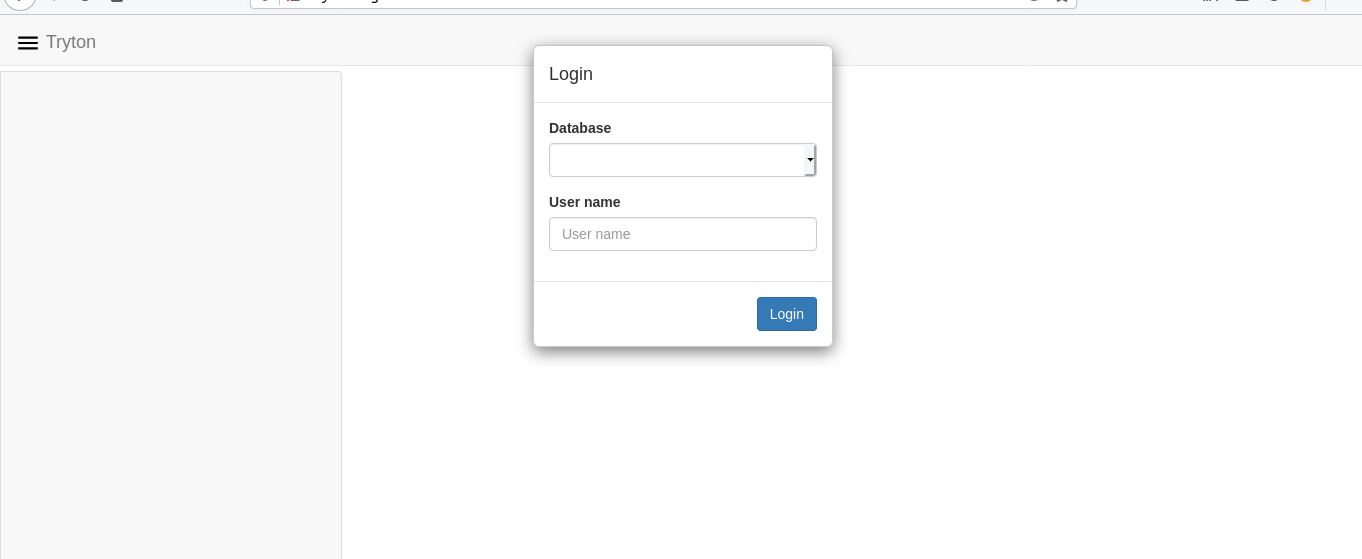
In the server log this is showing:
> 1058 140382867453696 [2020-03-04 02:44:50,269] INFO werkzeug 64.32.67.75 - - [04/Mar/2020 02:44:50] “GET /custom.js HTTP/1.1” 405 -
> 1058 140382867453696 [2020-03-04 02:44:50,399] INFO werkzeug 64.32.67.75 - - [04/Mar/2020 02:44:50] “GET /favicon.ico HTTP/1.1” 405 -
> 1058 140382867453696 [2020-03-04 02:45:07,023] INFO werkzeug 64.32.67.75 - - [04/Mar/2020 02:45:07] “GET / HTTP/1.1” 200 -
> 1058 140382867453696 [2020-03-04 02:45:07,168] INFO werkzeug 64.32.67.75 - - [04/Mar/2020 02:45:07] “GET /custom.js HTTP/1.1” 405 -
> 1058 140382867453696 [2020-03-04 02:45:07,230] INFO werkzeug 64.32.67.75 - - [04/Mar/2020 02:45:07] “GET /custom.css HTTP/1.1” 405 -
> 1058 140382867453696 [2020-03-04 02:45:07,450] INFO werkzeug 64.32.67.75 - - [04/Mar/2020 02:45:07] “GET /locale/en\_US.json HTTP/1.1” 405 -
> 1058 140382727984896 [2020-03-04 02:45:07,542] INFO werkzeug 64.32.67.75 - - [04/Mar/2020 02:45:07] “GET /locale/en.json HTTP/1.1” 405 -
> 1058 140382727984896 [2020-03-04 02:45:07,747] INFO werkzeug 64.32.67.75 - - [04/Mar/2020 02:45:07] “POST / HTTP/1.1” 200 -
My configuration is this:
```
[database]
uri = postgresql://xxxxxx: ******** @x.x.x.x/
path = path/sug_tryton/htdocs/
list=True
language=es
[web]
root = path/sao_tryton/sao
hostname = sugelicoMach
listen = 0.0.0.0:18462
```
Thanks in advance
---
### Author:  [@mccarthysean](https://discuss.tryton.org/u/mccarthysean)
#### Post date: [March 4, 2020, 3:36am UTC](https://discuss.tryton.org/t/sao-not-showing-database/2405/2 "2020-03-04T03:36:02Z")
Have you actually setup the PostgreSQL database yet?
“trytond-admin -d tryton --all” is the command to create all the tables once the database has been created.
Cheers,
Sean
---
### Author:  [@wifasoi](https://discuss.tryton.org/u/wifasoi)
#### Post date: [March 4, 2020, 9:26am UTC](https://discuss.tryton.org/t/sao-not-showing-database/2405/3 "2020-03-04T09:26:32Z")
If you open the log (in the browser [`ctrl+shift+k` in firefox]) you can check for a more specific error.
I had the same issue, and it was that the database role/user didn’t have access to the postgres templates (you can check the browser console logs, i think will say that failed to found Template0 or something like that..)
---
### Author:  [@hidura](https://discuss.tryton.org/u/hidura)
#### Post date: [March 4, 2020, 1:46pm UTC](https://discuss.tryton.org/t/sao-not-showing-database/2405/4 "2020-03-04T13:46:49Z")
```
Failed to load resource: the server responded with a status of 405 (METHOD NOT ALLOWED)
custom.css:1 Failed to load resource: the server responded with a status of 405 (METHOD NOT ALLOWED)
tryton-sao.min.js:5 [Deprecation] The Notification API may no longer be used from insecure origins. You should consider switching your application to a secure origin, such as HTTPS. See https://goo.gl/rStTGz for more details.
(anonymous) @ tryton-sao.min.js:5
:18462/locale/en_US.json:1 Failed to load resource: the server responded with a status of 405 (METHOD NOT ALLOWED)
:18462/locale/en.json:1 Failed to load resource: the server responded with a status of 405 (METHOD NOT ALLOWED)
custom.css:1 Failed to load resource: the server responded with a status of 404 (Not Found)
```
This is what I get @wifasoi
---
### Author:  [@ced](https://discuss.tryton.org/u/ced)
#### Post date: [March 4, 2020, 5:56pm UTC](https://discuss.tryton.org/t/sao-not-showing-database/2405/5 "2020-03-04T17:56:19Z")
Nothing to worry there.
If you did not setup the database, you must follow: [How to setup a database — Tryton server](https://docs.tryton.org/projects/server/en/latest/topics/setup_database.html#topics-setup-database)
And if you did it, you must ensure that the owner of the database is the same as the user used by trytond to connect to the database.
---
### Author:  [@hidura](https://discuss.tryton.org/u/hidura)
#### Post date: [March 4, 2020, 6:40pm UTC](https://discuss.tryton.org/t/sao-not-showing-database/2405/6 "2020-03-04T18:40:43Z")
It’s the same. I’d already follow the setup of the database.
---
### Author:  [@hidura](https://discuss.tryton.org/u/hidura)
#### Post date: [March 4, 2020, 7:07pm UTC](https://discuss.tryton.org/t/sao-not-showing-database/2405/7 "2020-03-04T19:07:00Z")
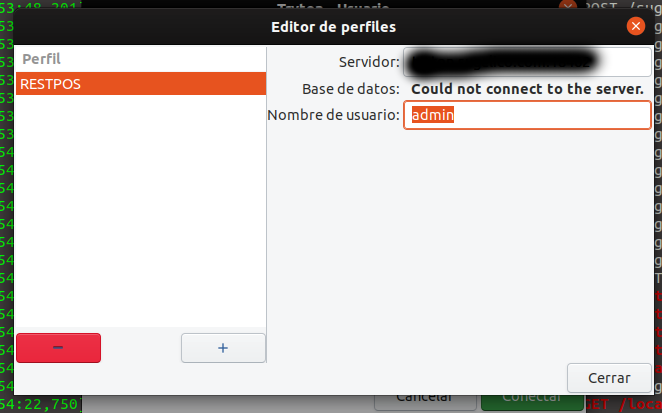
This is the error that comes in the desktop version, althought allow me to work, give me this problem, I just bring it to see if is related.
---
### Author:  [@ced](https://discuss.tryton.org/u/ced)
#### Post date: [March 4, 2020, 8:07pm UTC](https://discuss.tryton.org/t/sao-not-showing-database/2405/8 "2020-03-04T20:07:22Z")
Then check the server logs in verbose mode.
---
### Author:  [@hidura](https://discuss.tryton.org/u/hidura)
#### Post date: [March 4, 2020, 8:44pm UTC](https://discuss.tryton.org/t/sao-not-showing-database/2405/9 "2020-03-04T20:44:28Z")
```
2540 140092390315776 [2020-03-04 20:39:37,072] INFO werkzeug x.x.x.x.x - - [04/Mar/2020 20:39:37] "POST /sug_tryton/ HTTP/1.1" 200 -
2540 140092390315776 [2020-03-04 20:39:37,249] INFO werkzeug x.x.x.x.x - - [04/Mar/2020 20:39:37] "POST / HTTP/1.1" 200 -
2540 140092381923072 [2020-03-04 20:39:37,382] INFO werkzeug x.x.x.x.x - - [04/Mar/2020 20:39:37] "POST /sug_tryton/ HTTP/1.1" 200 -
2540 140092381923072 [2020-03-04 20:39:37,567] INFO werkzeug x.x.x.x.x - - [04/Mar/2020 20:39:37] "POST / HTTP/1.1" 200 -
2540 140092381923072 [2020-03-04 20:39:37,708] INFO werkzeug x.x.x.x.x - - [04/Mar/2020 20:39:37] "POST /sug_tryton/ HTTP/1.1" 200 -
2540 140092381923072 [2020-03-04 20:39:37,878] INFO werkzeug x.x.x.x.x - - [04/Mar/2020 20:39:37] "POST /sug_tryton/ HTTP/1.1" 200 -
2540 140092536309504 [2020-03-04 20:41:27,060] INFO werkzeug x.x.x.x.x - - [04/Mar/2020 20:41:27] "GET / HTTP/1.1" 200 -
2540 140092407625472 [2020-03-04 20:41:27,182] INFO werkzeug x.x.x.x.x - - [04/Mar/2020 20:41:27] "GET /custom.js HTTP/1.1" 405 -
2540 140092407625472 [2020-03-04 20:41:27,258] INFO werkzeug x.x.x.x.x - - [04/Mar/2020 20:41:27] "GET /custom.css HTTP/1.1" 405 -
2540 140092407625472 [2020-03-04 20:41:27,388] INFO werkzeug x.x.x.x.x - - [04/Mar/2020 20:41:27] "GET /custom.js HTTP/1.1" 405 -
2540 140092407625472 [2020-03-04 20:41:27,549] INFO werkzeug x.x.x.x.x - - [04/Mar/2020 20:41:27] "GET /custom.css HTTP/1.1" 405 -
2540 140092407625472 [2020-03-04 20:41:27,717] INFO werkzeug x.x.x.x.x - - [04/Mar/2020 20:41:27] "GET /locale/en_US.json HTTP/1.1" 405 -
2540 140092407625472 [2020-03-04 20:41:27,737] INFO werkzeug x.x.x.x.x - - [04/Mar/2020 20:41:27] "GET /images/tryton-icon.png HTTP/1.1" 200 -
2540 140092407625472 [2020-03-04 20:41:27,891] INFO werkzeug x.x.x.x.x - - [04/Mar/2020 20:41:27] "GET /locale/en.json HTTP/1.1" 405 -
2540 140092407625472 [2020-03-04 20:41:28,059] INFO werkzeug x.x.x.x.x - - [04/Mar/2020 20:41:28] "POST / HTTP/1.1" 200 -
```
It doen’t show anything wrong. I am thinking on make a clean installation of the server.
---
### Author:  [@ced](https://discuss.tryton.org/u/ced)
#### Post date: [March 4, 2020, 9:29pm UTC](https://discuss.tryton.org/t/sao-not-showing-database/2405/10 "2020-03-04T21:29:41Z")
Then it is typically because it does not find the database. Have not you define a specific hostname with `trytond-admin --hostname` ?
---
### Author:  [@hidura](https://discuss.tryton.org/u/hidura)
#### Post date: [March 4, 2020, 10:49pm UTC](https://discuss.tryton.org/t/sao-not-showing-database/2405/11 "2020-03-04T22:49:28Z")
In the config file, but let me do it in the admin
---
### Author:  [@ced](https://discuss.tryton.org/u/ced)
#### Post date: [March 4, 2020, 11:03pm UTC](https://discuss.tryton.org/t/sao-not-showing-database/2405/12 "2020-03-04T23:03:52Z")
You must not do it if you do not want it. I’m just trying to understand what exactly you did to no have the database listed. One possibility is to restrict a database to be listed based on hostname. But this is a very advanced usage.
---
### Author:  [@hidura](https://discuss.tryton.org/u/hidura)
#### Post date: [March 4, 2020, 11:08pm UTC](https://discuss.tryton.org/t/sao-not-showing-database/2405/13 "2020-03-04T23:08:59Z")
But if I want to expose a sao web to the world, I need to specified? Because my site is listed on a domain. and expose to the world.
---
### Author:  [@ced](https://discuss.tryton.org/u/ced)
#### Post date: [March 4, 2020, 11:16pm UTC](https://discuss.tryton.org/t/sao-not-showing-database/2405/14 "2020-03-04T23:16:34Z")
The `[web] hostname` is only for when trytond needs to construct an URL. It has no impact on the listen -only `[web] listen`.
The `trytond-admin --hostname` limit database listing to the hostname as the command line help says.
So to listen from the out side, you only need to setup `[web] listen` to `0.0.0.0`.
Now you have to debug trytond to understand why `Database.list` from `trytond/backend/postgresql/database.py` does not return your database.
---
### Author:  [@hidura](https://discuss.tryton.org/u/hidura)
#### Post date: [March 4, 2020, 11:41pm UTC](https://discuss.tryton.org/t/sao-not-showing-database/2405/15 "2020-03-04T23:41:13Z")
Ok, let me start with that!
Thanks, I’ll keep it post it!
---
### Author:  [@hidura](https://discuss.tryton.org/u/hidura)
#### Post date: [March 4, 2020, 11:50pm UTC](https://discuss.tryton.org/t/sao-not-showing-database/2405/16 "2020-03-04T23:50:51Z")
I was checking the error, and the problem is with the server specifically, I own the database but the server always give me the error, I think, one solution could be let the database area open so the user can put it when the system can’t find the database like the desktop client, another could be check the code, but there’s no error in the code.
---
### Author:  [@ced](https://discuss.tryton.org/u/ced)
#### Post date: [March 5, 2020, 8:24am UTC](https://discuss.tryton.org/t/sao-not-showing-database/2405/17 "2020-03-05T08:24:46Z")
> [@hidura](#):
>
> but the server always give me the error
What error? Could you please provide the exception and traceback?
---
### Author:  [@hidura](https://discuss.tryton.org/u/hidura)
#### Post date: [March 5, 2020, 3:19pm UTC](https://discuss.tryton.org/t/sao-not-showing-database/2405/18 "2020-03-05T15:19:23Z")
Hello, I found the problem, is that the database file use template1 as database to connect and make the check for the tryton databases, as I am not the owner of that database in the server, the system didn’t get any database, but when I’ve changed the name of the database to one that is own by me, the system start to work.
Here is the change to the code
```
def __new__ (cls, name='sug_tryton'):
with cls._lock:
now = datetime.now()
databases = cls._databases[os.getpid()]
for database in list(databases.values()):
if ((now - database._last_use).total_seconds() > _timeout
and database.name != name
and not database._connpool._used):
database.close()
if name in databases:
inst = databases[name]
else:
if name == _maindatabase:
minconn = 0
else:
minconn = _minconn
inst = DatabaseInterface. __new__ (cls, name=name)
logger.info('connect to "%s"', name)
inst._connpool = ThreadedConnectionPool(
minconn, _maxconn, **cls._connection_params(name),
cursor_factory=LoggingCursor)
databases[name] = inst
inst._last_use = datetime.now()
return inst
```
sug\_tryton, is my database, but can be change to another database, also I add
> \_maindatabase
so I can control from outside the database, I want to know more about how this code works, so I can help to improve it for people with hosting like me.
---
### Author:  [@ced](https://discuss.tryton.org/u/ced)
#### Post date: [March 5, 2020, 4:17pm UTC](https://discuss.tryton.org/t/sao-not-showing-database/2405/19 "2020-03-05T16:17:51Z")
By default `template1` is the name of the PostgreSQL database that any user can connect to.
But I agree that we should allow to [change this name](https://bugs.tryton.org/issue9121) for non standard setup.
---
### Author:  [@hidura](https://discuss.tryton.org/u/hidura)
#### Post date: [March 5, 2020, 9:02pm UTC](https://discuss.tryton.org/t/sao-not-showing-database/2405/20 "2020-03-05T21:02:17Z")
How can I upload a solution, to that code, when I find it?