# Puzzled with XML tree view... Doesn't sort correctly, skipped field
**URL:** https://discuss.tryton.org/t/puzzled-with-xml-tree-view-doesnt-sort-correctly-skipped-field/3581
**Category:** Developer
**Created:** [December 20, 2020, 3:55am UTC](https://discuss.tryton.org/t/puzzled-with-xml-tree-view-doesnt-sort-correctly-skipped-field/3581 "2020-12-20T03:55:35Z")
**Posts on this page:** 4
**Page:** 1
### Author:  [@banknote](https://discuss.tryton.org/u/banknote)
#### Post date: [December 20, 2020, 3:55am UTC](https://discuss.tryton.org/t/puzzled-with-xml-tree-view-doesnt-sort-correctly-skipped-field/3581/1 "2020-12-20T03:55:36Z")
I used the following XML tree description, **need descending order** :
```auto
```
With that, I am having the following list in a web-client:
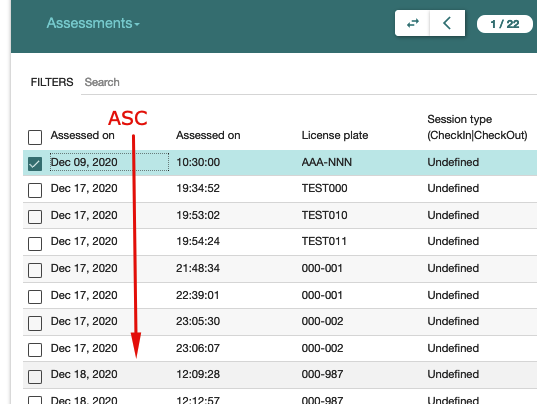
---
### Author:  [@ced](https://discuss.tryton.org/u/ced)
#### Post date: [December 20, 2020, 3:13pm UTC](https://discuss.tryton.org/t/puzzled-with-xml-tree-view-doesnt-sort-correctly-skipped-field/3581/2 "2020-12-20T15:13:21Z")
There’s no attribute on XML view to define the order. It is defined on the `ir.action.act_window` or on the xxx2many field.
---
### Author:  [@banknote](https://discuss.tryton.org/u/banknote)
#### Post date: [December 20, 2020, 4:35pm UTC](https://discuss.tryton.org/t/puzzled-with-xml-tree-view-doesnt-sort-correctly-skipped-field/3581/3 "2020-12-20T16:35:16Z")
> [@ced](#):
>
> `ir.action.act_window`
How it could be done? The same requirement: I need a stack view — the last order is on the top.
```auto
#tryton_orders.xml
store.orders
tree
store_orders_list
Store Orders
store.orders
```
---
### Author:  [@ced](https://discuss.tryton.org/u/ced)
#### Post date: [December 20, 2020, 6:13pm UTC](https://discuss.tryton.org/t/puzzled-with-xml-tree-view-doesnt-sort-correctly-skipped-field/3581/4 "2020-12-20T18:13:28Z")
There is an order field on `ir.action.act_window` that takes the same order as `ModelStorage.search`.