# How to use cookiecutter template from Heptapod
**URL:** https://discuss.tryton.org/t/how-to-use-cookiecutter-template-from-heptapod/5856
**Category:** Developer
**Created:** [January 23, 2023, 5:38pm UTC](https://discuss.tryton.org/t/how-to-use-cookiecutter-template-from-heptapod/5856 "2023-01-23T17:38:13Z")
**Posts on this page:** 7
**Page:** 1
### Author:  [@hodeinavarro](https://discuss.tryton.org/u/hodeinavarro)
#### Post date: [January 23, 2023, 5:38pm UTC](https://discuss.tryton.org/t/how-to-use-cookiecutter-template-from-heptapod/5856/1 "2023-01-23T17:38:13Z")
Hi,
I’d love to know how am I supposed to use the recently released [cookiecutter folder on Heptapod](https://foss.heptapod.net/tryton/tryton/-/tree/branch/default/cookiecutter-module).
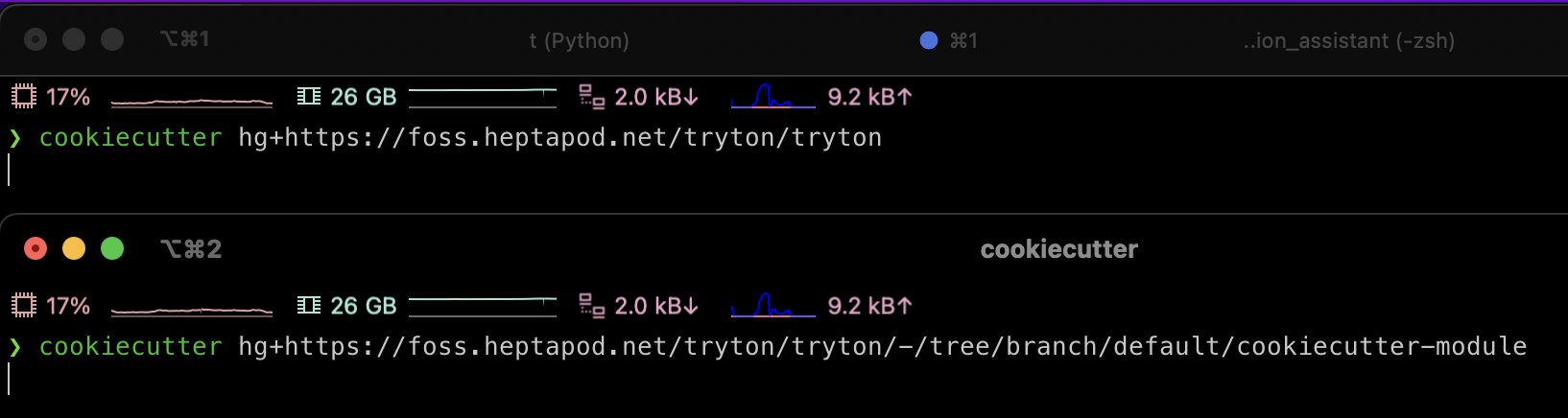
I’ve tried using cookiecutter against `/tryton/tryton` and `/tryton/tryton/-/tree/branch/default/cookiecutter-module`, but it gets stuck right after hitting enter on the CLI command.
I don’t know if I’m missing something. I’ve recently also experienced some degraded performance on Tryton repository due to the size of the monorepo itself… Maybe the cookiecutter is having the same issue?
```bash
❯ cookiecutter --version
Cookiecutter 2.1.1 from /opt/homebrew/lib/python3.11/site-packages (Python 3.11.1 (main, Dec 23 2022, 09:28:24) [Clang 14.0.0 (clang-1400.0.29.202)])
❯ hg --version
Mercurial Distributed SCM (version 6.3.2)
(see https://mercurial-scm.org for more information)
Copyright (C) 2005-2023 Olivia Mackall and others
This is free software; see the source for copying conditions. There is NO
warranty; not even for MERCHANTABILITY or FITNESS FOR A PARTICULAR PURPOSE.
❯ python --version
Python 3.11.1
```
Thank you beforehand
---
### Author:  [@ced](https://discuss.tryton.org/u/ced)
#### Post date: [January 23, 2023, 5:49pm UTC](https://discuss.tryton.org/t/how-to-use-cookiecutter-template-from-heptapod/5856/2 "2023-01-23T17:49:59Z")
`$ cookiecutter hg+https://code.tryton.org/tryton --directory cookiecutter-module`
See [Update cookiecutter url in module tutorial (!209) · Merge requests · Tryton / Tryton · GitLab](https://foss.heptapod.net/tryton/tryton/-/merge_requests/209)
---
### Author:  [@maxx](https://discuss.tryton.org/u/maxx)
#### Post date: [January 31, 2023, 10:00am UTC](https://discuss.tryton.org/t/how-to-use-cookiecutter-template-from-heptapod/5856/3 "2023-01-31T10:00:52Z")
Not working when doing this
```auto
cookiecutter hg+https://code.tryton.org/tryton --directory cookiecutter-module
The repository https://code.tryton.org/tryton could not be found, have you made a typo?
```
Doing:
```auto
cookiecutter hg+https://foss.heptapod.net/tryton/tryton --directory cookiecutter-module
```
---
### Author:  [@hodeinavarro](https://discuss.tryton.org/u/hodeinavarro)
#### Post date: [January 31, 2023, 3:03pm UTC](https://discuss.tryton.org/t/how-to-use-cookiecutter-template-from-heptapod/5856/4 "2023-01-31T15:03:11Z")
Works fine for me.
It usually takes a while, but I do not often re-download it.
Maybe you got issues with the [code.tryton.org](http://code.tryton.org) redirect?
```bash
❯ cookiecutter hg+https://code.tryton.org/tryton --directory cookiecutter-module
You've downloaded /Users/hodeinavarro/.cookiecutters/tryton before. Is it okay to delete and re-download it? [yes]: yes
module_name [my_module]:
```
---
### Author:  [@ced](https://discuss.tryton.org/u/ced)
#### Post date: [January 31, 2023, 3:07pm UTC](https://discuss.tryton.org/t/how-to-use-cookiecutter-template-from-heptapod/5856/5 "2023-01-31T15:07:29Z")
I do not think it is needed to redownload the repository each time. I guess the cache is just updated.
Also if you have already the tryton repository cloned somewhere, you can run `cookiecutter tryton//cookiecutter-module`.
> [@maxx](#):
>
> Not working when doing this
You need at least cookiecutter 2.1.
---
### Author:  [@maxx](https://discuss.tryton.org/u/maxx)
#### Post date: [January 31, 2023, 3:21pm UTC](https://discuss.tryton.org/t/how-to-use-cookiecutter-template-from-heptapod/5856/6 "2023-01-31T15:21:40Z")
> [@ced](#):
>
> You need at least cookiecutter 2.1.
Even with cookiecutter 2.1.1, [Tryton / Tryton · GitLab](https://code.tryton.org/tryton) is not working:
```auto
╰─ cookiecutter --version
Cookiecutter 2.1.1 from /home/mrichez/.local/lib/python3.10/site-packages (Python 3.10.9 (main, Dec 19 2022, 17:35:49) [GCC 12.2.0])
╭─ mrichez@richez/tmp
╰─ cookiecutter hg+https://code.tryton.org/tryton --directory cookiecutter-module
You've downloaded /home/mrichez/.cookiecutters/tryton before. Is it okay to delete and re-download it? [yes]: yes
The repository https://code.tryton.org/tryton could not be found, have you made a typo?
```
---
### Author:  [@system](https://discuss.tryton.org/u/system)
#### Post date: [March 2, 2023, 3:22pm UTC](https://discuss.tryton.org/t/how-to-use-cookiecutter-template-from-heptapod/5856/7 "2023-03-02T15:22:23Z")
This topic was automatically closed 30 days after the last reply. New replies are no longer allowed.