# How to get data in Excel file using python scripting
**URL:** https://discuss.tryton.org/t/how-to-get-data-in-excel-file-using-python-scripting/3764
**Category:** Developer
**Created:** [February 4, 2021, 7:51am UTC](https://discuss.tryton.org/t/how-to-get-data-in-excel-file-using-python-scripting/3764 "2021-02-04T07:51:42Z")
**Posts on this page:** 5
**Page:** 1
### Author:  [@prashasti.sharma](https://discuss.tryton.org/u/prashasti.sharma)
#### Post date: [February 4, 2021, 7:51am UTC](https://discuss.tryton.org/t/how-to-get-data-in-excel-file-using-python-scripting/3764/1 "2021-02-04T07:51:42Z")
How can I get all the data exported to CSV file containg all the fields of the of the form view using Python Scripting in Tryton. After each record being saved , the records data gets reflected in CSV file automatically.
Any reference to this requirement will be highly appreciable!!!
---
### Author:  [@pokoli](https://discuss.tryton.org/u/pokoli)
#### Post date: [February 4, 2021, 9:20am UTC](https://discuss.tryton.org/t/how-to-get-data-in-excel-file-using-python-scripting/3764/2 "2021-02-04T09:20:25Z")
Since [Add export CSV route (#9090) · Issues · Tryton / Tryton · GitLab](https://bugs.tryton.org/issue9090) it is possible to generate an URL from the client which match the export of module (containing the fields you want).
This URL will generate a CSV file with all the record matching the domain.
You can use this feature to generate a file with all the records. If you need to update the values, then probably the best is to use a cron job to update the file on a fixed time basis.
---
### Author:  [@prashasti.sharma](https://discuss.tryton.org/u/prashasti.sharma)
#### Post date: [February 4, 2021, 10:34am UTC](https://discuss.tryton.org/t/how-to-get-data-in-excel-file-using-python-scripting/3764/3 "2021-02-04T10:34:35Z")
How can we generate URL from client?? Due to Lack of knowledge about this feature i am unable to get this point and how it works.
---
### Author:  [@pokoli](https://discuss.tryton.org/u/pokoli)
#### Post date: [February 4, 2021, 12:02pm UTC](https://discuss.tryton.org/t/how-to-get-data-in-excel-file-using-python-scripting/3764/4 "2021-02-04T12:02:43Z")
Once you are on the export window there is a URL Export button which will give you the url when clicked. See:
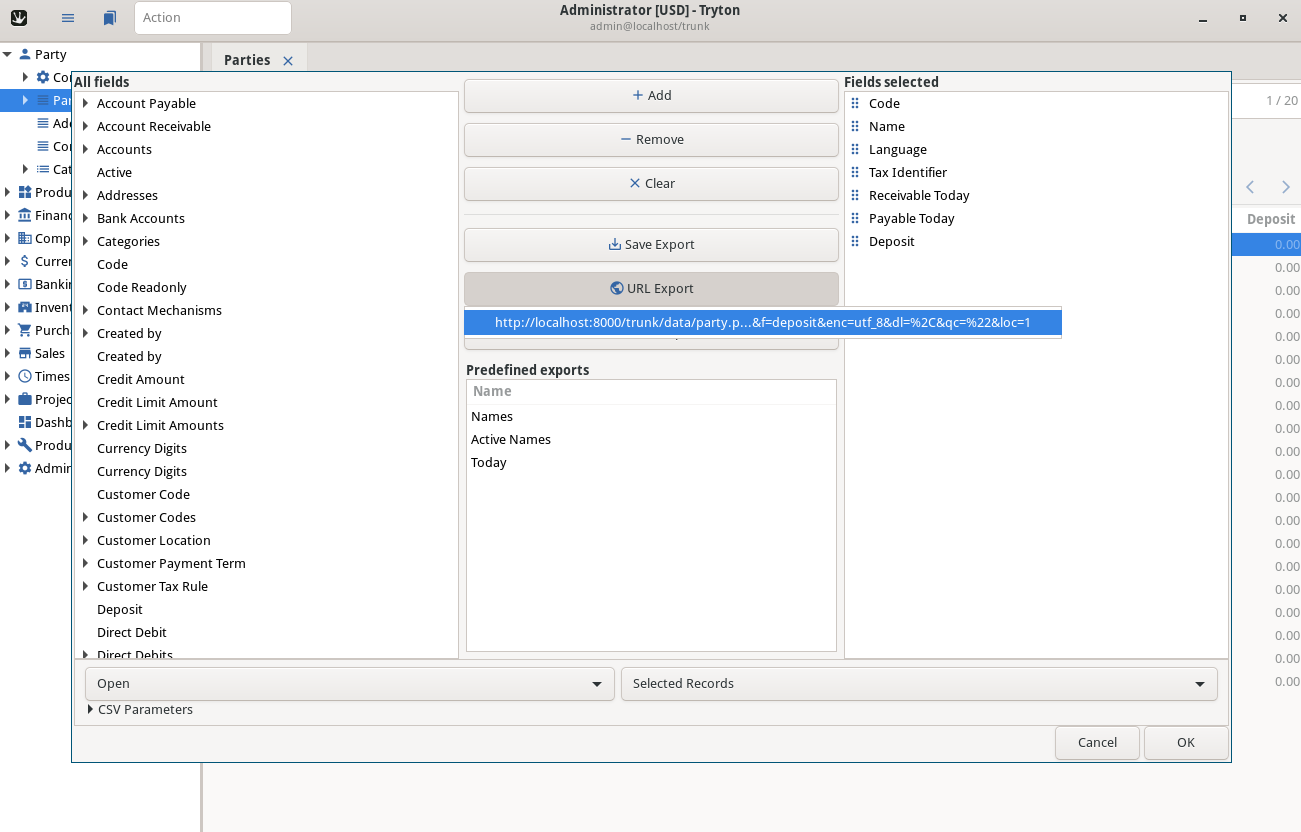
I’ve taken the screenshot from the issue linked above.
Note that this feature is only available on 5.6 or newer series.
---
### Author:  [@Rabbinray](https://discuss.tryton.org/u/Rabbinray)
#### Post date: [November 4, 2024, 1:41pm UTC](https://discuss.tryton.org/t/how-to-get-data-in-excel-file-using-python-scripting/3764/5 "2024-11-04T13:41:43Z")
Just saw your post from a while back. When I first started working with Python for data tasks, I was totally lost on how to get data into an Excel file. After some trial and error, I found a simple way using the pandas library. It’s super easy—just load your data into a DataFrame and then use the to\_excel function. This approach saved me a ton of time.
One day, I needed to analyze some sales data for a small project, and I thought of using [141 Free Excel Templates and Spreadsheets](https://www.myexcelonline.com/blog/free-excel-templates-and-spreadsheets/) I found online. These templates helped me organize my findings, and I could focus more on the analysis rather than the layout. They made everything look so much cleaner, and I even shared some with my team.