# How to filter several conditions using: action window domain
**URL:** https://discuss.tryton.org/t/how-to-filter-several-conditions-using-action-window-domain/4091
**Category:** Developer
**Created:** [April 23, 2021, 4:01am UTC](https://discuss.tryton.org/t/how-to-filter-several-conditions-using-action-window-domain/4091 "2021-04-23T04:01:32Z")
**Posts on this page:** 4
**Page:** 1
### Author:  [@tecpayci](https://discuss.tryton.org/u/tecpayci)
#### Post date: [April 23, 2021, 4:01am UTC](https://discuss.tryton.org/t/how-to-filter-several-conditions-using-action-window-domain/4091/1 "2021-04-23T04:01:32Z")
# PURPOSE:
To filter records that match multiple conditions at the same time and present them in a tree view.
## The context:
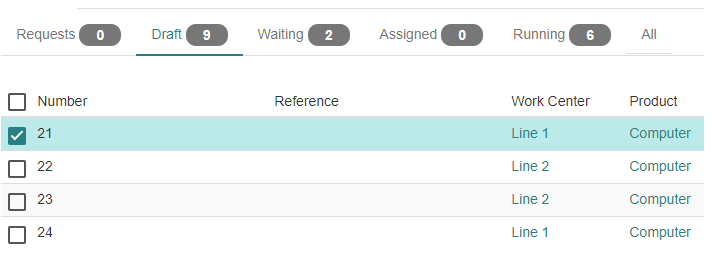
By understanding how to use **action window domains** , in a module we named “incident” has records that are categorized into States, Processes, User.
- The states are: Request, Draft, Waiting, Assigned, Running,
- In the “res.user” model we added the field “process” which assigns a Tryton user.
Currently, the window domains correctly filter requests by status. (only one condition)
# DIFFICULTY:
The following example code runs without generating errors, however, when including several conditions we are unsuccessful, it does not do the expected filtering of the domain by the conditions.
## ENVIRONMENT:
- OS: Ubuntu 20.04.1 LTS
- Python: 3.8.5
- Trytond: 5.8.7
- Tryton: 5.8.7
- Module: 5.8
- Postgresql: 12.5
# EXAMPLE CODE:
## Code to filter one condition
Code to filter by state:
```auto
Discarded
```
## Code to filter several conditions
Filtering by status and process of the active user.
```auto
Discarded
```
We appreciate your help !
---
### Author:  [@ced](https://discuss.tryton.org/u/ced)
#### Post date: [April 23, 2021, 8:39am UTC](https://discuss.tryton.org/t/how-to-filter-several-conditions-using-action-window-domain/4091/2 "2021-04-23T08:39:14Z")
You can not access the user attribute from a PYSON evaluation on the client side.
You have only access to `_user` which is the id of the logged user.
If you really need the value of the field `process` on the `User` model, you should consider adding it to the context by adding it to `User._context_fields`.
---
### Author:  [@tecpayci](https://discuss.tryton.org/u/tecpayci)
#### Post date: [May 5, 2021, 11:22am UTC](https://discuss.tryton.org/t/how-to-filter-several-conditions-using-action-window-domain/4091/3 "2021-05-05T11:22:54Z")
Thanks Cédric!
The **process** field is included within the context of the “res.user” model, i.e. in the **User.\_context\_fields**.
We still fail to achieve domain filtering by querying several conditions at once.
We tried to implement other code variants in the domain, still, we do not get the results.
We will explain our code better, and we appreciate more guidance:
Our module has the following fields, added to the User.\_context\_fields:
- State
- Assign\_process
- Assigned\_agent
- Applicant
In a menu, a window action is performed with domains, and works with the values contained in the **State** field: Request, Draft, Waiting, Assigned, Running.
It is intended to implement in a single code statement, in the same domain of the state, apply filters with multiple conditions, such as:
a- All records that meet a certain **State** and are assigned to the active user’s process ( **assign\_process** field).
b- All records that meet a certain **State** and are assigned to the active user ( **assigned\_agent** field).
c- All records that meet any **State** and were requested by the active user ( **Applicant** field).
d- Other filters with similar queries…
When we refer to similar queries, what we want to achieve is:
- Filters that always include querying the **State** (essential).
- Filters querying the **Assign\_process** , **Assigned\_agent** , **Applicant** , are optional queries, as they will be filters with the combination of the **State** condition with any of the three, or all three at the same time.
## validated code:
```auto
All
```
## another validated code alternative:
```auto
```
This last code only tries to filter by the **State** and the **Assign\_process** , but the record count does not work. We also failed to implement it by adding the other two conditions.
Are we forgetting something in our code?
If this is not the right way, it will help a lot to receive a similar example code.
---
### Author:  [@edbo](https://discuss.tryton.org/u/edbo)
#### Post date: [May 5, 2021, 12:35pm UTC](https://discuss.tryton.org/t/how-to-filter-several-conditions-using-action-window-domain/4091/4 "2021-05-05T12:35:19Z")
It’s a bit difficult to understand, but as I understand it correctly how Tryton works, the domain view is used to group data based on **one** column. So if you want to filter you have to:
1. use record\_rules
2. use the `domain` on a `ir.action.act_window` which also needs an (extra) menu entry
A use case I’m working on right now is that users only can see records they are assigned to. Those records have also a field called `state`. In this case I created the domain view with the state, so the user see the records grouped by `state` and I used a record\_rule to filter out only the records they are assigned to.
If the assignation is a list of users, and the user is also added to another `Many2One` field in the model, you can filter down further with the second point, adding a new menu entry with ‘My …’. That domain will filter down on the user.
I think you have to split things and make three menu entries:
1. Process
2. Agent
3. Applicant
You can use that to filter your records and then use the domain view to group each based on the state.