# How to connect database with tryton server
**URL:** https://discuss.tryton.org/t/how-to-connect-database-with-tryton-server/7187
**Category:** System Administrator
**Created:** [April 16, 2024, 9:09am UTC](https://discuss.tryton.org/t/how-to-connect-database-with-tryton-server/7187 "2024-04-16T09:09:18Z")
**Posts on this page:** 20
**Page:** 1
### Author:  [@shashi](https://discuss.tryton.org/u/shashi)
#### Post date: [April 16, 2024, 9:09am UTC](https://discuss.tryton.org/t/how-to-connect-database-with-tryton-server/7187/1 "2024-04-16T09:09:18Z")
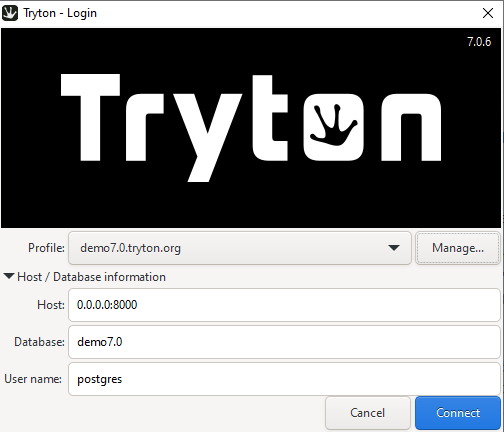
I have installed PostgreSQL,Python,pip and dekstop client tryton in my pc . but unable to connect database with tryton server,could you explain me how to connect database with tryton server step by step
---
### Author:  [@ced](https://discuss.tryton.org/u/ced)
#### Post date: [April 16, 2024, 9:17am UTC](https://discuss.tryton.org/t/how-to-connect-database-with-tryton-server/7187/5 "2024-04-16T09:17:36Z")
---
### Author:  [@shashi](https://discuss.tryton.org/u/shashi)
#### Post date: [April 16, 2024, 12:35pm UTC](https://discuss.tryton.org/t/how-to-connect-database-with-tryton-server/7187/6 "2024-04-16T12:35:23Z")
Pls help me to connect the database with tryton server step by step.
---
### Author:  [@dave](https://discuss.tryton.org/u/dave)
#### Post date: [April 16, 2024, 1:17pm UTC](https://discuss.tryton.org/t/how-to-connect-database-with-tryton-server/7187/7 "2024-04-16T13:17:54Z")
If you have only installed “Tryton desktop client, PostgreSQL,Python, pip” on your system then you will also need to install the Tryton Server.
I suggest taking a look at [Tryton components - What is needed for a functional system](https://discuss.tryton.org/t/tryton-components-what-is-needed-for-a-functional-system/6835) and [How to install Tryton — Tryton server](https://docs.tryton.org/latest/server/topics/install.html).
Then when you have all the components installed you should be able to create a [configuration file](https://docs.tryton.org/latest/server/topics/configuration.html) for the server, and start the server with the command line option suggested in [How I can connect tryton with with postgresql. Apart from that , I can't find configuration file of trytond - #12 by nicoe](https://discuss.tryton.org/t/how-i-can-connect-tryton-with-with-postgresql-apart-from-that-i-cant-find-configuration-file-of-trytond/7185/12)
Another alternative would be to try and get Tryton running using Docker: [How to run Tryton using Docker - #10](https://discuss.tryton.org/t/how-to-run-tryton-using-docker/3200/10)
---
### Author:  [@shashi](https://discuss.tryton.org/u/shashi)
#### Post date: [April 16, 2024, 1:41pm UTC](https://discuss.tryton.org/t/how-to-connect-database-with-tryton-server/7187/8 "2024-04-16T13:41:15Z")
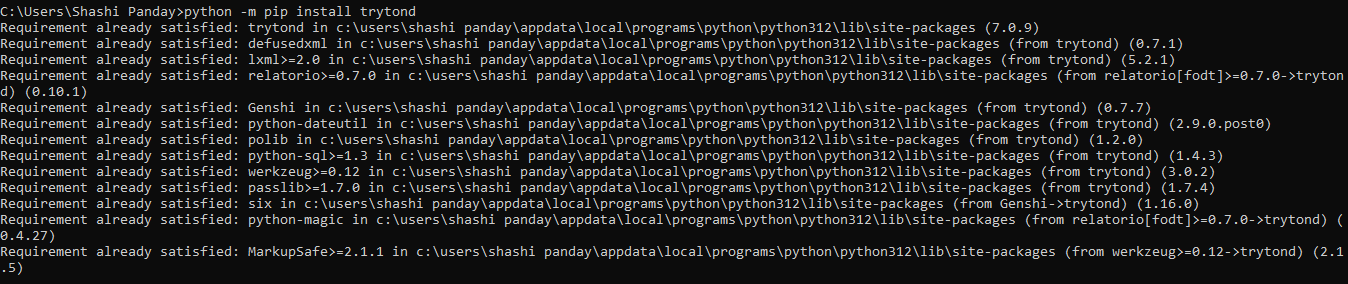
Hi @dave I have installed Tryton server as well from the cmd with command line **python -m pip install trytond**
but my question is how to connect this tryton server with postgresql and how to login in tryton desktop client , i 'm confused for configuration file as well , how to setup this pls clarify.Thanks !
---
### Author:  [@shashi](https://discuss.tryton.org/u/shashi)
#### Post date: [April 16, 2024, 1:42pm UTC](https://discuss.tryton.org/t/how-to-connect-database-with-tryton-server/7187/9 "2024-04-16T13:42:04Z")
---
### Author:  [@Basti](https://discuss.tryton.org/u/Basti)
#### Post date: [April 16, 2024, 2:21pm UTC](https://discuss.tryton.org/t/how-to-connect-database-with-tryton-server/7187/10 "2024-04-16T14:21:50Z")
Try it with the user “admin”
---
### Author:  [@herrdeh](https://discuss.tryton.org/u/herrdeh)
#### Post date: [April 16, 2024, 2:35pm UTC](https://discuss.tryton.org/t/how-to-connect-database-with-tryton-server/7187/11 "2024-04-16T14:35:46Z")
My guess is that you did not yet walk through the whole install procedure. I suggest you’d first have a look at [Install options](https://foss.heptapod.net/tryton-community/documentation/user-manual/-/wikis/Installation%20Options) at Tryton community wiki and find out which one fits best to you.
In case you’d want to go for a python virtual environment, we listed required commands [HERE in “Das Tryton-Buch”.](https://www.tryton-dach.org/tryton-buch-administrator/#Installation_Server_und_Client_auf_MS_Windows) Sorry, comments are in German, and it’s not very well-maintained because none of us is into Windows. So - feedback is welcome.
Good luck,
Wolf
---
### Author:  [@ced](https://discuss.tryton.org/u/ced)
#### Post date: [April 16, 2024, 2:55pm UTC](https://discuss.tryton.org/t/how-to-connect-database-with-tryton-server/7187/12 "2024-04-16T14:55:33Z")
> [@shashi](#):
>
> but my question is how to connect this tryton server with postgresql
The configuration of the database connection is done with the [`[database]` section of the configuration](https://docs.tryton.org/latest/server/topics/configuration.html#database).
> [@shashi](#):
>
> how to login in tryton desktop client
When you [initialize the database](https://docs.tryton.org/latest/server/topics/setup_database.html#initialize-a-database), the process ask you to set a password for the `admin` user. You must use this `admin` user for your first connection. Later you could add more users with dedicated access rights.
---
### Author:  [@shashi](https://discuss.tryton.org/u/shashi)
#### Post date: [April 17, 2024, 9:13am UTC](https://discuss.tryton.org/t/how-to-connect-database-with-tryton-server/7187/13 "2024-04-17T09:13:34Z")
Hi @ced
I am not clear with [database configuration] [Configuration file — Tryton server](https://docs.tryton.org/latest/server/topics/configuration.html#database)
this link to configure database in our system , i am facing issue to set up this database in our system, can you arrange a call to discuss how to set up and integration of database with tryton application.
---
### Author:  [@shashi](https://discuss.tryton.org/u/shashi)
#### Post date: [April 17, 2024, 9:23am UTC](https://discuss.tryton.org/t/how-to-connect-database-with-tryton-server/7187/14 "2024-04-17T09:23:42Z")
Hi @herrdeh
I walk through the whole install procedure like PostgreSQL ,Docker image, Python , Pip , Desktop client , Tryton server, and installation of trytond. But the question is how to integrate this with tryton. I 'm using windows 10 . is it possible to arrange a call for setup this in my system ?
---
### Author:  [@ced](https://discuss.tryton.org/u/ced)
#### Post date: [April 17, 2024, 9:26am UTC](https://discuss.tryton.org/t/how-to-connect-database-with-tryton-server/7187/15 "2024-04-17T09:26:04Z")
The problem is usually the client authentication configuration of PostgreSQL, see [PostgreSQL: Documentation: 17: 20.1. The pg\_hba.conf File](https://www.postgresql.org/docs/current/auth-pg-hba-conf.html)
---
### Author:  [@ced](https://discuss.tryton.org/u/ced)
#### Post date: [April 17, 2024, 9:27am UTC](https://discuss.tryton.org/t/how-to-connect-database-with-tryton-server/7187/16 "2024-04-17T09:27:49Z")
But the simplest way is to use Docker with the compose file on [https://hub.docker.com/r/tryton/tryton](https://hub.docker.com/r/tryton/tryton). It setup the database, the server and cron automatically.
---
### Author:  [@shashi](https://discuss.tryton.org/u/shashi)
#### Post date: [April 17, 2024, 10:14am UTC](https://discuss.tryton.org/t/how-to-connect-database-with-tryton-server/7187/17 "2024-04-17T10:14:45Z")
Hi @ced
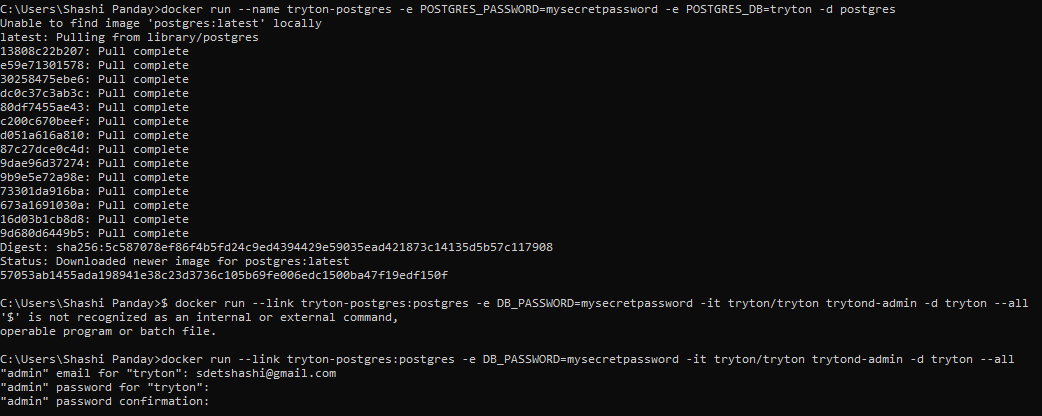
I have tried with docker in cmd , please suggest what to do next?
---
### Author:  [@ced](https://discuss.tryton.org/u/ced)
#### Post date: [April 17, 2024, 10:19am UTC](https://discuss.tryton.org/t/how-to-connect-database-with-tryton-server/7187/18 "2024-04-17T10:19:52Z")
This is not the docker compose. Check for " Deploy with compose file".
But your docker only way seems to be complete. You should have an image listening if you run the " Start a Tryton instance".
_NB: Please do not copy image of pure text, it can not be searched, translated nor indexed. And it waste resource on the server._
---
### Author:  [@shashi](https://discuss.tryton.org/u/shashi)
#### Post date: [April 17, 2024, 11:17am UTC](https://discuss.tryton.org/t/how-to-connect-database-with-tryton-server/7187/19 "2024-04-17T11:17:47Z")
Yes i have initialize the database but in Tryton application i have given the username and password , but password not accepted. Whereas i have already set the admin user and password.
---
### Author:  [@shashi](https://discuss.tryton.org/u/shashi)
#### Post date: [April 17, 2024, 11:40am UTC](https://discuss.tryton.org/t/how-to-connect-database-with-tryton-server/7187/20 "2024-04-17T11:40:31Z")
Can you tell me how to see the docker compose, how to check deploy with compose file?
---
### Author:  [@acaubet](https://discuss.tryton.org/u/acaubet)
#### Post date: [April 17, 2024, 12:11pm UTC](https://discuss.tryton.org/t/how-to-connect-database-with-tryton-server/7187/21 "2024-04-17T12:11:21Z")
> **[Tryton / Tryton Docker · GitLab](https://foss.heptapod.net/tryton/tryton-docker#deploy-with-compose-file)**
>
> Tryton Docker Image
---
### Author:  [@shashi](https://discuss.tryton.org/u/shashi)
#### Post date: [April 17, 2024, 12:18pm UTC](https://discuss.tryton.org/t/how-to-connect-database-with-tryton-server/7187/22 "2024-04-17T12:18:41Z")
Hi @acaubet
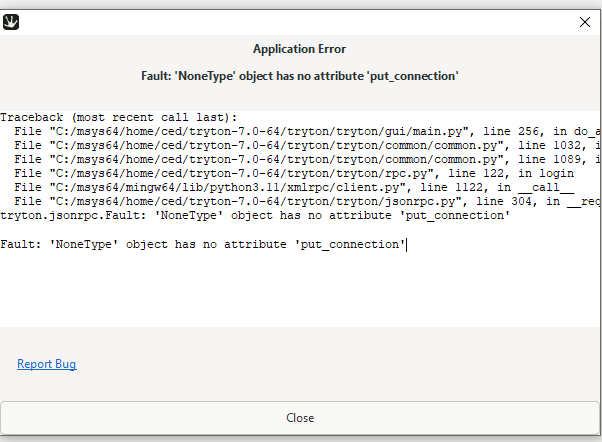
I’m getting application error
---
### Author:  [@shashi](https://discuss.tryton.org/u/shashi)
#### Post date: [April 17, 2024, 12:26pm UTC](https://discuss.tryton.org/t/how-to-connect-database-with-tryton-server/7187/23 "2024-04-17T12:26:59Z")
I have tried with following credentials after running this command(trytond-admin -d -p) in cmd.
Host: [http://localhost:8000/](http://localhost:8000/)
Database : tryton
Username : admin
after entering this i’m getting could not connect to server.
[Next page](https://discuss.tryton.org/t/how-to-connect-database-with-tryton-server/7187.md?page=2)