# How debug code with breakpoint in Tryton?
**URL:** https://discuss.tryton.org/t/how-debug-code-with-breakpoint-in-tryton/5181
**Category:** User
**Created:** [April 19, 2022, 3:45pm UTC](https://discuss.tryton.org/t/how-debug-code-with-breakpoint-in-tryton/5181 "2022-04-19T15:45:58Z")
**Posts on this page:** 10
**Page:** 1
### Author:  [@Marwen](https://discuss.tryton.org/u/Marwen)
#### Post date: [April 19, 2022, 3:45pm UTC](https://discuss.tryton.org/t/how-debug-code-with-breakpoint-in-tryton/5181/1 "2022-04-19T15:45:58Z")
Hi ,
I’m newbie with Tryton , I need some help to setting up my environment in Pycharm IDE to debug my code with breakpoint method. I can’t find the entry file or main method in the Trytond Module. If there is another method to debug my code please let me know .
My local environment:
tryton==5.0.44
trytond==5.0.46
Werkzeug==0.16.1
Thanks
Marwen
---
### Author:  [@ced](https://discuss.tryton.org/u/ced)
#### Post date: [April 19, 2022, 8:11pm UTC](https://discuss.tryton.org/t/how-debug-code-with-breakpoint-in-tryton/5181/2 "2022-04-19T20:11:52Z")
> [@Marwen](#):
>
> I need some help to setting up my environment in Pycharm IDE to debug my code with breakpoint method
I do not use such tools for development. Usually I’m fine with logging and some print statement.
The main difficulty is that trytond is a multi-threaded server.
> [@Marwen](#):
>
> I can’t find the entry file or main method in the Trytond Module
Modules do not have main entry. They are loaded by the `trytond` server, registered in the Pool and their RPC API is exposed. So the main entry for `trytond` is the `bin/trytond` if you are using the default werkzeug server otherwise it should be `trytond.wsgi.app`.
> [@Marwen](#):
>
> tryton==5.0.44
> trytond==5.0.46
You should start development with more recent version. If you want LTS it should be 6.0 otherwise 6.2.
The 5.0 is the older LTS (still maintained but missing a lot of new features and improvements).
---
### Author:  [@Marwen](https://discuss.tryton.org/u/Marwen)
#### Post date: [April 20, 2022, 6:31am UTC](https://discuss.tryton.org/t/how-debug-code-with-breakpoint-in-tryton/5181/3 "2022-04-20T06:31:36Z")
@ced That seems clear to me, thanks for the help.
---
### Author:  [@oscarQ](https://discuss.tryton.org/u/oscarQ)
#### Post date: [April 21, 2022, 5:33am UTC](https://discuss.tryton.org/t/how-debug-code-with-breakpoint-in-tryton/5181/4 "2022-04-21T05:33:19Z")
I usually use [pdb](https://docs.python.org/3/library/pdb.html) / [pudb](https://pypi.org/project/pudb/) librarys to debug through the terminal.
---
### Author:  [@JonatanGk](https://discuss.tryton.org/u/JonatanGk)
#### Post date: [April 21, 2022, 12:23pm UTC](https://discuss.tryton.org/t/how-debug-code-with-breakpoint-in-tryton/5181/5 "2022-04-21T12:23:47Z")
> [@Marwen](#):
>
> Pycharm IDE to
I use Pycharm with Tryton and u can debug with Run/Configuration profile like this
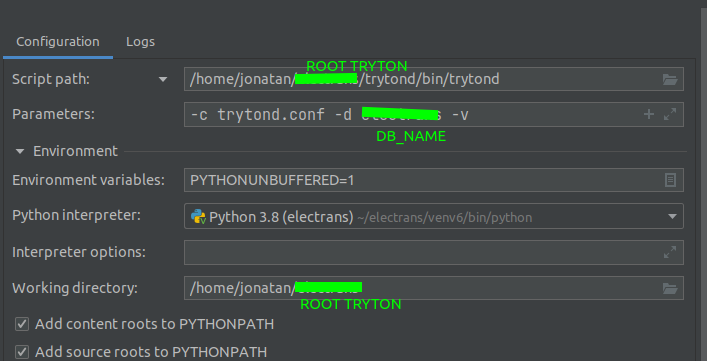
I hope it helps you
---
### Author:  [@Marwen](https://discuss.tryton.org/u/Marwen)
#### Post date: [April 21, 2022, 2:49pm UTC](https://discuss.tryton.org/t/how-debug-code-with-breakpoint-in-tryton/5181/6 "2022-04-21T14:49:10Z")
Hello @JonatanGk Thanks for the answer . Now the server run in the debug mode but when i try to connect in the terminal with client side I get this error :
> raise IOError('Database “%s” doesn\'t exist!' % db\_filename)\nOSError: Database “training.sqlite” doesn't exist!\n’\>
The problem is that I use Postgres database but it’s readed as Sqlite .
In the paramaters field i set :
> -c trytond.conf -d training -v
How can i change the configuration to identify my table ?
---
### Author:  [@Marwen](https://discuss.tryton.org/u/Marwen)
#### Post date: [April 21, 2022, 3:10pm UTC](https://discuss.tryton.org/t/how-debug-code-with-breakpoint-in-tryton/5181/8 "2022-04-21T15:10:30Z")
Hello @oscarQ Thanks for the answer. Yes I use those librarys but also i want to find a way to stop runnig code and check values before proceeding further.
---
### Author:  [@ced](https://discuss.tryton.org/u/ced)
#### Post date: [April 21, 2022, 3:14pm UTC](https://discuss.tryton.org/t/how-debug-code-with-breakpoint-in-tryton/5181/9 "2022-04-21T15:14:46Z")
> [@Marwen](#):
>
> How can i change the configuration to identify my table ?
The `--config` option must point to the existing configuration file.
I guess in this case it can be relative to the working directory (but in case of doubt you could use absolute path).
---
### Author:  [@Marwen](https://discuss.tryton.org/u/Marwen)
#### Post date: [April 21, 2022, 4:02pm UTC](https://discuss.tryton.org/t/how-debug-code-with-breakpoint-in-tryton/5181/10 "2022-04-21T16:02:39Z")
Yes, it’s works with the absolute path . Thank you !
---
### Author:  [@system](https://discuss.tryton.org/u/system)
#### Post date: [May 21, 2022, 4:03pm UTC](https://discuss.tryton.org/t/how-debug-code-with-breakpoint-in-tryton/5181/11 "2022-05-21T16:03:27Z")
This topic was automatically closed 30 days after the last reply. New replies are no longer allowed.