# Hiding column in treeview on specific model

**URL:** https://discuss.tryton.org/t/hiding-column-in-treeview-on-specific-model/5672
**Category:** Developer
**Tags:** stock
**Created:** [November 4, 2022, 1:12pm UTC](https://discuss.tryton.org/t/hiding-column-in-treeview-on-specific-model/5672 "2022-11-04T13:12:33Z")
**Posts on this page:** 8
**Page:** 1

<div class="post-metadata">

### Author: ![maxx](https://discuss-cdn.tryton.org/user_avatar/discuss.tryton.org/maxx/32/2320_2.png) [@maxx](https://discuss.tryton.org/u/maxx)
#### Post date: [November 4, 2022, 1:12pm UTC](https://discuss.tryton.org/t/hiding-column-in-treeview-on-specific-model/5672/1 "2022-11-04T13:12:33Z")

</div>

Hi,

I need some help to hide a column in a treeview in some cases.

I defined a button for a custom wizard on outgoing assigned inventory moves (customer shipment).

```auto
class Move(metaclass=PoolMeta):
    __name__ = 'stock.move'

    @classmethod
    def __setup__ (cls):
        super(). __setup__ ()
        cls._buttons.update({
                'update_quantity_wizard': {
                    'invisible': ~Eval('state').in_(['assigned']),
                    'depends': ['state'],
                    },
                })

    @classmethod
    @ModelView.button_action('module.wizard_update_quantity')
    def update_quantity_wizard(cls, moves):
        pass

```

Updating stock.move\_list\_shipment.xml:

```auto
<data>
    <xpath expr="/tree" position="inside">
        <button name="update_quantity_wizard" string="Pick"/>
    </xpath>
</data>

```

With this result:

Button is visible when move state is “Assigned”:
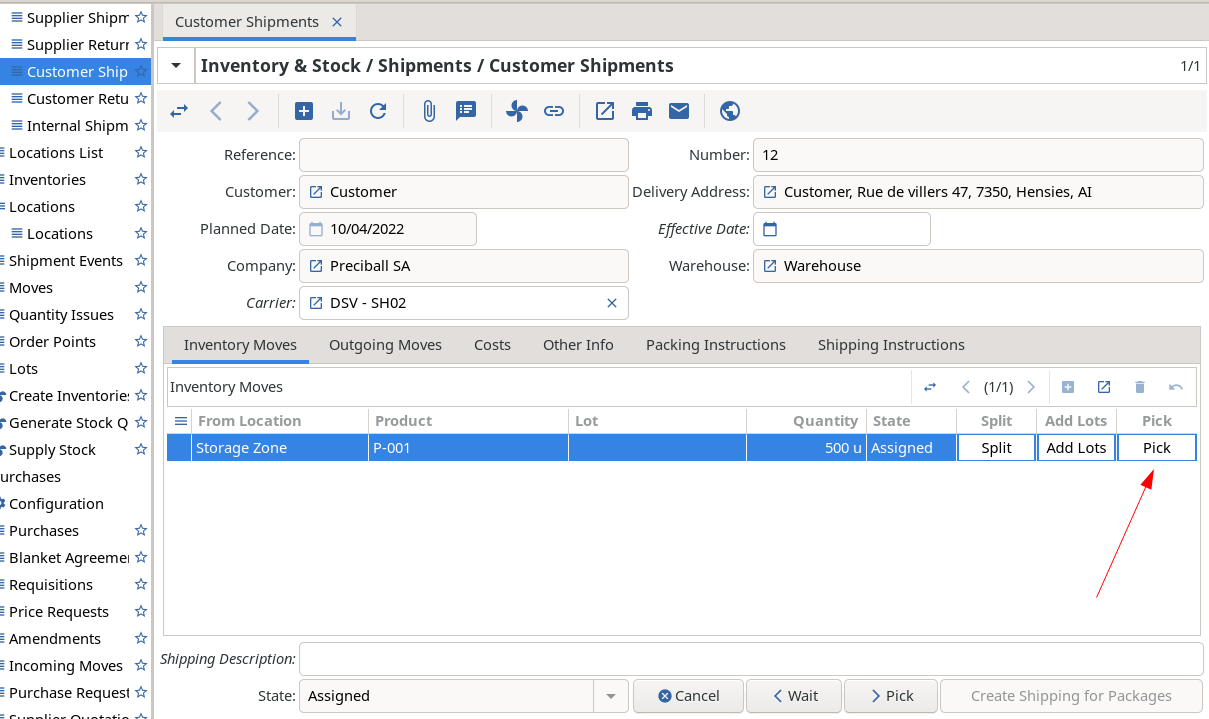
 ![2022-11-04_13-44](https://discuss-cdn.tryton.org/uploads/default/original/2X/8/850492268b0a398deb56cf3cf76bc223108111db.png)

Button is invisible for other states:
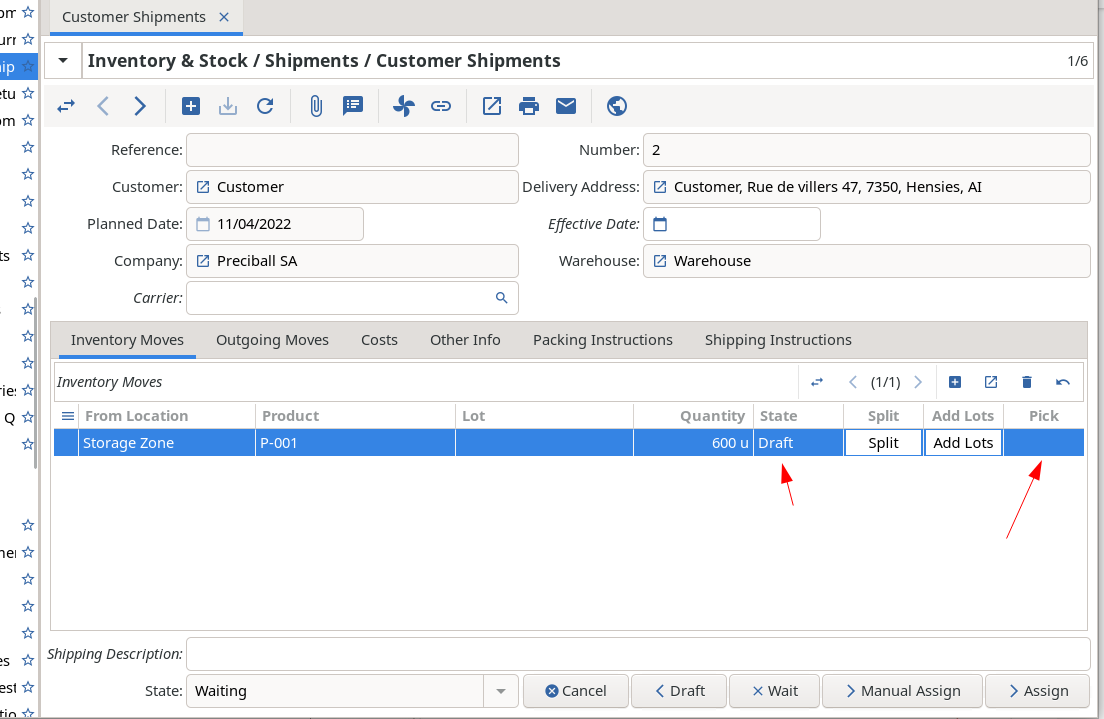
 ![2022-11-04_13-45](https://discuss-cdn.tryton.org/uploads/default/original/2X/0/003573761d35ec908e5f600df5f8889499e688bf.png)

Until now, everything is ok 🙂

But this button is specific to Customer Shipment. So i don’t want to display the column “Pick” in Supplier Shipment model.

After a discuss on Irc, the suggestion was to use view\_attributes and context to hide the column.

```auto
class Move(metaclass=PoolMeta):
    __name__ = 'stock.move'

    @classmethod
    def view_attributes(cls):
        return super().view_attributes() + [
            ('/tree/button[@name="update_quantity_wizard"]', 'tree_invisible',
                Eval('context', {}).get('shipment_in', False)),
            ]

```

And adding a variable in the action context:

```auto
<?xml version="1.0"?>
<tryton>
    <data>
        <record model="ir.action.act_window" id="stock.act_shipment_in_form">
            <field name="context" eval="{'shipment_in': True}" pyson="1"/>
        </record>
    </data>
</tryton>

```

But, this is not working and i’m still viewing the column “Pick” in the supplier shipment form:
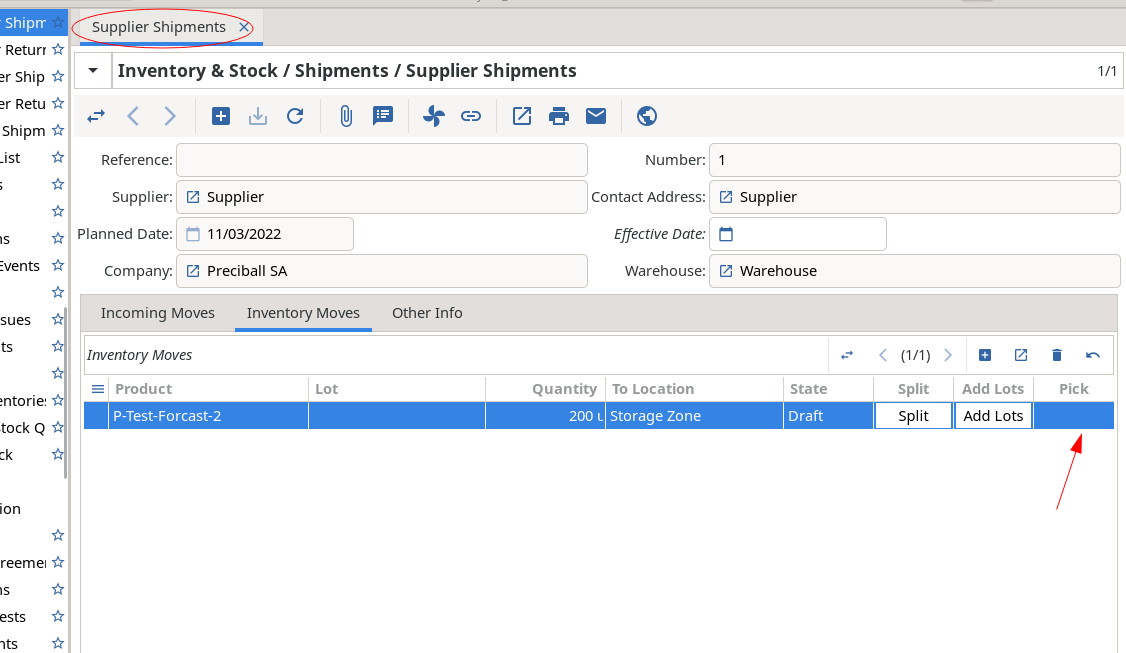
 ![2022-11-04_14-03](https://discuss-cdn.tryton.org/uploads/default/original/2X/8/870d0ed86a60959f4c5fd532d767a70b68042f3d.png)

Thanks for your help 🙂

---

<div class="post-metadata">

### Author: ![ced](https://discuss-cdn.tryton.org/user_avatar/discuss.tryton.org/ced/32/1237_2.png) [@ced](https://discuss.tryton.org/u/ced)
#### Post date: [November 4, 2022, 1:31pm UTC](https://discuss.tryton.org/t/hiding-column-in-treeview-on-specific-model/5672/2 "2022-11-04T13:31:29Z")

</div>

> [@maxx](#):
>
> `Eval('context', {}).get('shipment_in', False)),`

It must be `Eval('shipment_in', Fase)`

> [@maxx](#):
>
> And adding a variable in the action context:
> 
> ```auto
> <?xml version="1.0"?>
> <tryton>
> <data>
> <record model="ir.action.act_window" id="stock.act_shipment_in_form">
> <field name="context" eval="{'shipment_in': True}" pyson="1"/>
> </record>
> </data>
> </tryton>
> 
> ```

Are you sure this is actually updated? It is always odd to update existing XML record.

Indeed this can not work because the view you try to modify is not the view of the action because it is a One2Many.  
For now the context is not passed to the screen of One2Many. I guess it could be taken via the view.

---

<div class="post-metadata">

### Author: ![maxx](https://discuss-cdn.tryton.org/user_avatar/discuss.tryton.org/maxx/32/2320_2.png) [@maxx](https://discuss.tryton.org/u/maxx)
#### Post date: [November 4, 2022, 1:47pm UTC](https://discuss.tryton.org/t/hiding-column-in-treeview-on-specific-model/5672/3 "2022-11-04T13:47:05Z")

</div>

> [@ced](#):
>
> It must be `Eval('shipment_in', False)`

Ok, i did this way previously.

> [@ced](#):
>
> Are you sure this is actually updated? It is always odd to update existing XML record.

Yes, i saw the variable in the context when doing “tryton -v”

> [@ced](#):
>
> For now the context is not passed to the screen of One2Many. I guess it could be taken via the view.

What do you mean by “taken via the view” ? Adding ‘context’ in the field definition of “inventory\_moves” ?

---

<div class="post-metadata">

### Author: ![ced](https://discuss-cdn.tryton.org/user_avatar/discuss.tryton.org/ced/32/1237_2.png) [@ced](https://discuss.tryton.org/u/ced)
#### Post date: [November 4, 2022, 1:59pm UTC](https://discuss.tryton.org/t/hiding-column-in-treeview-on-specific-model/5672/4 "2022-11-04T13:59:25Z")

</div>

> [@maxx](#):
>
> What do you mean by “taken via the view” ?

When the widget instantiate its Screen, it could retrieve the context from the parent Screen via the `view` attribute.

---

<div class="post-metadata">

### Author: ![maxx](https://discuss-cdn.tryton.org/user_avatar/discuss.tryton.org/maxx/32/2320_2.png) [@maxx](https://discuss.tryton.org/u/maxx)
#### Post date: [November 4, 2022, 2:31pm UTC](https://discuss.tryton.org/t/hiding-column-in-treeview-on-specific-model/5672/5 "2022-11-04T14:31:42Z")

</div>

I tried this:

```auto
    @classmethod
    def view_attributes(cls):
        return super().view_attributes() + [
            ('/tree/button[@name="update_quantity_wizard"]', 'tree_invisible',
                Eval('_parent_shipment', {}).get('shipment_in', False)),
            ]

```

and this:

```auto
    @classmethod
    def view_attributes(cls):
        return super().view_attributes() + [
            ('/tree/button[@name="update_quantity_wizard"]', 'tree_invisible',
                Eval('_parent_context', {}).get('shipment_in', False)),
            ]

```

but not working ☹

---

<div class="post-metadata">

### Author: ![ced](https://discuss-cdn.tryton.org/user_avatar/discuss.tryton.org/ced/32/1237_2.png) [@ced](https://discuss.tryton.org/u/ced)
#### Post date: [November 4, 2022, 2:52pm UTC](https://discuss.tryton.org/t/hiding-column-in-treeview-on-specific-model/5672/6 "2022-11-04T14:52:58Z")

</div>

I can not as the screen context of a One2Many is always empty.

---

<div class="post-metadata">

### Author: ![maxx](https://discuss-cdn.tryton.org/user_avatar/discuss.tryton.org/maxx/32/2320_2.png) [@maxx](https://discuss.tryton.org/u/maxx)
#### Post date: [November 4, 2022, 3:08pm UTC](https://discuss.tryton.org/t/hiding-column-in-treeview-on-specific-model/5672/7 "2022-11-04T15:08:17Z")

</div>

So it’s not possible ?

---

<div class="post-metadata">

### Author: ![ced](https://discuss-cdn.tryton.org/user_avatar/discuss.tryton.org/ced/32/1237_2.png) [@ced](https://discuss.tryton.org/u/ced)
#### Post date: [November 4, 2022, 3:21pm UTC](https://discuss.tryton.org/t/hiding-column-in-treeview-on-specific-model/5672/8 "2022-11-04T15:21:25Z")

</div>

Not until this is solved:

> [@ced](#):
>
> For now the context is not passed to the screen of One2Many. I guess it could be taken via the view.
