# Hide Menu for a user
**URL:** https://discuss.tryton.org/t/hide-menu-for-a-user/8567
**Category:** User
**Created:** [May 8, 2025, 10:09am UTC](https://discuss.tryton.org/t/hide-menu-for-a-user/8567 "2025-05-08T10:09:04Z")
**Posts on this page:** 8
**Page:** 1
### Author:  [@finals\_mvp](https://discuss.tryton.org/u/finals_mvp)
#### Post date: [May 8, 2025, 10:09am UTC](https://discuss.tryton.org/t/hide-menu-for-a-user/8567/1 "2025-05-08T10:09:04Z")
I’m trying to restrict access to certain menus in Tryton based on user groups. For example, I want to **hide the “Party Category”** submenu under the “Parties” menu for certain users, while keeping it visible for others (like admin).
So far, I’ve been directly manipulating the database tables such as `ir_ui_menu-res_group` and `ir_menu` to add or remove access. However, this approach often leads to **unintended consequences** —for example, sometimes the menu gets hidden from the admin user as well, or completely disappears.
Is there a **recommended and safe way** to control which user groups can see which menu entries?
It would be really helpful if someone could walk me through the proper approach to **menu-level access control** in Tryton, ideally without breaking access for the admin or needing to touch the database directly.
Thanks in advance!
---
### Author:  [@Xavi](https://discuss.tryton.org/u/Xavi)
#### Post date: [May 8, 2025, 10:33am UTC](https://discuss.tryton.org/t/hide-menu-for-a-user/8567/2 "2025-05-08T10:33:20Z")
Hi @finals_mvp,
You can go from the client to `Administration > Users > Groups`, then on your groups form, you can give access to certain menus:
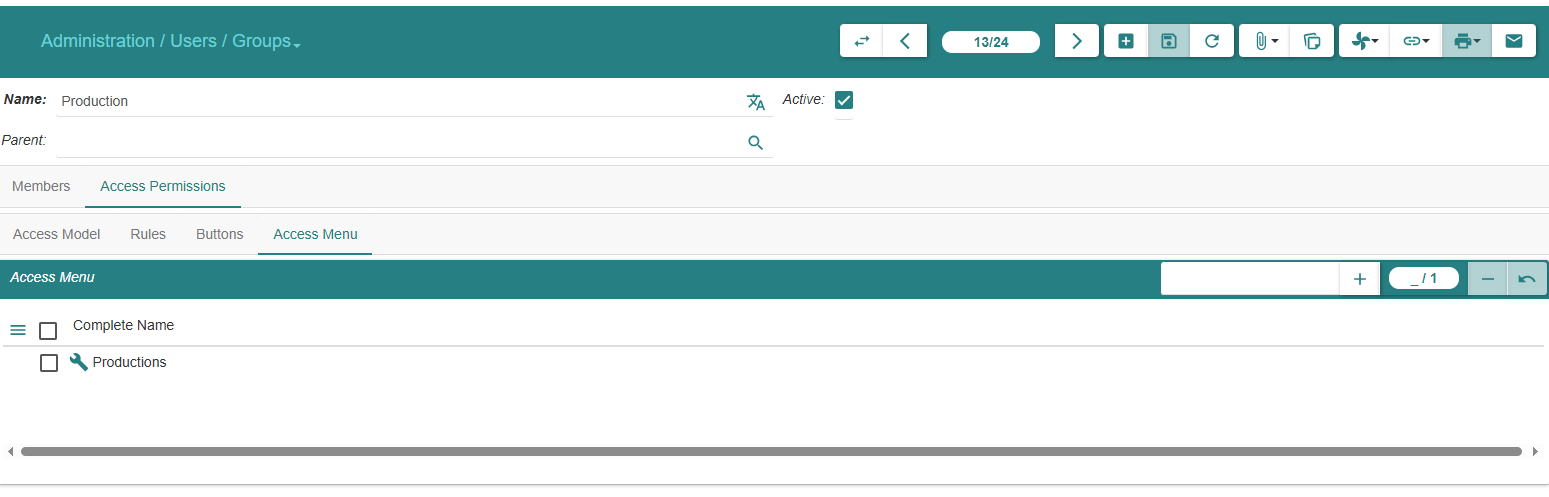
(This is basically the `ir_ui_menu-res_group` table that you’ve mentioned)
---
### Author:  [@mlop](https://discuss.tryton.org/u/mlop)
#### Post date: [May 8, 2025, 11:02am UTC](https://discuss.tryton.org/t/hide-menu-for-a-user/8567/3 "2025-05-08T11:02:13Z")
You could create new permission access and make the access to the menus you want to hide more restrictive, so only those with the new permission can view them.
---
### Author:  [@finals\_mvp](https://discuss.tryton.org/u/finals_mvp)
#### Post date: [May 8, 2025, 12:39pm UTC](https://discuss.tryton.org/t/hide-menu-for-a-user/8567/4 "2025-05-08T12:39:27Z")
Can you walk me through the correct approach to hide the Party Categories from the menu, for a user?
---
### Author:  [@Xavi](https://discuss.tryton.org/u/Xavi)
#### Post date: [May 8, 2025, 12:57pm UTC](https://discuss.tryton.org/t/hide-menu-for-a-user/8567/5 "2025-05-08T12:57:04Z")
You don’t have to hide the menu to an user/group but give access to another, for example, if you have group\_1 and group\_2, and you want a menu only available for group\_1, then go to this group, in the menu i’ve shown before, and give him the menu access, then automatically the group\_2 won’t have access
---
### Author:  [@finals\_mvp](https://discuss.tryton.org/u/finals_mvp)
#### Post date: [May 8, 2025, 1:12pm UTC](https://discuss.tryton.org/t/hide-menu-for-a-user/8567/6 "2025-05-08T13:12:13Z")
In the Access Permissions → Access Menu Tab, I added a few menus, but then after clicking the save button they disappeared from the Access Menu list, and now when adding the Add button again, I can’t find those menus, I don’t know if this should happen.
---
### Author:  [@ced](https://discuss.tryton.org/u/ced)
#### Post date: [May 8, 2025, 4:09pm UTC](https://discuss.tryton.org/t/hide-menu-for-a-user/8567/7 "2025-05-08T16:09:49Z")
If your user is not in the restricted groups that you added, it is normal that you do not see them anymore.
Remember “admin” has nothing special, he is just in all groups by creation.
---
### Author:  [@finals\_mvp](https://discuss.tryton.org/u/finals_mvp)
#### Post date: [May 9, 2025, 2:08pm UTC](https://discuss.tryton.org/t/hide-menu-for-a-user/8567/8 "2025-05-09T14:08:58Z")
I tested this approach and confirmed that I was able to control **menu visibility** based on user-group as of now. It works as expected—thank you!