# Hide ir.action.keyword depending on State
**URL:** https://discuss.tryton.org/t/hide-ir-action-keyword-depending-on-state/5096
**Category:** Developer
**Tags:** ir
**Created:** [March 18, 2022, 7:52am UTC](https://discuss.tryton.org/t/hide-ir-action-keyword-depending-on-state/5096 "2022-03-18T07:52:48Z")
**Posts on this page:** 6
**Page:** 1
### Author:  [@pandasloth](https://discuss.tryton.org/u/pandasloth)
#### Post date: [March 18, 2022, 7:52am UTC](https://discuss.tryton.org/t/hide-ir-action-keyword-depending-on-state/5096/1 "2022-03-18T07:52:48Z")
Hello,
How do I set this print report to invisible depending on its state?
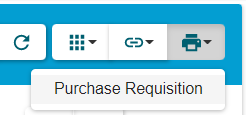
```
form_print
purchase.requisition,-1
```
Best regards
---
### Author:  [@oscarQ](https://discuss.tryton.org/u/oscarQ)
#### Post date: [March 18, 2022, 8:28am UTC](https://discuss.tryton.org/t/hide-ir-action-keyword-depending-on-state/5096/2 "2022-03-18T08:28:10Z")
AFAIK it’s not doable. An alternative is to override a report class function (like the [execute](https://github.com/tryton/trytond/blob/develop/trytond/report/report.py#L136) one) to check the state and show a warning to the user in order to prevent the print. Anyway, I am not sure if it is a good practice, maybe someone else can confirm which is the best way to achieve it.
---
### Author:  [@ced](https://discuss.tryton.org/u/ced)
#### Post date: [March 18, 2022, 8:50am UTC](https://discuss.tryton.org/t/hide-ir-action-keyword-depending-on-state/5096/3 "2022-03-18T08:50:39Z")
Indeed the alternative is to use a button action with a states (and to add the button to the views form and list).
---
### Author:  [@oscarQ](https://discuss.tryton.org/u/oscarQ)
#### Post date: [March 18, 2022, 9:09am UTC](https://discuss.tryton.org/t/hide-ir-action-keyword-depending-on-state/5096/4 "2022-03-18T09:09:48Z")
You are right, this solution fits better with the Tryton framework, however it can create confusión for the user who expects to find the report always in the same place.
---
### Author:  [@ced](https://discuss.tryton.org/u/ced)
#### Post date: [March 18, 2022, 9:17am UTC](https://discuss.tryton.org/t/hide-ir-action-keyword-depending-on-state/5096/5 "2022-03-18T09:17:13Z")
I do not think there is a valid use case for a conditional report. A report is just displaying record on a printable format (just like there is not conditional usage of a form view).
---
### Author:  [@pandasloth](https://discuss.tryton.org/u/pandasloth)
#### Post date: [March 22, 2022, 7:00am UTC](https://discuss.tryton.org/t/hide-ir-action-keyword-depending-on-state/5096/6 "2022-03-22T07:00:23Z")
Thank you for your kind suggestion.
It was because our user gave a feedback that it was an eyesore.