# Excel File using xlsx writer?
**URL:** https://discuss.tryton.org/t/excel-file-using-xlsx-writer/4218
**Category:** Developer
**Created:** [May 18, 2021, 5:54am UTC](https://discuss.tryton.org/t/excel-file-using-xlsx-writer/4218 "2021-05-18T05:54:36Z")
**Posts on this page:** 3
**Page:** 1
### Author:  [@deathrake](https://discuss.tryton.org/u/deathrake)
#### Post date: [May 18, 2021, 5:54am UTC](https://discuss.tryton.org/t/excel-file-using-xlsx-writer/4218/1 "2021-05-18T05:54:36Z")
hello
i am trying to generate a xlsx workbook using xlsx writer butt i am getting this error
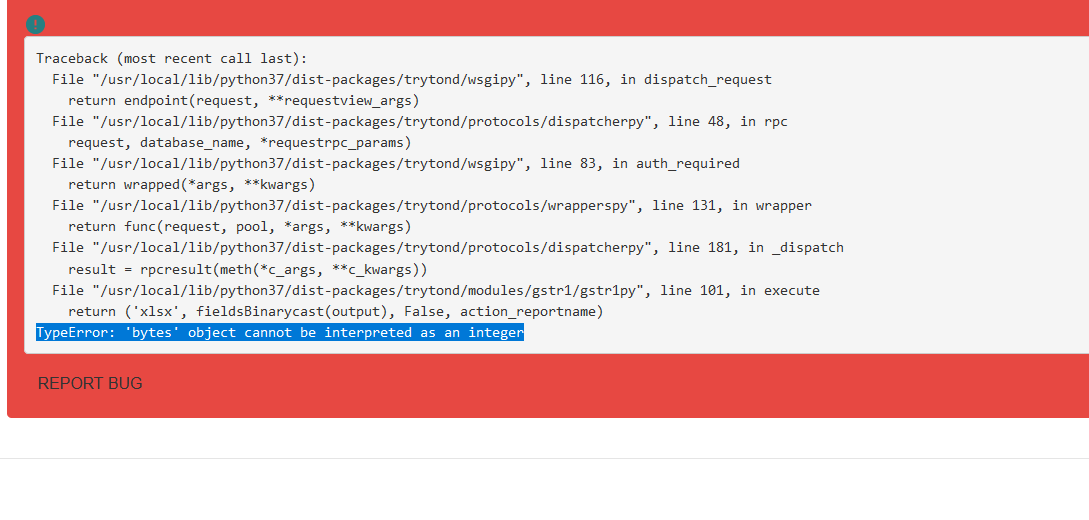
here is my code
```auto
class GSTR1EXCEL(Report):
__name__ = 'ir.model.gstr1'
@classmethod
def execute(cls, ids, data):
pool = Pool()
Model = pool.get('ir.model')
ActionReport = pool.get('ir.action.report')
action_report_ids = ActionReport.search([
('report_name', '=', cls. __name__ )
])
if not action_report_ids:
raise Exception('Error', 'Report (%s) not find!' % cls. __name__ )
action_report = ActionReport(action_report_ids[0])
models = Model.browse(ids)
output = io.BytesIO()
workbook = xlsxwriter.Workbook(output, {'in_memory': True})
worksheet = workbook.add_worksheet()
worksheet.write("A1","#")
worksheet.set_column('A:A', 2)
worksheet.write("B1","Invoice Number")
worksheet.set_column('B:B', 16)
worksheet.write("C1","Sales Data")
worksheet.set_column('C:C', 16)
worksheet.write("D1","Customer Name")
worksheet.set_column('D:D', 16)
worksheet.write("E1","GST Number")
worksheet.set_column('E:E', 16)
worksheet.write("F1","Rate")
worksheet.set_column('F:F', 16)
worksheet.write("G1","Discount Amount")
worksheet.set_column('G:G', 16)
worksheet.write("H1","GST")
worksheet.set_column('H:H', 16)
worksheet.write("I1","CGST")
worksheet.set_column('I:I', 16)
worksheet.write("J1","SGST")
worksheet.set_column('J:J', 16)
worksheet.write("K1","IGST")
worksheet.set_column('K:K', 16)
worksheet.write("L1","Round Off")
worksheet.set_column('L:L', 16)
worksheet.write("M1","Invoice Total")
worksheet.set_column('M:M', 16)
row = 1
col = 0
expenses = (
[1 ,"SL/2021/02/0001","19-04-2021","Micheal","TAX123456","220660",0,"GST 18%",19859.4,19859.4,0,0.2,260379],
[2 ,"SL/2021/02/0001","19-04-2021","Micheal","TAX123456","220660",0,"GST 18%",19859.4,19859.4,0,0.2,260379],
[3 ,"SL/2021/02/0001","19-04-2021","Micheal","TAX123456","220660",0,"GST 18%",19859.4,19859.4,0,0.2,260379],
[4 ,"SL/2021/02/0001","19-04-2021","Micheal","TAX123456","220660",0,"GST 18%",19859.4,19859.4,0,0.2,260379]
)
for i ,invoiceno,salesdate ,customer ,gstn,rate,discount,gst,cgst,sgst,igst,rof,invtot in (expenses):
worksheet.write(row, col, i)
worksheet.write(row, col + 1, invoiceno)
worksheet.write(row, col + 2, salesdate)
worksheet.write(row, col + 3, customer)
worksheet.write(row, col + 4, gstn)
worksheet.write(row, col + 5, rate)
worksheet.write(row, col + 6, discount)
worksheet.write(row, col + 7, gst)
worksheet.write(row, col + 8, cgst)
worksheet.write(row, col + 9, sgst)
worksheet.write(row, col + 10, igst)
worksheet.write(row, col + 11, rof)
worksheet.write(row, col + 12, invtot)
row += 1
workbook.close()
output.seek(0)
# output.close()
return ('xlsx', fields.Binary.cast(output), False, action_report.name)
```
---
### Author:  [@pokoli](https://discuss.tryton.org/u/pokoli)
#### Post date: [May 18, 2021, 6:21am UTC](https://discuss.tryton.org/t/excel-file-using-xlsx-writer/4218/2 "2021-05-18T06:21:44Z")
From the traceback the problem is that output is an Integer and can not be converted to bytes.
You should read the value from the stream to get its content. It should be fixed with the following line:
```auto
return ('xlsx', output.read(), False, action_report.name)
```
Having said that if you want to generate Excel files, you can use a ods template with relatorio, and set the extension to xlsx to convert the file to the expected format. Just take care of having libreoffice installed on the server to enable report conversion.
Hope it helps!
---
### Author:  [@system](https://discuss.tryton.org/u/system)
#### Post date: [June 22, 2021, 5:48pm UTC](https://discuss.tryton.org/t/excel-file-using-xlsx-writer/4218/4 "2021-06-22T17:48:25Z")
This topic was automatically closed 30 days after the last reply. New replies are no longer allowed.