# Decimal problem in version 7.0.7
**URL:** https://discuss.tryton.org/t/decimal-problem-in-version-7-0-7/7040
**Category:** User
**Created:** [March 1, 2024, 4:37pm UTC](https://discuss.tryton.org/t/decimal-problem-in-version-7-0-7/7040 "2024-03-01T16:37:11Z")
**Posts on this page:** 6
**Page:** 1
### Author:  [@dortizmunoz](https://discuss.tryton.org/u/dortizmunoz)
#### Post date: [March 1, 2024, 4:37pm UTC](https://discuss.tryton.org/t/decimal-problem-in-version-7-0-7/7040/1 "2024-03-01T16:37:11Z")
Hello, I have a problem that I don’t really know how to solve.
This happened some time ago and I don’t remember which version but it’s happening to me now.
In theory I have the latest version 7.0.7 installed, but it gives me the error:
“The number of digits in the value “‘12.670’” for field “Total Cache” in “4” of “Purchase” exceeds the limit of “2”.”
This comes up when validating, in my case, a purchase delivery note.
If you can guide me I would appreciate it.
Thank you
---
### Author:  [@ced](https://discuss.tryton.org/u/ced)
#### Post date: [March 1, 2024, 5:04pm UTC](https://discuss.tryton.org/t/decimal-problem-in-version-7-0-7/7040/2 "2024-03-01T17:04:50Z")
Since [Sepa payments rejected because of exagerated decimal values (#12587) · Issues · Tryton / Tryton · GitLab](https://bugs.tryton.org/issue12587) trailing zero are considered as an error.
I guess you have some value that are stored with too much trailing zero before the update to 7.0. You should find them and remove the trailing zeros.
---
### Author:  [@dortizmunoz](https://discuss.tryton.org/u/dortizmunoz)
#### Post date: [March 2, 2024, 2:50pm UTC](https://discuss.tryton.org/t/decimal-problem-in-version-7-0-7/7040/3 "2024-03-02T14:50:05Z")
Well it shouldn’t because it is not an update. It is a new empty installation.
I only have one article that I am doing the appropriate tests with.
It must be something else. I will continue investigating the tables.
---
### Author:  [@dortizmunoz](https://discuss.tryton.org/u/dortizmunoz)
#### Post date: [March 14, 2024, 3:16pm UTC](https://discuss.tryton.org/t/decimal-problem-in-version-7-0-7/7040/4 "2024-03-14T15:16:03Z")
I have installed the new version 7.0.8 and I have already been able to install the “account\_es” module.
But I still have the problem with decimals.
With a single item (€12.67 in my case) and making the first Purchase Invoice, I created the draft and when I passed it to the budget, the following error appears:
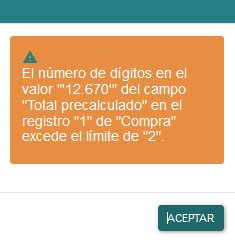
Does anyone have any idea what could be happening?
---
### Author:  [@dortizmunoz](https://discuss.tryton.org/u/dortizmunoz)
#### Post date: [March 18, 2024, 9:57am UTC](https://discuss.tryton.org/t/decimal-problem-in-version-7-0-7/7040/5 "2024-03-18T09:57:38Z")
I answer myself.
The problem was in the Third \> Accounting Tab \> Vendor Tax Rule.
He had assigned a VAT tax in there and that was the problem. When you remove it, everything works correctly. The calculation makes it correct.
---
### Author:  [@system](https://discuss.tryton.org/u/system)
#### Post date: [April 17, 2024, 9:57am UTC](https://discuss.tryton.org/t/decimal-problem-in-version-7-0-7/7040/6 "2024-04-17T09:57:47Z")
This topic was automatically closed 30 days after the last reply. New replies are no longer allowed.