# Cobas e 411 Machine Not Scanning Tryton-Generated Barcode
**URL:** https://discuss.tryton.org/t/cobas-e-411-machine-not-scanning-tryton-generated-barcode/8898
**Category:** Developer
**Created:** [October 16, 2025, 11:39am UTC](https://discuss.tryton.org/t/cobas-e-411-machine-not-scanning-tryton-generated-barcode/8898 "2025-10-16T11:39:49Z")
**Posts on this page:** 16
**Page:** 1
### Author:  [@shafi12](https://discuss.tryton.org/u/shafi12)
#### Post date: [October 16, 2025, 11:39am UTC](https://discuss.tryton.org/t/cobas-e-411-machine-not-scanning-tryton-generated-barcode/8898/1 "2025-10-16T11:39:49Z")
Hello everyone,
I’m facing a barcode compatibility issue with the **Cobas e 411 analyzer**. The barcode generated from Tryton is **not being detected** by the Cobas machine. However, the **same analyzer perfectly reads barcodes generated from another software** , so the issue seems to be with how the barcode is being generated/formatted in Tryton.
Below is the code currently used in my model to generate the barcode:
```auto
import barcode
from barcode.writer import SVGWriter
bar = fields.Function(fields.Binary(‘Bar Code39’), ‘make_barcode’)
def make_barcode(self, name):
labtest_id = self.name or ''
CODE39 = barcode.get_barcode_class('code128')
code39 = CODE39(labtest_id, writer=SVGWriter())
options = dict(font_size=10, module_height=15, module_width=0.20, quiet_zone=3, text_distance=1, format='BMP', dpi=400, center_text=True, write_text=False)
holder = io.BytesIO()
code39.write(holder, options)
code39_png = holder.getvalue()
holder.close()
return bytearray(code39_png)
```
1. The barcode is generated correctly and visible in Tryton reports.
2. The same **Cobas e 411** device successfully scans barcodes printed from **other software systems** , so the hardware is fine.
3. i have also share the snap of fodt img setting..
Thanks
---
### Author:  [@ced](https://discuss.tryton.org/u/ced)
#### Post date: [October 16, 2025, 1:55pm UTC](https://discuss.tryton.org/t/cobas-e-411-machine-not-scanning-tryton-generated-barcode/8898/2 "2025-10-16T13:55:06Z")
> [@shafi12](#):
>
> `CODE39 = barcode.get_barcode_class('code128')`
Why do not you use the `code39` as the name suggest?
---
### Author:  [@shafi12](https://discuss.tryton.org/u/shafi12)
#### Post date: [October 16, 2025, 3:43pm UTC](https://discuss.tryton.org/t/cobas-e-411-machine-not-scanning-tryton-generated-barcode/8898/3 "2025-10-16T15:43:36Z")
because our machine supports code128
---
### Author:  [@shafi12](https://discuss.tryton.org/u/shafi12)
#### Post date: [October 16, 2025, 6:24pm UTC](https://discuss.tryton.org/t/cobas-e-411-machine-not-scanning-tryton-generated-barcode/8898/4 "2025-10-16T18:24:31Z")
@ced @pokoli yours help needed!
---
### Author:  [@ced](https://discuss.tryton.org/u/ced)
#### Post date: [October 16, 2025, 8:08pm UTC](https://discuss.tryton.org/t/cobas-e-411-machine-not-scanning-tryton-generated-barcode/8898/5 "2025-10-16T20:08:04Z")
A possible issue is the (print) resolution of the image. Sometimes having fuzzy grey border prevents correct scanning.
---
### Author:  [@shafi12](https://discuss.tryton.org/u/shafi12)
#### Post date: [October 17, 2025, 4:52am UTC](https://discuss.tryton.org/t/cobas-e-411-machine-not-scanning-tryton-generated-barcode/8898/6 "2025-10-17T04:52:04Z")
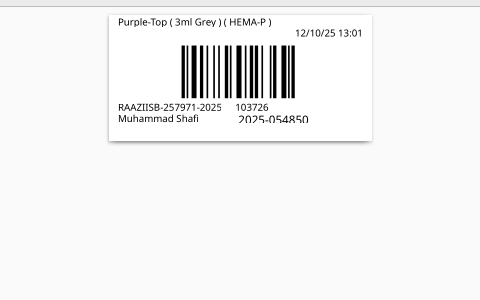
i think there is no issue in print resolution, because from the same printer we prints the other barcodes for other machines, which reads the barcode correctly, but the issue comes with the cobas e 411 machine, however the same cobas machine correctly scanning the barcode of another software. so i think we have increase barcode scanning efficiency, but how? you can also see the barcode snap
---
### Author:  [@ced](https://discuss.tryton.org/u/ced)
#### Post date: [October 17, 2025, 6:38am UTC](https://discuss.tryton.org/t/cobas-e-411-machine-not-scanning-tryton-generated-barcode/8898/7 "2025-10-17T06:38:58Z")
From what I see the resolution is not so great and the lines are blurred.
---
### Author:  [@shafi12](https://discuss.tryton.org/u/shafi12)
#### Post date: [October 17, 2025, 11:12am UTC](https://discuss.tryton.org/t/cobas-e-411-machine-not-scanning-tryton-generated-barcode/8898/8 "2025-10-17T11:12:52Z")
so what would be right solution?
---
### Author:  [@acaubet](https://discuss.tryton.org/u/acaubet)
#### Post date: [October 17, 2025, 12:14pm UTC](https://discuss.tryton.org/t/cobas-e-411-machine-not-scanning-tryton-generated-barcode/8898/9 "2025-10-17T12:14:38Z")
Another option you can try is to install [LibreBarcode](https://fonts.google.com/specimen/Libre+Barcode+128) and use that font on the LibreOffice report over the `record.name` you want to display as barcode.
---
### Author:  [@nicoe](https://discuss.tryton.org/u/nicoe)
#### Post date: [October 17, 2025, 12:23pm UTC](https://discuss.tryton.org/t/cobas-e-411-machine-not-scanning-tryton-generated-barcode/8898/10 "2025-10-17T12:23:18Z")
I tested with my phone (which is not at all a fancy phone with a top notch camera) and this application:
> **[Atharok / Barcode Scanner · GitLab](https://gitlab.com/Atharok/BarcodeScanner)**
>
> An open-source app that allows you to read and generate barcodes for Android.
And it worked with your image. I guess the issue is in the scanner.
---
### Author:  [@shafi12](https://discuss.tryton.org/u/shafi12)
#### Post date: [October 18, 2025, 5:24am UTC](https://discuss.tryton.org/t/cobas-e-411-machine-not-scanning-tryton-generated-barcode/8898/11 "2025-10-18T05:24:41Z")
if the problem is in the scanner, then why it scans the barcode of another software correctly?
---
### Author:  [@nicoe](https://discuss.tryton.org/u/nicoe)
#### Post date: [October 18, 2025, 8:34am UTC](https://discuss.tryton.org/t/cobas-e-411-machine-not-scanning-tryton-generated-barcode/8898/12 "2025-10-18T08:34:50Z")
With this kind of reasoning I could easily say:
If the problem is in the barcode, then why is it scanned by some other hardware?
I don’t know why your scanner doesn’t work with this code bar. All I know is that is works in our environment. And when I test your code bar it also works.
---
### Author:  [@lars\_wuerfel](https://discuss.tryton.org/u/lars_wuerfel)
#### Post date: [October 18, 2025, 9:57am UTC](https://discuss.tryton.org/t/cobas-e-411-machine-not-scanning-tryton-generated-barcode/8898/13 "2025-10-18T09:57:06Z")
The barcode reads fine, even from the screen, with a smartphone app.
There are 3 “types” of Code-128 barcodes, “A”, “B”, and “C”, which are used for different character sets.
The Barcode from your Screenshot is a “Type C” Barcode, which can express digits only, where two digits are kind of compressed to one character, which makes the code short.
Can you post a barcode which is printed from the other software, and which your reader is able to read?
Is there maybe a fine graned configuration option in your device, where you can limit Code-128 Barcode reading to Type A, B, or C?
---
### Author:  [@shafi12](https://discuss.tryton.org/u/shafi12)
#### Post date: [October 20, 2025, 5:16am UTC](https://discuss.tryton.org/t/cobas-e-411-machine-not-scanning-tryton-generated-barcode/8898/14 "2025-10-20T05:16:10Z")
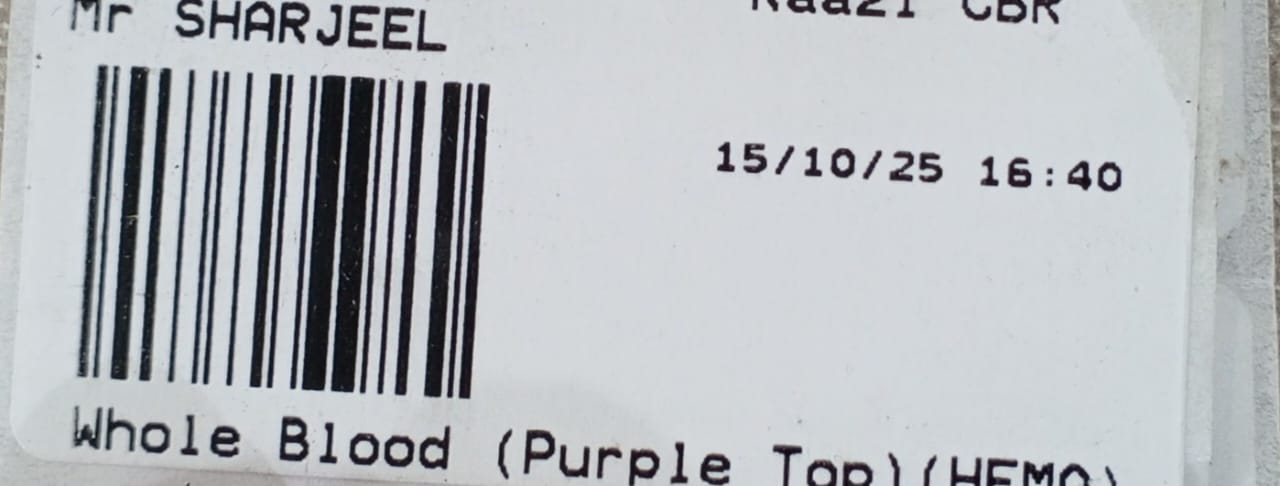
this is the other software barcode which scans correctly,
---
### Author:  [@lars\_wuerfel](https://discuss.tryton.org/u/lars_wuerfel)
#### Post date: [October 20, 2025, 8:37am UTC](https://discuss.tryton.org/t/cobas-e-411-machine-not-scanning-tryton-generated-barcode/8898/15 "2025-10-20T08:37:41Z")
Ok, this is also a “Type C” Code-128, so my assumption about disabled Type-C scanning was wrong.
Both codes, as far as I understand, are valid and readable.
The raw values of the first, non-functional code, are:
```auto
105 10 37 26 61 106
```
105 is the “Start Type-C” code
103726 is your code
61 is the checksum which is correct (1x10 + 2x37 + 3x26 + 105) mod 103 = 61
106 is the End code
The raw values of second, functional code, are:
```auto
105 41 35 94 86 106
```
413594 is your code, checksum 86 is correct.
Do you have the possibility to generate a barcode with the other software that represents the number “103726” which does not work when printed with Tryton?
Or is it possible to generate the number “413594” with your Tryton instance?
So that we can directly compare these two printouts. Sorry, I have no other idea, the code generated from Tryton seems really correct to me.
---
### Author:  [@edbo](https://discuss.tryton.org/u/edbo)
#### Post date: [October 20, 2025, 9:28am UTC](https://discuss.tryton.org/t/cobas-e-411-machine-not-scanning-tryton-generated-barcode/8898/16 "2025-10-20T09:28:38Z")
I think it is the camera hardware in the machine which hasn’t the quality of a smartphone camera. The contrast between the lines should be really hard, so no blurry lines. To test the barcode you can try:
1. directly save the barcode to disk as a image, not in a template. Then add the barcode by hand into a text document, print it and try to scan it. Make sure the barcode has the actual size you exported it.
2. try different export formats, the best is SVG or EPS or any other vector format which you can scale without any loss of quality
3. use a different barcode library. I myself use [Treepoem](https://pypi.org/project/treepoem/) but that’s because I need 2D-matrix barcodes.
4. Print a barcode with exactly the same code from Tryton as well as from the other software and lay them side by side and check the lines. This way you can tell if the lines kind of matches and your have the same amount of lines.