# Closing a warehouse
**URL:** https://discuss.tryton.org/t/closing-a-warehouse/4030
**Category:** User
**Tags:** stock
**Created:** [April 10, 2021, 8:31am UTC](https://discuss.tryton.org/t/closing-a-warehouse/4030 "2021-04-10T08:31:49Z")
**Posts on this page:** 6
**Page:** 1
### Author:  [@herrdeh](https://discuss.tryton.org/u/herrdeh)
#### Post date: [April 10, 2021, 8:31am UTC](https://discuss.tryton.org/t/closing-a-warehouse/4030/1 "2021-04-10T08:31:49Z")
Recently, I gave up a storage location. I transferrd all the contents (with a rented Mercedes station wagon loaded slightly beyond its limits, squeaking distressingly…), but now this needs to be done in Tryton as well.
How do I? - When trying to create an internal move, the “execute” button is grayed out when filling in the correct origin warehouse.
NB: Is there a chance not having to touch everey single item, but doing it somehow efficiently?
Cheers,
Wolf
---
### Author:  [@ced](https://discuss.tryton.org/u/ced)
#### Post date: [April 10, 2021, 9:55am UTC](https://discuss.tryton.org/t/closing-a-warehouse/4030/2 "2021-04-10T09:55:43Z")
You must empty all the locations of all the products using internal shipment. Then you will be allowed to inactivate the warehouse and its locations.
There is no wizard to create automatically such shipment. But indeed it is probably a good opportunity to record exactly what was moved out of it and check that the data are correct (a kind of last inventory).
---
### Author:  [@herrdeh](https://discuss.tryton.org/u/herrdeh)
#### Post date: [April 10, 2021, 5:59pm UTC](https://discuss.tryton.org/t/closing-a-warehouse/4030/3 "2021-04-10T17:59:32Z")
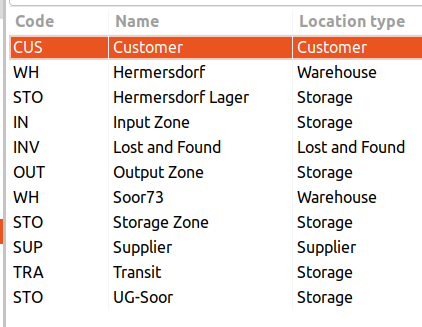
This is how my present warehouse setup looks like. When I try to create a move from a “storage” location, the “DO” button gets grayed out. Only “Supplier” and “transit” seem to be allowed.
What’s my mistake?
Cheers,
Wolf
---
### Author:  [@ced](https://discuss.tryton.org/u/ced)
#### Post date: [April 10, 2021, 6:46pm UTC](https://discuss.tryton.org/t/closing-a-warehouse/4030/4 "2021-04-10T18:46:10Z")
> [@herrdeh](#):
>
> What’s my mistake?
As I said you must use an internal shipment.
---
### Author:  [@herrdeh](https://discuss.tryton.org/u/herrdeh)
#### Post date: [April 13, 2021, 10:32am UTC](https://discuss.tryton.org/t/closing-a-warehouse/4030/5 "2021-04-13T10:32:52Z")
> [@ced](#):
>
> As I said you must use an internal shipment.
Ah. I thought to create an internal shipment, I need to create move(s) first. Thank you!
---
### Author:  [@system](https://discuss.tryton.org/u/system)
#### Post date: [May 13, 2021, 10:32am UTC](https://discuss.tryton.org/t/closing-a-warehouse/4030/6 "2021-05-13T10:32:56Z")
This topic was automatically closed 30 days after the last reply. New replies are no longer allowed.