# Can not sent drop shipment
**URL:** https://discuss.tryton.org/t/can-not-sent-drop-shipment/5462
**Category:** User
**Tags:** stock
**Created:** [August 10, 2022, 10:03am UTC](https://discuss.tryton.org/t/can-not-sent-drop-shipment/5462 "2022-08-10T10:03:39Z")
**Posts on this page:** 20
**Page:** 1
### Author:  [@herrdeh](https://discuss.tryton.org/u/herrdeh)
#### Post date: [August 10, 2022, 10:03am UTC](https://discuss.tryton.org/t/can-not-sent-drop-shipment/5462/1 "2022-08-10T10:03:39Z")
Allright. Did so. Now I successfully can hit the “wait” button, but when I click “send”, this occurs:
```auto
Traceback (most recent call last):
File "/trytond/wsgi.py", line 119, in dispatch_request
return endpoint(request, **request.view_args)
File "/trytond/protocols/dispatcher.py", line 46, in rpc
return methods.get(request.rpc_method, _dispatch)(
File "/trytond/wsgi.py", line 86, in auth_required
return wrapped(*args, **kwargs)
File "/trytond/protocols/wrappers.py", line 161, in wrapper
return func(request, pool, *args, **kwargs)
File "/trytond/protocols/dispatcher.py", line 181, in _dispatch
result = rpc.result(meth(*c_args, **c_kwargs))
File "/trytond/model/modelview.py", line 707, in wrapper
return func(cls, records, *args, **kwargs)
File "/trytond/model/workflow.py", line 37, in wrapper
result = func(cls, filtered, *args, **kwargs)
File "/trytond/modules/sale/stock.py", line 25, in wrapper
func(cls, shipments)
File "/trytond/modules/purchase/stock.py", line 28, in wrapper
func(cls, shipments)
File "/trytond/modules/sale_supply_drop_shipment/stock.py", line 600, in ship
Move.do([m for s in shipments for m in s.supplier_moves])
File "/trytond/model/modelview.py", line 707, in wrapper
return func(cls, records, *args, **kwargs)
File "/trytond/model/workflow.py", line 37, in wrapper
result = func(cls, filtered, *args, **kwargs)
File "/trytond/modules/stock_consignment/stock.py", line 82, in wrapper
return func(cls, moves)
File "/trytond/modules/stock_consignment/stock.py", line 279, in do
super(Move, cls).do(moves)
File "/trytond/model/modelview.py", line 707, in wrapper
return func(cls, records, *args, **kwargs)
File "/trytond/model/workflow.py", line 37, in wrapper
result = func(cls, filtered, *args, **kwargs)
File "/trytond/modules/purchase/stock.py", line 153, in wrapper
func(cls, moves)
File "/trytond/modules/purchase/stock.py", line 249, in do
super().do(moves)
File "/trytond/model/modelview.py", line 707, in wrapper
return func(cls, records, *args, **kwargs)
File "/trytond/model/workflow.py", line 37, in wrapper
result = func(cls, filtered, *args, **kwargs)
File "/trytond/modules/account_invoice_stock/stock.py", line 81, in do
super().do(moves)
File "/trytond/model/modelview.py", line 707, in wrapper
return func(cls, records, *args, **kwargs)
File "/trytond/model/workflow.py", line 37, in wrapper
result = func(cls, filtered, *args, **kwargs)
File "/trytond/modules/account_stock_continental/stock.py", line 171, in do
account_move = move._get_account_stock_move()
File "/trytond/modules/account_stock_continental/stock.py", line 139, in _get_account_stock_move
account_move_lines = self._get_account_stock_move_lines(type_)
File "/trytond/modules/account_stock_continental/stock.py", line 34, in _get_account_stock_move_lines
Decimal(str(self.quantity)) * unit_price)
TypeError: unsupported operand type(s) for *: 'decimal.Decimal' and 'NoneType'
Fault: unsupported operand type(s) for *: 'decimal.Decimal' and 'NoneType'
```
What should I do?
Wolf
---
### Author:  [@ced](https://discuss.tryton.org/u/ced)
#### Post date: [August 10, 2022, 10:16am UTC](https://discuss.tryton.org/t/can-not-sent-drop-shipment/5462/2 "2022-08-10T10:16:15Z")
You seem to not have the required unit price on the supplier move.
---
### Author:  [@herrdeh](https://discuss.tryton.org/u/herrdeh)
#### Post date: [August 10, 2022, 10:31am UTC](https://discuss.tryton.org/t/can-not-sent-drop-shipment/5462/3 "2022-08-10T10:31:15Z")
Hm.
I created a purchase, there the unit price is set. And in “move of articles from supplier” and “move of items to customer” in drop shipment, it’s set as well. Where else do I need it?
---
### Author:  [@herrdeh](https://discuss.tryton.org/u/herrdeh)
#### Post date: [August 18, 2022, 7:21am UTC](https://discuss.tryton.org/t/can-not-sent-drop-shipment/5462/4 "2022-08-18T07:21:45Z")
Should I file an issue on this?
---
### Author:  [@ced](https://discuss.tryton.org/u/ced)
#### Post date: [August 18, 2022, 7:57am UTC](https://discuss.tryton.org/t/can-not-sent-drop-shipment/5462/5 "2022-08-18T07:57:55Z")
Yes but please explain in detail how you end up with a supplier move without a cost price.
---
### Author:  [@herrdeh](https://discuss.tryton.org/u/herrdeh)
#### Post date: [August 19, 2022, 6:49am UTC](https://discuss.tryton.org/t/can-not-sent-drop-shipment/5462/6 "2022-08-19T06:49:39Z")
> **[drop shipment: cannot send (#11654) · Issues · Tryton / Tryton · GitLab](https://foss.heptapod.net/tryton/tryton/-/issues/11654)**
>
> https://discuss.tryton.org/t/can-not-sent-drop-shipment/5462 Procedure: created a sale created a drop shipment:
---
### Author:  [@herrdeh](https://discuss.tryton.org/u/herrdeh)
#### Post date: [September 8, 2022, 3:24pm UTC](https://discuss.tryton.org/t/can-not-sent-drop-shipment/5462/7 "2022-09-08T15:24:01Z")
Not sure, but I guess the bug mentioned about has been fixed. Thank you!
But now I recognize that I do not understand the workflow. My guess was:
1. create a sale
2. flnalize it - but create a drop shipment instead of a normal delivery
3. finalize the drop shipment
But I could not find out how to execute step 2. I could not choose “drop shipment” from “warehouse”. Sorry, I’m afraid I need some advice here; even the combined force of fellow @rmartin and my humble self could not crack that nut.
Cheers,
Wolf
---
### Author:  [@herrdeh](https://discuss.tryton.org/u/herrdeh)
#### Post date: [September 14, 2022, 10:19am UTC](https://discuss.tryton.org/t/can-not-sent-drop-shipment/5462/8 "2022-09-14T10:19:35Z")
More trial-and-error… ):
- Created a sale with two items
- created a shipment with one item, finalized it
- created a drop shipment for the 2nd item, finalized it, such it looks:
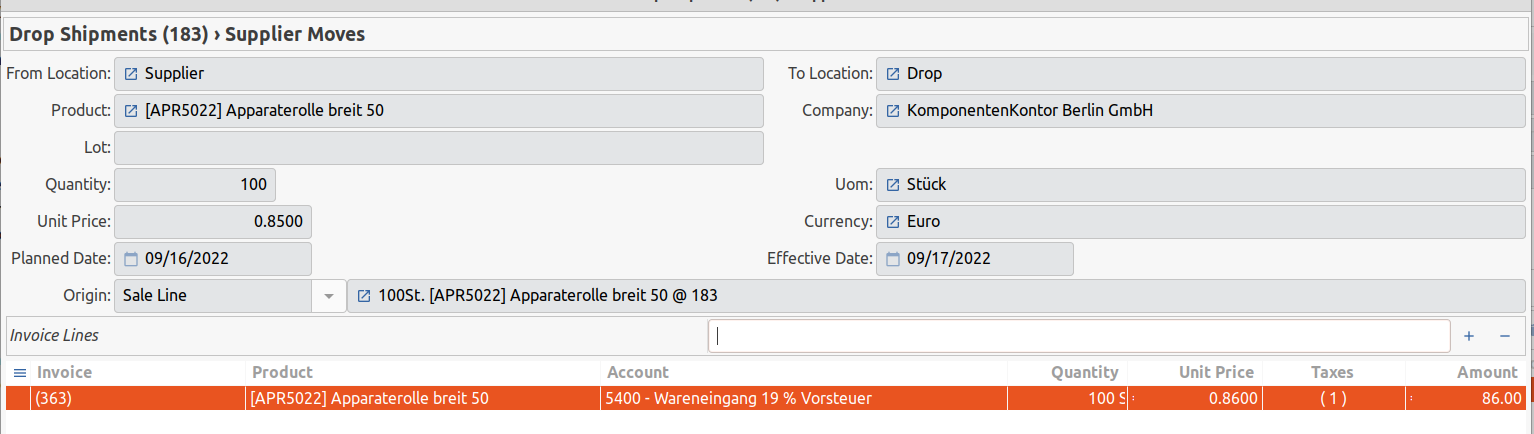
But in sales \> shipment the 2nd item still is marked as “waiting”. Do I need to cancel it manually?
---
### Author:  [@ced](https://discuss.tryton.org/u/ced)
#### Post date: [September 14, 2022, 10:59am UTC](https://discuss.tryton.org/t/can-not-sent-drop-shipment/5462/9 "2022-09-14T10:59:24Z")
> [@herrdeh](#):
>
> created a shipment with one item, finalized it
You should not create shipment, it is the sale that must do it.
> [@herrdeh](#):
>
> created a drop shipment for the 2nd item
Idem.
> [@herrdeh](#):
>
> But in sales \> shipment the 2nd item still is marked as “waiting”
I do not understand what this means.
Anyway I can not see how you could do drop shipment in your scenario if you do not convert the purchase requests into purchases.
See [Sale Supply Module — Tryton module for sale supply](https://docs.tryton.org/projects/modules-sale-supply/en/latest/)
and [Sale Supply Drop Shipment Model — Tryton module for sale supply drop shipment](https://docs.tryton.org/projects/modules-sale-supply-drop-shipment/en/latest/)
---
### Author:  [@herrdeh](https://discuss.tryton.org/u/herrdeh)
#### Post date: [September 15, 2022, 11:27am UTC](https://discuss.tryton.org/t/can-not-sent-drop-shipment/5462/10 "2022-09-15T11:27:57Z")
Tricky.
The process seems to work better (or only that way) when I start with a _purchase_ instead of a _sale_.
Doing so, I can follow the process, but at the end, no customer invoice (my customer, paying to me) is created. Purchaser invoice is.
Does this module not create the customer invoice - or did I miss a step or made another mistake?
Cheers,
Wolf
---
### Author:  [@ced](https://discuss.tryton.org/u/ced)
#### Post date: [September 15, 2022, 11:31am UTC](https://discuss.tryton.org/t/can-not-sent-drop-shipment/5462/11 "2022-09-15T11:31:00Z")
> [@herrdeh](#):
>
> Does this module not create the customer invoice - or did I miss a step or made another mistake?
No if you do not start from a sale.
---
### Author:  [@herrdeh](https://discuss.tryton.org/u/herrdeh)
#### Post date: [September 15, 2022, 3:27pm UTC](https://discuss.tryton.org/t/can-not-sent-drop-shipment/5462/12 "2022-09-15T15:27:59Z")
Hm.
I regret having to say that I’ll give in now. After more than 10 hrs of tinkering and kindly granted support of my fellow friend @rmartin I could not find out how to run this module.
Sad.
W
---
### Author:  [@ced](https://discuss.tryton.org/u/ced)
#### Post date: [September 16, 2022, 7:49am UTC](https://discuss.tryton.org/t/can-not-sent-drop-shipment/5462/13 "2022-09-16T07:49:48Z")
Sorry to hear that but for me the main blocker to help you is that we do not have a precise description of what you are doing (from the beginning). Mainly we just see random post about being block here and there (each from different usage/scenario).
---
### Author:  [@herrdeh](https://discuss.tryton.org/u/herrdeh)
#### Post date: [September 16, 2022, 9:22am UTC](https://discuss.tryton.org/t/can-not-sent-drop-shipment/5462/14 "2022-09-16T09:22:38Z")
Thank you very much for your care and your commitment, I deeply appreciate this.
My problem is that I do not really know what to do, documentation does not tell that. So I tried numerous variants, hoping that one would be successful some day.
My task, I think is a very vanilla one: Place an order of two articles at a supplier, deliver one article to my own warehouse, deliver half of the other article to a customer and half to my warehouse. (I tried to describe that under #7 and #8). My guess is that this
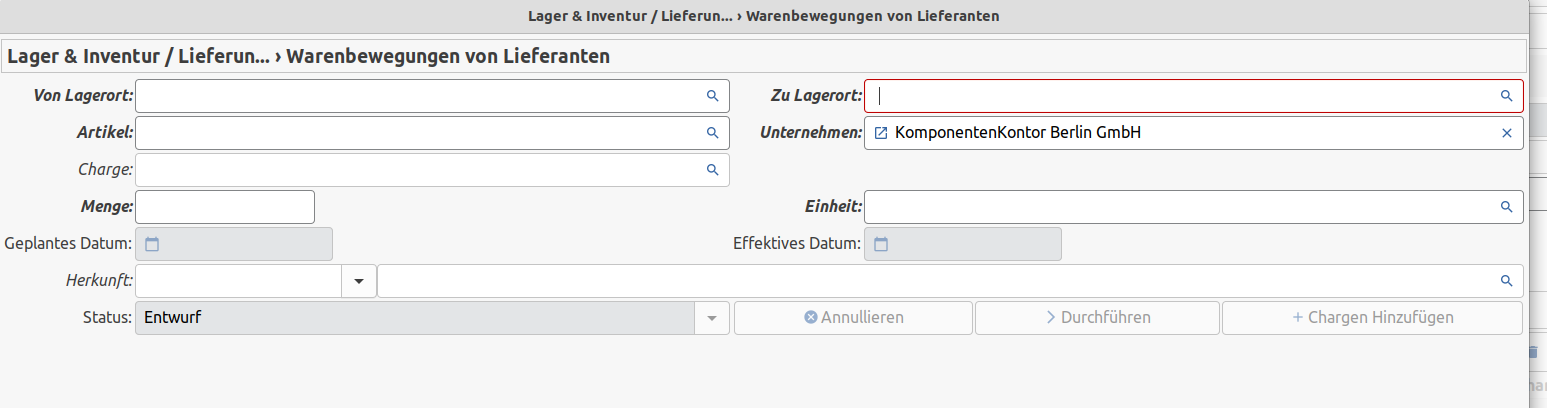
window is the main problem, because it’s not clear to me which entries are required.
So I think I rather do not need a particular solution for a very special problem, but very basic instructions to handle the task.
Cheers,
Wolf
---
### Author:  [@ced](https://discuss.tryton.org/u/ced)
#### Post date: [September 16, 2022, 9:52am UTC](https://discuss.tryton.org/t/can-not-sent-drop-shipment/5462/15 "2022-09-16T09:52:30Z")
> [@herrdeh](#):
>
> Place an order of two articles at a supplier, deliver one article to my own warehouse, deliver half of the other article to a customer and half to my warehouse.
This is not supported, you must have two purchase order.
> [@herrdeh](#):
>
> My guess is that this
>
> 
>
> window is the main problem, because it’s not clear to me which entries are required.
I do not know what screen this is because I do not speak German.
> [@herrdeh](#):
>
> So I think I rather do not need a particular solution for a very special problem, but very basic instructions to handle the task.
The drop shipment is working only from a sale order on which some products sold are configured (for the best supplier) has supporting drop shipment.
When such order are confirmed, they create [purchase requests](https://docs.tryton.org/projects/modules-purchase-request/en/latest/) for each product which must be converted into purchase orders (which will have a customer (read-only) field filled.
The important thing is that as soon has there is a problem in the supply chain (missing quantity, order cancelled etc.), the sale order will fallback to the standard workflow by creating a customer shipment.
---
### Author:  [@herrdeh](https://discuss.tryton.org/u/herrdeh)
#### Post date: [September 24, 2022, 5:43am UTC](https://discuss.tryton.org/t/can-not-sent-drop-shipment/5462/16 "2022-09-24T05:43:53Z")
Had a nice talk with fellows @jgras and Frederik J. In the end we agreed that all of us do not really understand how this module is supposed to work, and we believe it lacks essential features. So, here comes a suggestion of what I’d regard as crucial - certainly this is incomplete, maybe it’s too ambitious. Just my 2cts.
I think we need both:
- create drop shipment from a purchase, to be obtained from various suppliers, and
- create drop shipment from an order, to be delivered to various customers.
## Processing via purchase:
Business case is products to be delivered from one supplier to various customers - e.g. in a collective order to acquire a quantity discount.
With the module installed, the user should be able to decide at any product he adds to the purchase, whether this product comes from his own warehouse or from a drop shipment. Such, the process could look as follows:
User actions:
- Create a purchase
- add a product to list
- at the product window, we need a checkbox “drop shipment”:
- if ticked, fields “customer”, “quantity”, “price” (possibly others) are displayed
- multiple customer lines can be added (blue “+” on white background)
- **or:** the article must be created several times, each with a different customer.
- articles marked as “drop shipment” are collected under the “drop shipment” tab, reception can be confirmed there
- customer invoices drafts and purchase invoice drafts are created, such as incoming delivery draft(s) for those items which go to user’s own warehouse.
## Processing via sale:
The same - mirror-inverted - should be possible with a sale. Business case could be a customer, who is supplied by various sources, because my own warehouse does not have enough in stock to satisfy this demand, I do not have the capacity to store big amounts, drop shipment is faster etc.
Both cases frequently occur even in my really small business.
Fellow friends @rmartin and Frederik J. do have a (AFAIK much more) sophisticated drop ship module, AKAIK they’ll be happy to provide it as a blueprint.
Sorry. Wolf
---
### Author:  [@pokoli](https://discuss.tryton.org/u/pokoli)
#### Post date: [September 24, 2022, 1:30pm UTC](https://discuss.tryton.org/t/can-not-sent-drop-shipment/5462/17 "2022-09-24T13:30:37Z")
> [@herrdeh](#):
>
> Business case is products to be delivered from one supplier to various customers - e.g. in a collective order to acquire a quantity discount.
This is not drop shipment but `stock_supply`
Drop shipment is when the supplier delivers directly to the customer without sending the goods to the company warehouse
> [@herrdeh](#):
>
> , the user should be able to decide at any product he adds to the purchase, whether this product comes from his own warehouse or from a drop shipment
This is defined at product level. So for each product you have a static configuration for all sale orders.
This is managed by the `supply_on_sale` and `drop_shipment` checkboxes under the customer tab in products. Note that you must check the first to see the later.
When both are set, whenever a sale order is confirmed containing the product a purchse request linked to both supplier and customer will be created by the system. Such purchase requests should be used to create the supplier purchase.
HIH
---
### Author:  [@ced](https://discuss.tryton.org/u/ced)
#### Post date: [September 25, 2022, 6:26am UTC](https://discuss.tryton.org/t/can-not-sent-drop-shipment/5462/18 "2022-09-25T06:26:27Z")
> [@pokoli](#):
>
> This is managed by the `supply_on_sale` and `drop_shipment` checkboxes under the customer tab in products.
As far as I see they mainly want to be able to configure that on the sale order instead of having static configuration on the product.
I have always been reluctant to have this in standard because for me it is not the job of the salesmen to decide about the supply. But it is quite easy to implement it in custom module (we already did) to add a fields on the sale line to customize the `supply_on_sale` and `get_purchase_request`.
But I think what could be implemented would be the possibility at the purchase request to change it (if it has a sale has origin) into a drop shipment request by filling the customer and delivery address. Such wizard should take care of updating the stock move of the sale to become a drop move. I think this new feature could be in standard module because it is the right level (the purchaser) to overrule the default behavior.
> [@herrdeh](#):
>
> create drop shipment from a purchase
For me this is clearly a bad workflow. The salesmen have nothing to do with the purchases.
Also if such purchase can not be fulfilled by the supplier there will be no trace anymore of what was requested by the customer. We always need a sale order to record what a customer requested.
> [@herrdeh](#):
>
> Business case is products to be delivered from one supplier to various customers
I would not be against such feature if someone proposed it. But it should still provide the simpler design which is one purchase order per customer by default. Also once the customer and delivery address are on the purchase line, they must be grouped in the same drop shipment.
Indeed I’m wondering if it will be simpler to group purchase orders for the same supplier under a single printed document/reference.
---
### Author:  [@herrdeh](https://discuss.tryton.org/u/herrdeh)
#### Post date: [September 27, 2022, 10:48am UTC](https://discuss.tryton.org/t/can-not-sent-drop-shipment/5462/19 "2022-09-27T10:48:54Z")
> [@ced](#):
>
> As far as I see they mainly want to be able to configure that on the sale order instead of having static configuration on the product.
To me, this is essential. Sourcing is such a complex thing, I would never leave it to an algorithm, not even the most sophisticated one. And things are getting worse with supply chains getting more fragile these days.
> [@ced](#):
>
> t is not the job of the salesmen to decide about the supply.
> [@ced](#):
>
> For me this is clearly a bad workflow. The salesmen have nothing to do with the purchases.
This may be the case in a big company. In far most companies ([see: Where is Tryton’s largest potential of customers?](https://discuss.tryton.org/t/where-is-trytons-largest-potential-of-customers/5566)), all of them are one person - or at least sitting in the same office and will discuss how to do best sourcing at a given moment.
---
### Author:  [@herrdeh](https://discuss.tryton.org/u/herrdeh)
#### Post date: [November 26, 2022, 5:51am UTC](https://discuss.tryton.org/t/can-not-sent-drop-shipment/5462/20 "2022-11-26T05:51:56Z")
Had another intense talk with fellow friend @udono on this - but even this Grand Master could not make it work.
We simplified use case as far as possible, just one product going from one supplier to one customer. Product is marked as salable, purchaseable, supply on sale; supplier is marked as “drop shipment”. Stock is lower than amount to be sold.
We create a sale - but when confirmed, a “ordinary” shipment is created, not a drop shipment. How can I tell Tryton to create a drop shipment? - I think, there must be some kind of control (“drop shipment instead of shipment to own warehouse”) to achieve this, but we could not find such.
Cheers,
Wolf
[Next page](https://discuss.tryton.org/t/can-not-sent-drop-shipment/5462.md?page=2)