# Automatic currency rate update set to 0
**URL:** https://discuss.tryton.org/t/automatic-currency-rate-update-set-to-0/5229
**Category:** User
**Created:** [May 3, 2022, 8:42am UTC](https://discuss.tryton.org/t/automatic-currency-rate-update-set-to-0/5229 "2022-05-03T08:42:28Z")
**Posts on this page:** 18
**Page:** 1
### Author:  [@herrdeh](https://discuss.tryton.org/u/herrdeh)
#### Post date: [May 3, 2022, 8:42am UTC](https://discuss.tryton.org/t/automatic-currency-rate-update-set-to-0/5229/1 "2022-05-03T08:42:28Z")
Happened to find the “trytond\_import\_currencies” script, and the exchange rate feature.
Nice indeed. My crons are doing their job, but what I get for all currencies is a rate of “0,000000”. Do I need more setup to make it work?
---
### Author:  [@pokoli](https://discuss.tryton.org/u/pokoli)
#### Post date: [May 3, 2022, 9:51am UTC](https://discuss.tryton.org/t/automatic-currency-rate-update-set-to-0/5229/2 "2022-05-03T09:51:39Z")
I guess you are missing some base currency or you have something not properly configured.
Could you share how did you configured the update?
---
### Author:  [@herrdeh](https://discuss.tryton.org/u/herrdeh)
#### Post date: [May 3, 2022, 10:44am UTC](https://discuss.tryton.org/t/automatic-currency-rate-update-set-to-0/5229/3 "2022-05-03T10:44:08Z")
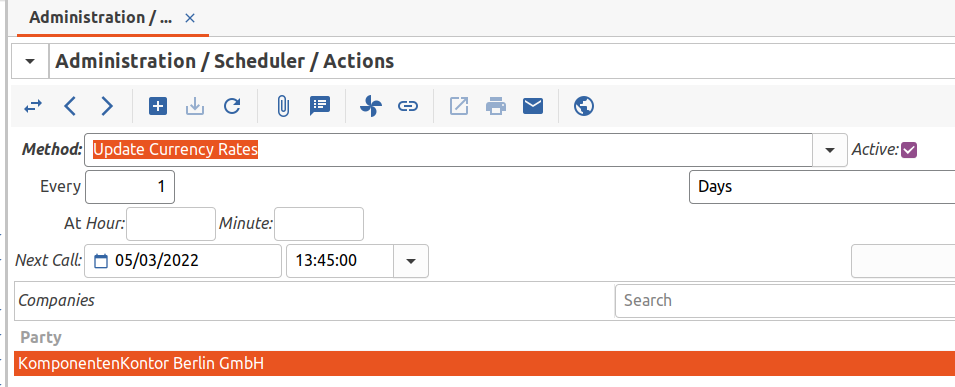
Hm. I didnt do anything special. Here you see what I counfigured in “scheduler \> actions” and “currencies”. Euro’s rate is set to “1”.
Would I need more?

---
### Author:  [@ced](https://discuss.tryton.org/u/ced)
#### Post date: [May 3, 2022, 11:55am UTC](https://discuss.tryton.org/t/automatic-currency-rate-update-set-to-0/5229/4 "2022-05-03T11:55:55Z")
You must configure a [Schedule Rate Updates](https://docs.tryton.org/projects/modules-currency/en/latest/design.html#scheduled-rate-updates).
---
### Author:  [@herrdeh](https://discuss.tryton.org/u/herrdeh)
#### Post date: [May 4, 2022, 6:52am UTC](https://discuss.tryton.org/t/automatic-currency-rate-update-set-to-0/5229/5 "2022-05-04T06:52:40Z")
I thought that’s what is displayed in 2nd screenshot above?
---
### Author:  [@ced](https://discuss.tryton.org/u/ced)
#### Post date: [May 4, 2022, 6:58am UTC](https://discuss.tryton.org/t/automatic-currency-rate-update-set-to-0/5229/6 "2022-05-04T06:58:29Z")
This is the general task but you have to configure the schedule for each source etc.
---
### Author:  [@edbo](https://discuss.tryton.org/u/edbo)
#### Post date: [May 4, 2022, 9:21am UTC](https://discuss.tryton.org/t/automatic-currency-rate-update-set-to-0/5229/7 "2022-05-04T09:21:25Z")
I think you missed the `Currencies -> Scheduled Rate Updates` menu. There you have to create the data to update a currency. You select a source where to download the rates how often and for which currency. Then you add the different currencies you want the rates for.
Running the scheduled task will then take that information and updates your currency rates.
---
### Author:  [@herrdeh](https://discuss.tryton.org/u/herrdeh)
#### Post date: [May 4, 2022, 3:30pm UTC](https://discuss.tryton.org/t/automatic-currency-rate-update-set-to-0/5229/8 "2022-05-04T15:30:53Z")
Please apologize - I still do not understand. I could neither find a
`Currencies > Currencies > Scheduled Rate Updates` menu nor a
`Currencies > Scheduled Rate Updates` menu
Do I need another module - or is it advanced blindness…?
---
### Author:  [@edbo](https://discuss.tryton.org/u/edbo)
#### Post date: [May 4, 2022, 5:53pm UTC](https://discuss.tryton.org/t/automatic-currency-rate-update-set-to-0/5229/9 "2022-05-04T17:53:57Z")
> [@herrdeh](#):
>
> Do I need another module - or is it advanced blindness…?
It depends 😉 To me it seems you have the `Currency` module installed otherwise you didn’t have the option in the task scheduler. But I think you are logged in as a ‘normal’ user, but that user is not in the `Currency Administration` group. I checked on the demo server and indeed the default `demo_XX` users are not in the `Currency Administration` group and then you don’t see the `Currency` menu.
---
### Author:  [@herrdeh](https://discuss.tryton.org/u/herrdeh)
#### Post date: [May 4, 2022, 7:10pm UTC](https://discuss.tryton.org/t/automatic-currency-rate-update-set-to-0/5229/10 "2022-05-04T19:10:40Z")
Well, I am “admin”, and admin has got access permission to `currency administration`. So there may be another reason.
---
### Author:  [@edbo](https://discuss.tryton.org/u/edbo)
#### Post date: [May 4, 2022, 8:06pm UTC](https://discuss.tryton.org/t/automatic-currency-rate-update-set-to-0/5229/11 "2022-05-04T20:06:53Z")
Hmm, weird, you are `admin` and you are in the `Currency Administration` group and you don’t see `Currency` in the `main menu` at the side?
---
### Author:  [@herrdeh](https://discuss.tryton.org/u/herrdeh)
#### Post date: [May 5, 2022, 10:26am UTC](https://discuss.tryton.org/t/automatic-currency-rate-update-set-to-0/5229/12 "2022-05-05T10:26:35Z")
Thanks for your patience. This is how the menu looks like:
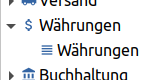
“Währungen” translates to “currencies”.
---
### Author:  [@edbo](https://discuss.tryton.org/u/edbo)
#### Post date: [May 5, 2022, 8:30pm UTC](https://discuss.tryton.org/t/automatic-currency-rate-update-set-to-0/5229/13 "2022-05-05T20:30:06Z")
I just logged in into the [demo6.4.tryton.org](http://demo6.4.tryton.org) as admin and added the German user `demo_de` to the `Currency Administration` group. Then I logged out and logged in as `demo_de` and I see this.
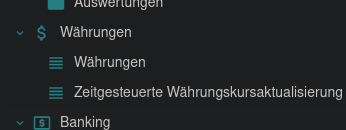
So there is something wrong with your installation. On what version are you and what happens when you switch to ‘English’ language? Did you somehow manage to add an `access right` 😉 ?
---
### Author:  [@herrdeh](https://discuss.tryton.org/u/herrdeh)
#### Post date: [May 8, 2022, 9:13am UTC](https://discuss.tryton.org/t/automatic-currency-rate-update-set-to-0/5229/14 "2022-05-08T09:13:10Z")
Well, I’m von v6.0. Not change when I switch to English.
These are permissions of admin (=me):
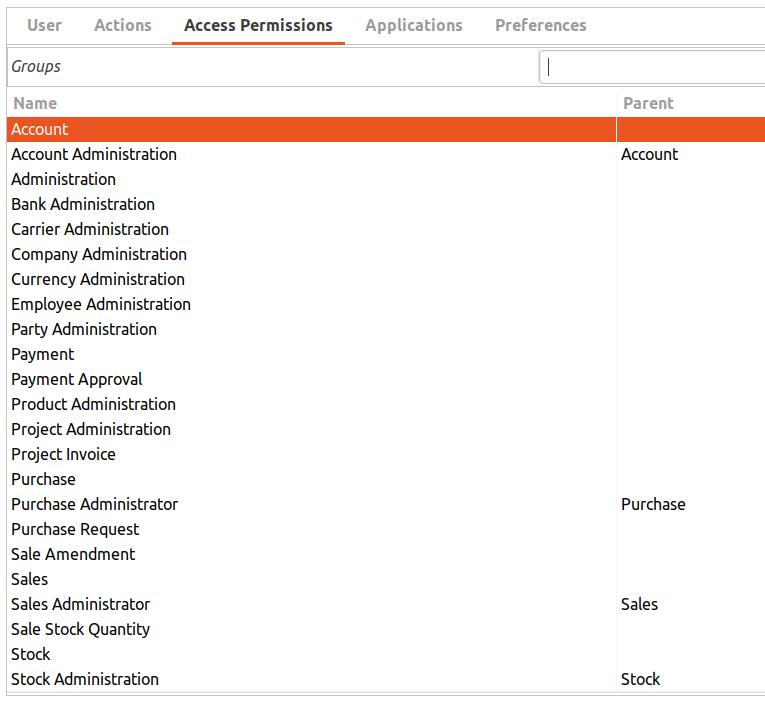

I’m not aware of having changed anything there - but I cannot be 100% certain.
---
### Author:  [@edbo](https://discuss.tryton.org/u/edbo)
#### Post date: [May 9, 2022, 10:13am UTC](https://discuss.tryton.org/t/automatic-currency-rate-update-set-to-0/5229/15 "2022-05-09T10:13:54Z")
What happens when you do a database update for the currency module?
```bash
trytond-admin -c -d --update=currency -vv
```
It seems that the rate scheduler is introduced in version 6.0. Also check the version of your currency module.
---
### Author:  [@herrdeh](https://discuss.tryton.org/u/herrdeh)
#### Post date: [May 9, 2022, 10:43am UTC](https://discuss.tryton.org/t/automatic-currency-rate-update-set-to-0/5229/16 "2022-05-09T10:43:02Z")
Currency module is v6.0.1
This is the output of the command you requested:
[Logfile](https://nextcloud.rollentausch.eu/index.php/s/LZLXGZSniNRzw4B)
---
### Author:  [@edbo](https://discuss.tryton.org/u/edbo)
#### Post date: [May 9, 2022, 12:18pm UTC](https://discuss.tryton.org/t/automatic-currency-rate-update-set-to-0/5229/17 "2022-05-09T12:18:25Z")
Do you mind to create a new empty database, initialize it and install the currency module and see if the menu item appears?
---
### Author:  [@edbo](https://discuss.tryton.org/u/edbo)
#### Post date: [May 9, 2022, 12:25pm UTC](https://discuss.tryton.org/t/automatic-currency-rate-update-set-to-0/5229/18 "2022-05-09T12:25:07Z")
There is nothing which could case the issue. Can you compare your `Currency Administration` group with the one on [demo6.0.tryton.org](https://demo6.0.tryton.org/#demo6.0/model/res.group/2;name=%22Administration%20%2F%20Users%20%2F%20Groups%22&views=%5B102%2C103%5D)?
Mostly the tab `Access permissions`, check these.
Also do you have custom modules installed? Not the Tryton ones, but from other parties. If so, check these also because it can be possible that there is a group who toke the menu so it will not be shown when not in that group.