# Articles in stock figures
**URL:** https://discuss.tryton.org/t/articles-in-stock-figures/2732
**Category:** User
**Created:** [May 18, 2020, 3:03pm UTC](https://discuss.tryton.org/t/articles-in-stock-figures/2732 "2020-05-18T15:03:38Z")
**Posts on this page:** 3
**Page:** 1
### Author:  [@herrdeh](https://discuss.tryton.org/u/herrdeh)
#### Post date: [May 18, 2020, 3:03pm UTC](https://discuss.tryton.org/t/articles-in-stock-figures/2732/1 "2020-05-18T15:03:38Z")
Sorry, I’m still stuck with the very stupid questions.
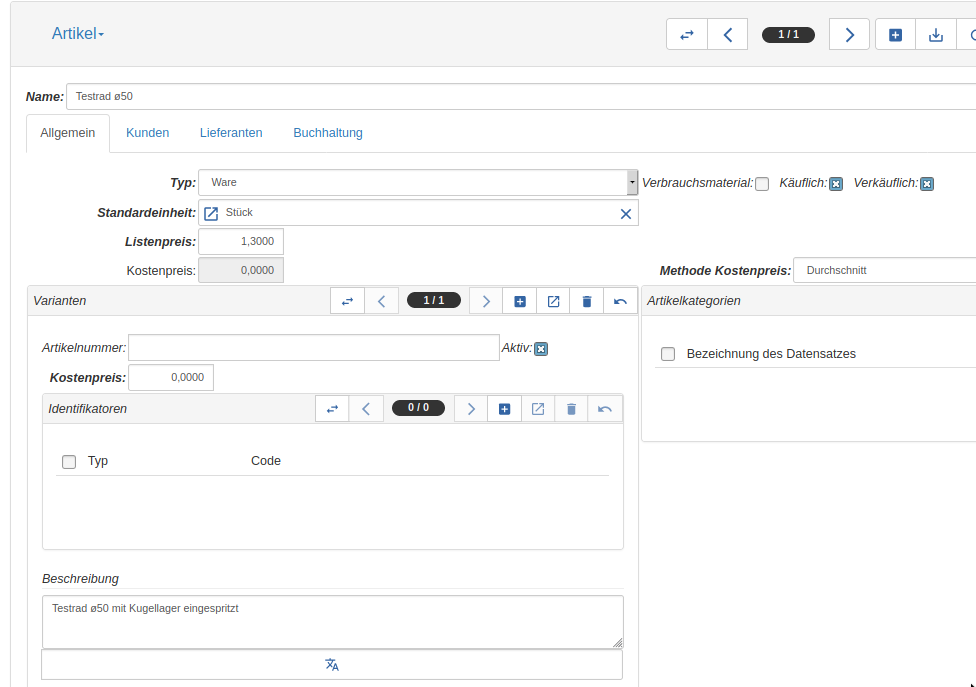
When creating an article, I need to save some figures about it - number of articles in stock, desired stock, limit with warning etc. I could nowhere in the “articles” window anything about that - and not elsewhere. Where do I have to look? - My “articles” window looks like this:
---
### Author:  [@jeromarquez](https://discuss.tryton.org/u/jeromarquez)
#### Post date: [May 18, 2020, 4:21pm UTC](https://discuss.tryton.org/t/articles-in-stock-figures/2732/2 "2020-05-18T16:21:42Z")
In Varianten window, select the article you want, go to “Ralated records” (chain icon) and there you have two options to see the Quantity info. You must consider that Tryton has multiples locations so talking about “Stock” as a unique number it’s a little bit difficult.
Cheers!
---
### Author:  [@pokoli](https://discuss.tryton.org/u/pokoli)
#### Post date: [May 18, 2020, 4:36pm UTC](https://discuss.tryton.org/t/articles-in-stock-figures/2732/3 "2020-05-18T16:36:03Z")
> [@herrdeh](#):
>
> desired stock
For desired stock you should create and order point with the minum and target quantity.
> [@herrdeh](#):
>
> limit with warning
There is no limit warning, tryton manages the forecast quantity and with this quantities generates the required orders to fill all the orders in the system.