# Activating Account module got "Error \[0\]"
**URL:** https://discuss.tryton.org/t/activating-account-module-got-error-0/7784
**Category:** System Administrator
**Tags:** accounting
**Created:** [September 2, 2024, 6:17pm UTC](https://discuss.tryton.org/t/activating-account-module-got-error-0/7784 "2024-09-02T18:17:10Z")
**Posts on this page:** 5
**Page:** 1
### Author:  [@raserize](https://discuss.tryton.org/u/raserize)
#### Post date: [September 2, 2024, 6:17pm UTC](https://discuss.tryton.org/t/activating-account-module-got-error-0/7784/1 "2024-09-02T18:17:10Z")
Hi,
I was trying to activate the accounting module using web interface, but I’m stuck with this error:
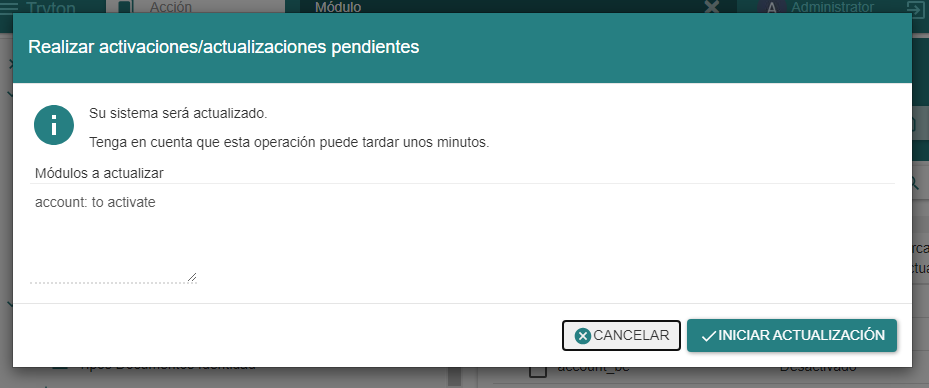
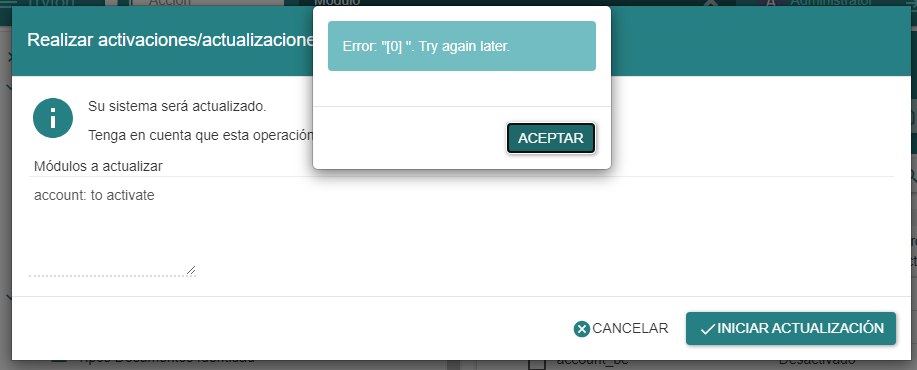
I’m using the docker distro, And I didn’t get errors activating other modules (bank, country, etc).
Also I try to set more RAM in the .wslconfig
[ws12]
processors=1
memory=6GB
pageReporting=true
System specs:
$ uname -v
#1 SMP Fri Mar 29 23:14:13 UTC 2024
$ python3 -V
Python 3.11.2
Nombre del sistema operativo: Microsoft Windows 11 Pro
Fabricante del sistema operativo: Microsoft Corporation
Procesador(es): 1 Procesadores instalados.
[01]: Intel64 Family 6 Model 126 Stepping 5 GenuineIntel ~991 Mhz
Cantidad total de memoria física: 20,275 MB
Memoria física disponible: 2,698 MB
Memoria virtual: tamaño máximo: 23,868 MB
Memoria virtual: disponible: 3,374 MB
Memoria virtual: en uso: 20,494 MB
---
### Author:  [@philipp.ludwig](https://discuss.tryton.org/u/philipp.ludwig)
#### Post date: [September 3, 2024, 8:40am UTC](https://discuss.tryton.org/t/activating-account-module-got-error-0/7784/2 "2024-09-03T08:40:22Z")
What is the log saying? I.e., since you are using the docker container, what does the log of the container say?
---
### Author:  [@pokoli](https://discuss.tryton.org/u/pokoli)
#### Post date: [September 3, 2024, 8:46am UTC](https://discuss.tryton.org/t/activating-account-module-got-error-0/7784/3 "2024-09-03T08:46:01Z")
I do not think its a problem realted to memory but that the your are hitting the gunicorn timeout. Probably this topic may help you:
> [@Change client timeout?](https://discuss.tryton.org/t/change-client-timeout/7106/3):
>
> If you are running the tryton 7.0 series on docker images the timeout is caused by gunicorn and it is fixed by setting the following environment variable on your docker server: GUNICORN\_CMD\_ARGS="--timeout=600"
---
### Author:  [@raserize](https://discuss.tryton.org/u/raserize)
#### Post date: [September 3, 2024, 3:32pm UTC](https://discuss.tryton.org/t/activating-account-module-got-error-0/7784/4 "2024-09-03T15:32:33Z")
Success!! I took some of the advices and I tested them.
The problem was the gunicorn timeout.
2024-09-03 10:09:32 [2024-09-03 15:09:32 +0000] [1] [CRITICAL] WORKER TIMEOUT (pid:1239)
2024-09-03 10:09:32 [2024-09-03 15:09:32 +0000] [1239] [INFO] Worker exiting (pid: 1239)
2024-09-03 10:09:33 [2024-09-03 15:09:33 +0000] [1] [WARNING] Worker with pid 1239 was terminated due to signal 9
2024-09-03 10:09:33 [2024-09-03 15:09:33 +0000] [1243] [INFO] Booting worker with pid: 1243
I didn’t know that process was gunicorn.
First I tried to set environment variables with exec but it didn’t work.
docker exec --env GUNICORN\_CMD\_ARGS=“–timeout=600” revisaweb env
Then I set the same variables in bash with root access and I got the same.
export GUNICORN\_CMD\_ARGS=“–timeout=600”
Then I went to the gunicorn.conf.py and I add this key:
timeout = 900
Finally I restarted containers and it worked!
---
### Author:  [@RawSmoke](https://discuss.tryton.org/u/RawSmoke)
#### Post date: [December 25, 2024, 3:09am UTC](https://discuss.tryton.org/t/activating-account-module-got-error-0/7784/5 "2024-12-25T03:09:02Z")
Oh boy, this worked like a charm for me, thanks a lot! Btw, my name is Gonzalo de la Serna… We share last name, lol.